1-8
Overview
▍
mainboard sPecifications
Processor
Intel
®
Atom™ Dual-Core Processor D510 (Optional)
CPU Frequency 1.6 GHz
Chipset
Intel
®
NM10 Express Chipset
Memory
2 DDR2 667MHz SO-DIMM slots (Optional)
2 DDR3 1066MHz SO-DIMM slots (Optional)
Supports the maximum of 4GB
LAN
Gigabit Fast Ethernet by Realtek
®
RTL8111C GbE controller
Audio
Chip integrated by Realtek
®
ALC888
Compliant with Azalia 1.0 spec
Integrated Graphics
ATI
®
M92-XT, M2 package size, DDR3, 512GB VRAM (Optional)
ATI
®
Park-LP, M2 package size, DDR3, 512MB VRAM (Optional)
Realtek
®
RTD2482D-GR multi-function display controller
Form Factor
210 mm (W) X 197 mm (H)
■
■
■
■
■
■
■
■
■
■
■
■
■
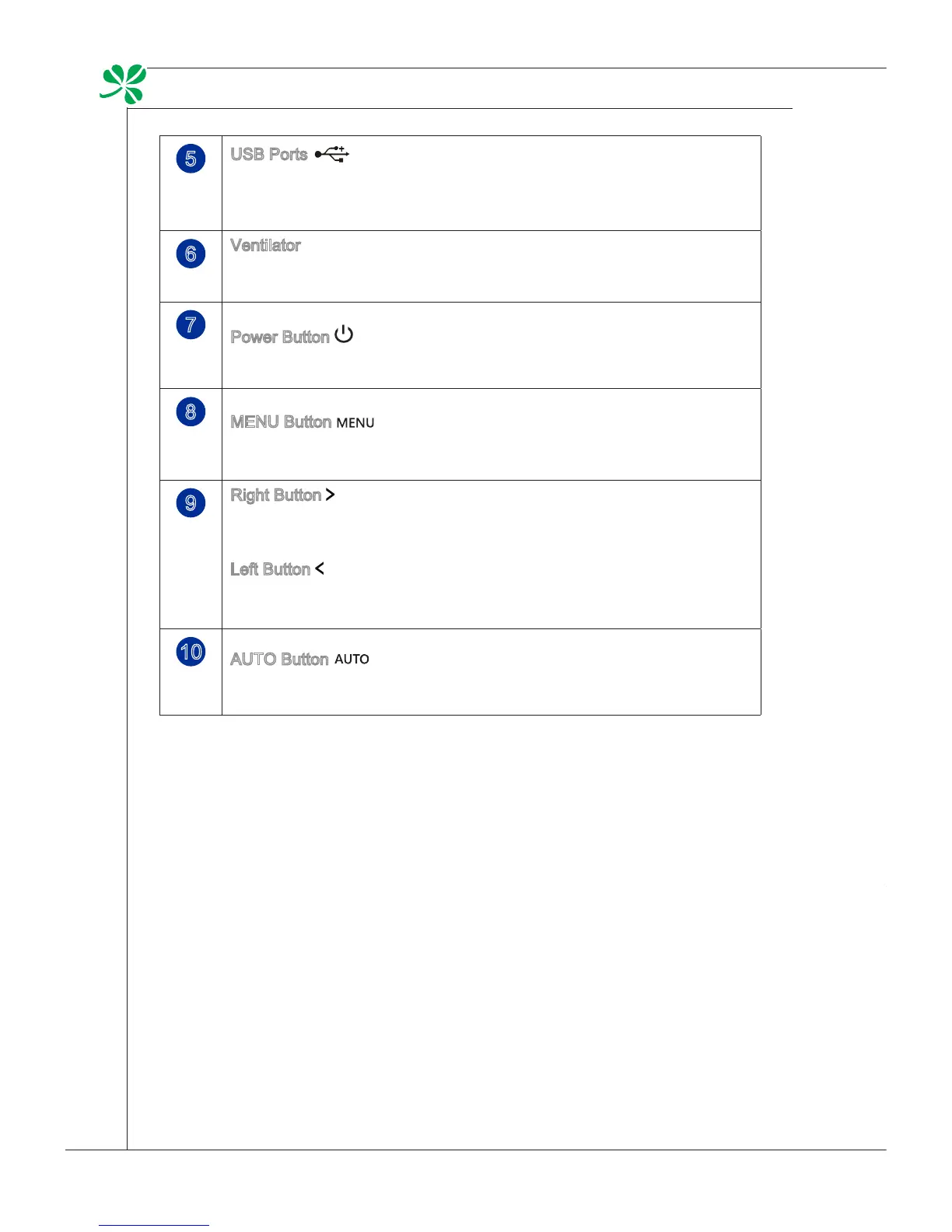
5
USB Ports
- The USB (Universal Serial Bus) port is provided for attaching USB
devices such as mouse, keyboard, printer, scanner, camera, PDA or
other USB-compatible devices.
6
Ventilator
- The ventilator on the enclosure is used for air convection and to pre-
vent the equipment from overheating. Do not cover the ventilator.
7
Power Button
- Press the power button to turn the system on and o.
8
MENU Button
- Press this button to view the OSD menu or enter into the sub menu.
9
Right Button
- This button indicates the cursor movement or OSD manual selection
in incremental values.
Left Button
- This button indicates the cursor movement or OSD manual selection
in decremental values.
10
AUTO Button
- Press this button to view the video mode menu or exit the submenu.


 To Next Page