3-23
MS-A923
Step 2. Press the Right & Left arrow buttons to adjust the system volume.
Step 3. Press the AUTO button to view the video mode menu. Use the Right & Left ar-
row buttons to select a desired mode and press the AUTO button to exit after
the selection is made.
power management
Power management of personal computers (PCs) and monitors has the poten-
tial to save signicant amounts of electricity as well as deliver environmental
benets.
To be energy ecient, turn o your display or set your PC to sleep mode after a
period of user inactivity.
Power Management in Windows OS
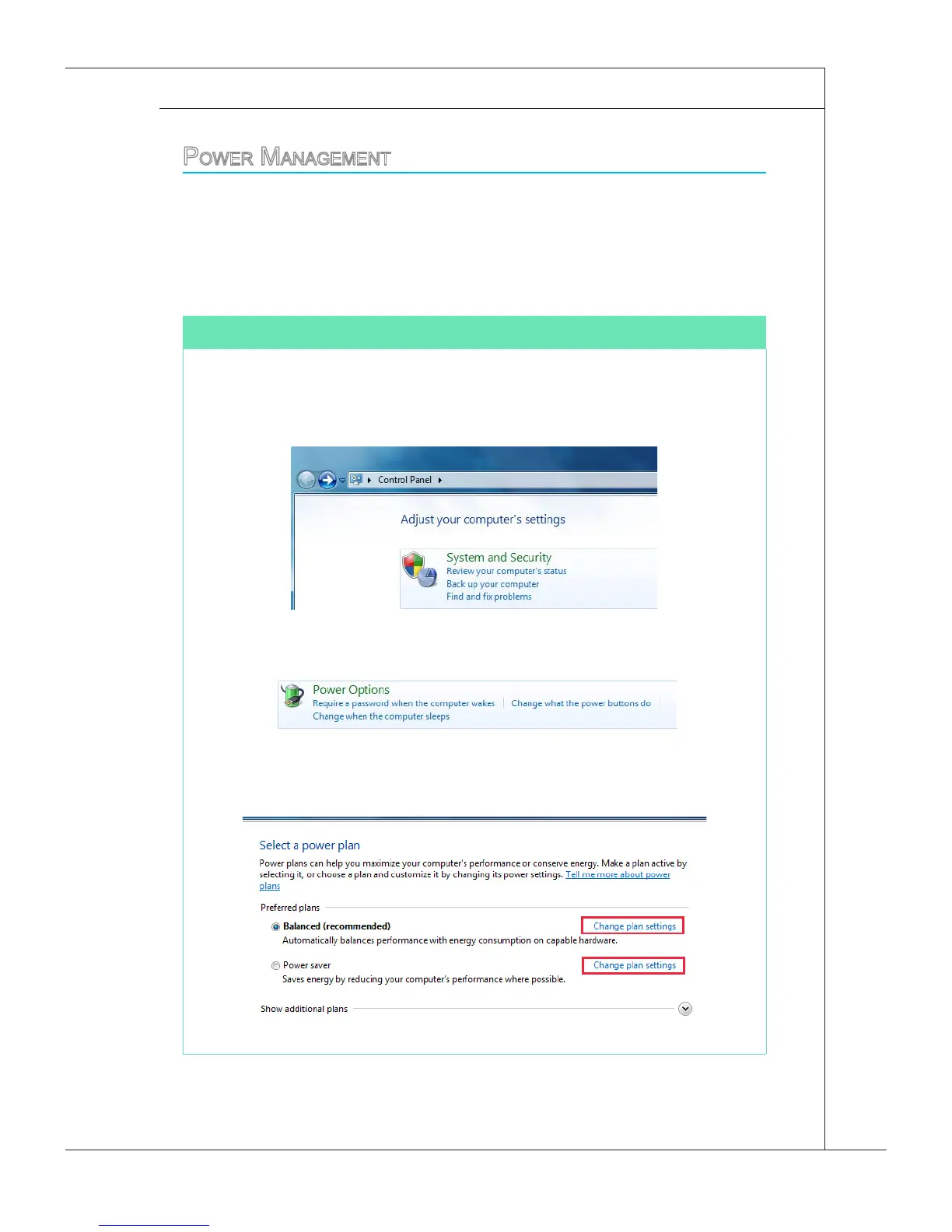
[Power Options] in Windows OS allow you to control the power man-
agement features of your display, hard drive, and battery. Go to [Start]
> [Control Panel] > [System and Security].
Then click on the [Power Options] link.
Select a power plan that suits your personal needs. You may also ne-
tune the settings by clicking [Change plan settings].
■


 To Next Page