3-28
System Operations
▍
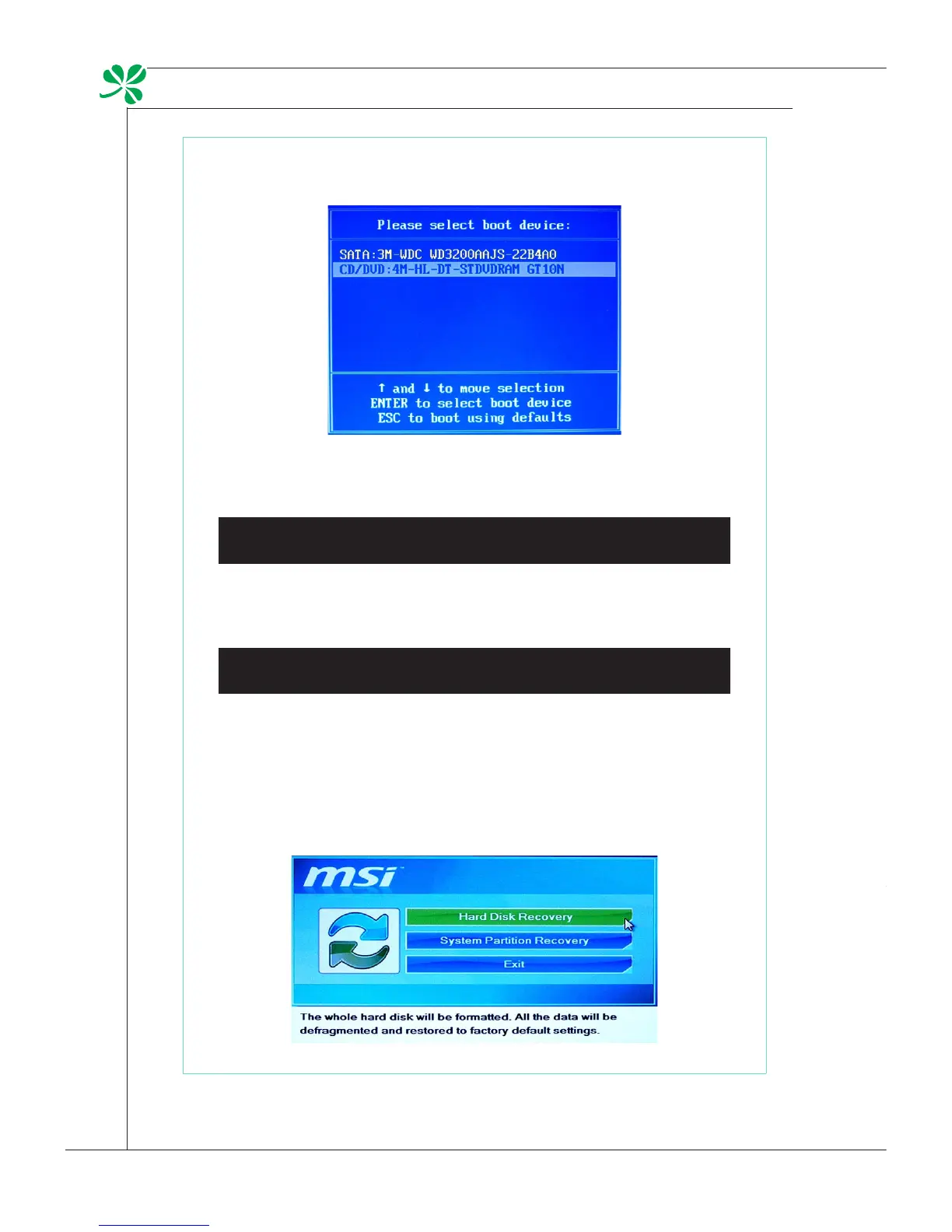
3. Select the [CD/DVD] device as the boot device and press [Enter] to conrm
the selection.
Press any key to reconrm the selection when the following message ap-
pears.
Press any key to boot from CD or DVD ...
4. The Windows OS starts loading les.
Windows is loading les ...
5. The system recovery menu pops up. [Hard Disk Recovery] will format the
whole HDD. All data on the HDD will be erased while all settings will be
restored to manufacturer default. Select [Hard Disk Recovery] only when
your HDD is infected with fatal viruses and no solution can be found except
a clear cleanup of the HDD.
[System Partition Recovery] will format the C drive only. Only the C drive
will be restored to manufacturer default. Other drives will not be aected.
It is highly recommended that users select [System Partition Recovery] to
restore the system.
6. The system recovery will format your HDD partition. Make sure that the
important data have been backed up. Click [YES] to continue; click [NO] to
stop the system recovery.
Click [YES] again to reconrm; click [NO] to stop the system recovery.


 To Next Page