This document provides a user guide for the MSI ARTYMIS Series LCD Monitors, specifically the MPG ARTYMIS 323CQR (3DB1) and MAG ARTYMIS 324CP (3DB3) models. It covers setup, OSD menus, specifications, troubleshooting, safety instructions, and regulatory notices.
Function Description:
The MSI ARTYMIS Series LCD Monitors are designed for an immersive viewing experience, offering various adjustments for user comfort and a range of features for gaming and professional use. They incorporate advanced technologies like AI algorithms for smart crosshair and ambient light/RGB control, and support high refresh rates for smooth visuals.
Important Technical Specifications:
- Models: MPG ARTYMIS 323CQR (3DB1), MAG ARTYMIS 324CP (3DB3)
- Size: 31.5 inch
- Curvature: 1000R
- Panel Type: VA
- Resolution:
- MPG ARTYMIS 323CQR: 2560 x 1440 @165Hz
- MAG ARTYMIS 324CP: 1920 x 1080 @165Hz
- Aspect Ratio: 16:9
- Brightness (nits):
- MPG ARTYMIS 323CQR: 400
- MAG ARTYMIS 324CP: 300
- Contrast Ratio:
- MPG ARTYMIS 323CQR: 2500:1
- MAG ARTYMIS 324CP: 3000:1
- Refresh Rate: 165Hz
- Response Time: 4ms (GTG)
- MPRT: 1ms
- I/O Ports:
- DisplayPort x 1
- HDMI Port x 2
- USB Type-C Port x 1 (supports DisplayPort Alternate Mode and up to 5V/3A power delivery)
- USB 2.0 Type-A Port x 2
- USB 2.0 Type-B Upstream Port x 1
- Headphone Jack x 1
- View Angles: 178°(H), 178°(V)
- DCI-P3/sRGB:*
- MPG ARTYMIS 323CQR: 89.8% / 113%
- MAG ARTYMIS 324CP: 92.6% / 116.8%
- Surface Treatment: Anti-glare
- Display Colors: 1.07B (8 bit +FRC)
- Monitor Power Options: 100~240Vac, 50/60Hz, 2A
- Power Consumption (Typical): Power On < 105W, Standby < 0.5W, Power Off < 0.3W
- Adjustment (Tilt): -5° ~ 20°
- Adjustment (Height): 0 ~ 100mm
- Adjustment (Swivel): -30° ~ 30°
- Kensington Lock: Yes
- VESA Mounting: 100 x 100 mm (M4 x 10 mm screw type, 4 mm thread diameter, 0.7 mm thread pitch, 10 mm thread length)
- Dimension (W x H x D): 701.4 x 473.4 x 317.7 mm
- Weight:
- MPG ARTYMIS 323CQR: 9.0 Kg (Net) / 12.8 Kg (Gross)
- MAG ARTYMIS 324CP: 8.7 Kg (Net) / 11.8 Kg (Gross)
- Operating Environment: Temperature: 0°C to 40°C, Humidity: 20% to 90% (non-condensing), Altitude: 0 ~ 5000m
- Storage Environment: Temperature: -20°C to 60°C, Humidity: 10% to 90% (non-condensing)
Usage Features:
- OSD Setup: Navigated using a multi-directional Navi Key. Hot Keys allow quick access to preset function menus.
- G.I. (Gaming Intelligence) Features (MPG ARTYMIS 323CQR):
- Auto Brightness Control: Uses an internal Light Sensor and AI algorithm to automatically adjust brightness based on ambient light. Customizable brightness curve. HDCR and MPRT are disabled when active.
- Ambient RGB Light: Uses an internal RGB Sensor and AI algorithm to detect ambient color temperature and sync light effects to the environment. Color Temperature in OSD is disabled when active.
- Sound Tune: Uses an internal digital array microphone and AI algorithm for Active Noise Cancellation (ANC). Requires USB Upstream connection for proper function.
- KVM: Allows automatic switching between USB input sources (keyboards, mice) or designation of Upstream port or USB Type-C as the sole USB signal source.
- Smart Crosshair: AI-enhanced visibility of in-game crosshair, with customizable color and position.
- Gaming Features:
- Game Mode: Preset modes (User, FPS, Racing, RTS, RPG) for optimized display settings.
- Night Vision: Optimizes background brightness, recommended for FPS games, with settings like OFF, Normal, Strong, Strongest, and A.I.
- Response Time: Adjustable (Normal, Fast, Fastest). Disabled when MPRT is enabled.
- MPRT: 1ms response time. Disabled when Brightness or Response Time are enabled. Available when refresh rate is over 85Hz.
- Refresh Rate: Adjustable location for display in OSD (Left Top, Right Top, Left Bottom, Right Bottom, Customize). Follows and works at the Operating System's preset Screen Refresh Rate.
- Alarm Clock: Customizable timer with selectable location.
- Professional Features:
- Pro Mode: Preset modes (User, Anti-Blue, Movie, Office, sRGB, ECO) for optimized display settings.
- Low Blue Light: Protects eyes by adjusting screen color temperature to a warmer glow. Mandatory when Pro Mode is set to Anti-Blue.
- HDCR: Enhances image quality by increasing contrast. Brightness is disabled when HDCR is ON. Cannot be enabled simultaneously with MPRT.
- Image Enhancement: Enhances image edges (OFF, Weak, Medium, Strong, Strongest).
- Image Settings: Brightness, Contrast, Sharpness, Color Temperature (Cool, Normal, Warm, Customization with R/G/B values), Screen Size (Auto, 4:3, 16:9).
- Input Source: Manual selection (HDMI1, HDMI2, DP, Type-C) or Auto Scan.
- Navi Key Customization: Allows users to assign functions (Brightness, Game Mode, Smart Crosshair, Alarm Clock, Input Source, Refresh Rate, Info. On Screen, Night Vision, KVM) to Navi Key directions.
- Setting Options:
- Language: Independent setting, overrides factory default.
- Transparency: Adjustable OSD transparency.
- OSD Time Out: Adjustable OSD display duration.
- RGB LED (MPG ARTYMIS 323CQR): Turn RGB LED ON or OFF.
- Power Button: Set to OFF (turns off monitor) or Standby (turns off panel and backlight).
- Info. On Screen: Displays monitor status information.
- HDMI CEC (Consumer Electronics Control): Supports Sony PlayStation®, Nintendo® Switch™, Xbox Series X|S consoles, and other CEC-capable audio-visual devices. Enables automatic power-on with CEC device and power-saving mode when monitor is off. Sets Game and Pro Mode to User (Default) for connected consoles.
- Reset: Restores OSD settings to original default.
Maintenance Features:
- Troubleshooting Guide: Provides solutions for common issues like power LED off, no image, improper screen sizing, no Plug & Play, fuzzy/blurry/color problems, and flickering/waves.
- Safety Instructions: Emphasizes proper power handling (voltage, grounding, cord placement, adapter use), battery precautions (explosion risk, disposal, ingestion), and environmental guidelines (placement, temperature, cleaning, magnetic objects, service personnel contact).
- TÜV Rheinland Low Blue Light Certification: Provides recommendations to reduce eye strain from blue light exposure, such as screen distance, blinking, breaks, and using Reader/Anti-Blue mode.
- TÜV Rheinland Flicker Free Certification: Confirms the display produces no visible or invisible flicker within 0-3000 Hz range under various brightness settings. Notes that Flicker Free is not supported when Anti Motion Blur/MPRT is enabled.
- Regulatory Notices: Includes CE Conformity, FCC-B Radio Frequency Interference Statement, WEEE Statement, Chemical Substances Information, RoHS Statement (Japan JIS C 0950, India, Turkey, Ukraine, Vietnam), and Green Product Features (reduced energy consumption, limited harmful substances, easy dismantling/recycling, reduced natural resource use, extended product lifetime, reduced solid waste).
- Environmental Policy: Encourages proper disposal and recycling of end-of-life products, with contact information for MSI support.
- Warning on Overuse of Screens: Recommendations for screen time breaks, especially for children.
- Technical Support: Directs users to contact their dealer or MSI support website for assistance.

 Need help?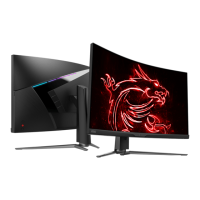





 To Next Page

 General