En-6
MS-7758 Manboard
Back Panel Quck Gude
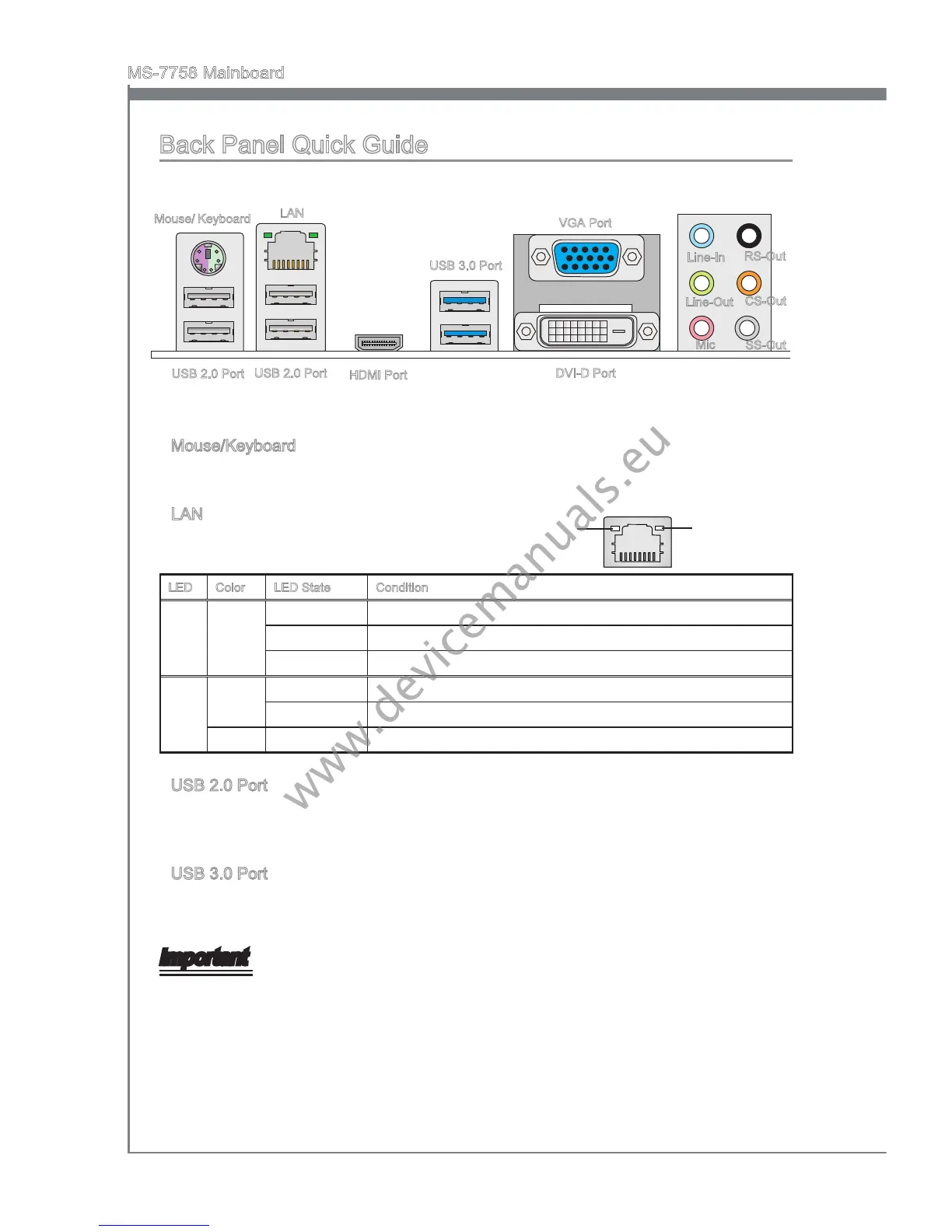
Mouse/Keyboard
A combnaton PS/2
®
mouse/keyboard DIN connector for a PS/2
®
mouse/keyboard.
LAN
The standard RJ-45 LAN jack s for connectng to
a Local Area Network (LAN).
LED Color LED State Condton
Left Yellow O LAN lnk
s not establshed.
On(Steady) LAN lnk
s establshed.
On(ashng) The computer s communcatng wth another computer on the network.
Rght Green O 10 Mbts/sec data rate
On 100 Mbts/sec data rate
Orange
On 1000 Mbts/sec data rate
USB 2.0 Port
The USB 2.0 port s for attachng USB 2.0 devces such as keyboard, mouse, or other
USB 2.0-compatble devces.
USB 3.0 Port
USB 3.0 port s backward-compatble wth USB 2.0 devces. It supports data transfer
rate up to 5 Gbt/s (SuperSpeed).
Important
In order to use USB 3.0 devces, you must connect to a USB 3.0 port. If a USB cable s
used, t must be USB 3.0 complant.
▶
▶
▶
▶
Yellow Green/ Orange
Lne-In
Lne-Out
Mc
RS-Out
CS-Out
SS-Out
USB 3.0 Port
LAN
Mouse/ Keyboard
USB 2.0 Port
VGA Port
DVI-D Port
USB 2.0 Port
HDMI Port


 To Next Page
 Loading...