2-6 2-7
Introductions
6. Power Button/ Status LED/ Fingerprint Sensor
Power Button
• Press this button to power on the device.
• While the device is powered on, press this button to force
it into sleep state. Press again to wake up the system from
sleep state.
• Long press this button and follow the on-screen instructions
to power off the device.
Status LED
• LED glows white when the device is powered on.
• LED goes off when the device goes to the sleep state.
• LED goes off when the device is turned off.
• LED glows amber when the battery is being charged.
• LED blinks continuously in amber if the battery fails.
If the problem persists, please contact your local authorized
retailer or service center.
• LED goes out when the battery is fully charged or when AC
adapter is disconnected.
Fingerprint
• Fingerprint sensor allows users to set up their own
fingerprints to unlock the device.
7. LT Button
Control button for game playing.
8. LB Button
Control button for game playing.
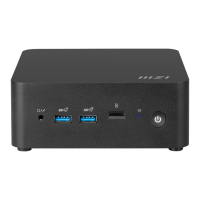
9. Card Reader
The built-in card reader supports various types of memory cards. Check the
Specifications for details.
10. Combo Audio Port
• A port for a headset, microphone, or headset with microphone.
• The Combo Audio Port supports 4-Pole 3.5mm headphone jack.


 To Next Page