Chapter 2
2-18
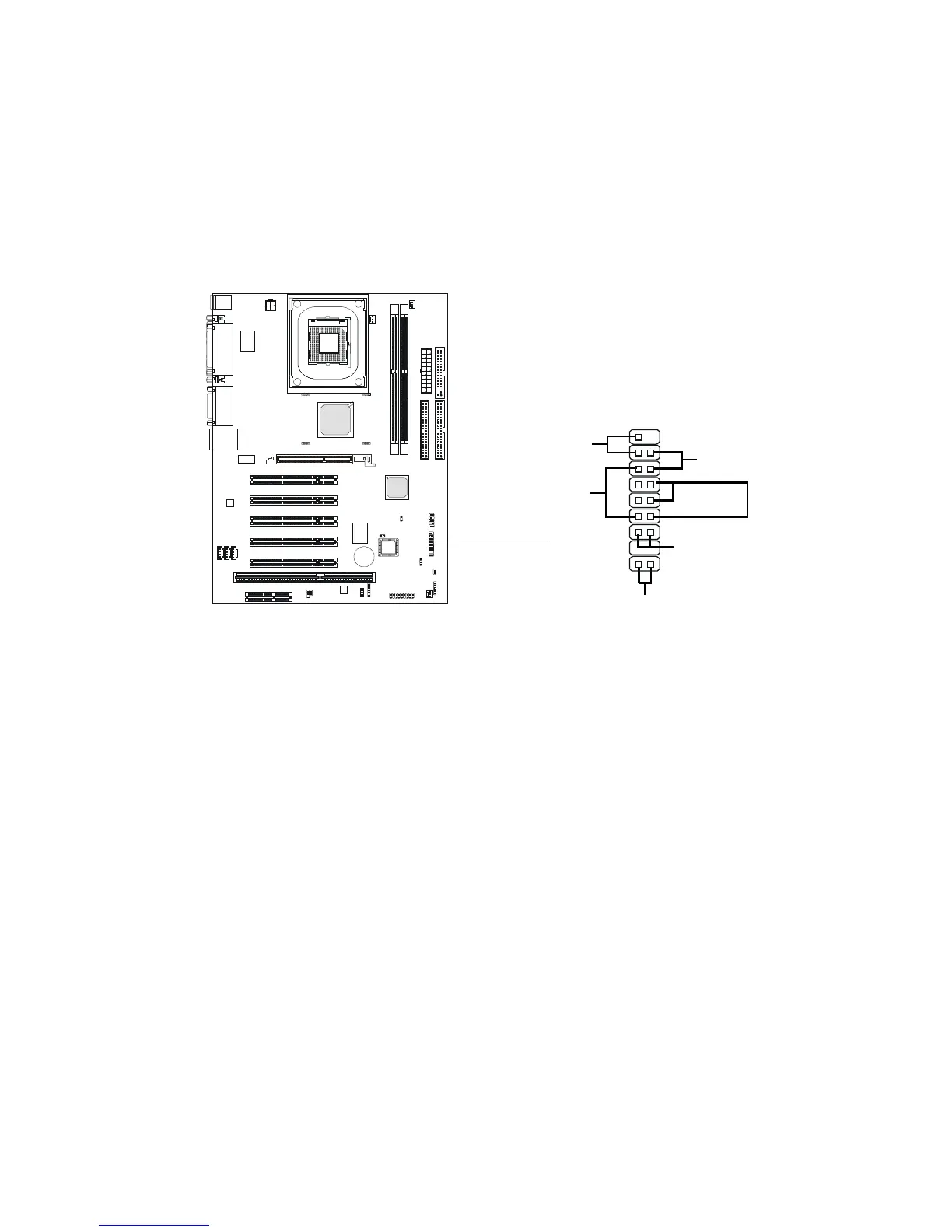
Front Panel Connector: F_P1
The mainboard provides one front panel connector for electrical connec-
tion to the front panel switches and LEDs.
Reset Switch
Reset switch is used to reboot the system rather than turning the power ON/
OFF. Avoid rebooting while the HDD LED is lit. You can connect the Reset
switch from the system case to this pin.
Power/Suspend LED
The Power/Suspend LED is lit while the system power is on. Connect the
Power/Suspend LED from the system case to this pin. There are three types
of LEDs that you can use: 2-pin single color, 2-pin dual color or 3-pin dual
color LED (ACPI request).
a. 2-pin single color LED connects to pin 5 & 6. This LED will light
up when the system is on and blink during the suspend mode.
b. 2-pin dual color LED connects to pin 4 & 5.
GREEN Color: Indicate the system is in full on mode.
ORANGE Color: Indicate the system is in suspend mod
c. 3-pin dual color LED connects to pin 4, 5 & 6.
GREEN Color: Indicate the system is in full on mode.
ORANGE Color: Indicate the system is in suspend mode.
Power
LED
F_P1
Power
Switch
Reset
Switch
HDD LED
+
Speaker
Keylock
1
10
18
9
Buzzer
-
+


 To Next Page