MS-7260 Mainboard
3-14
On-Chip IDE Controller
This item allows you to enable/ disable IDE Controller.
Serial-ATA Devices
These items allow users to enable or disable the SATA controller.
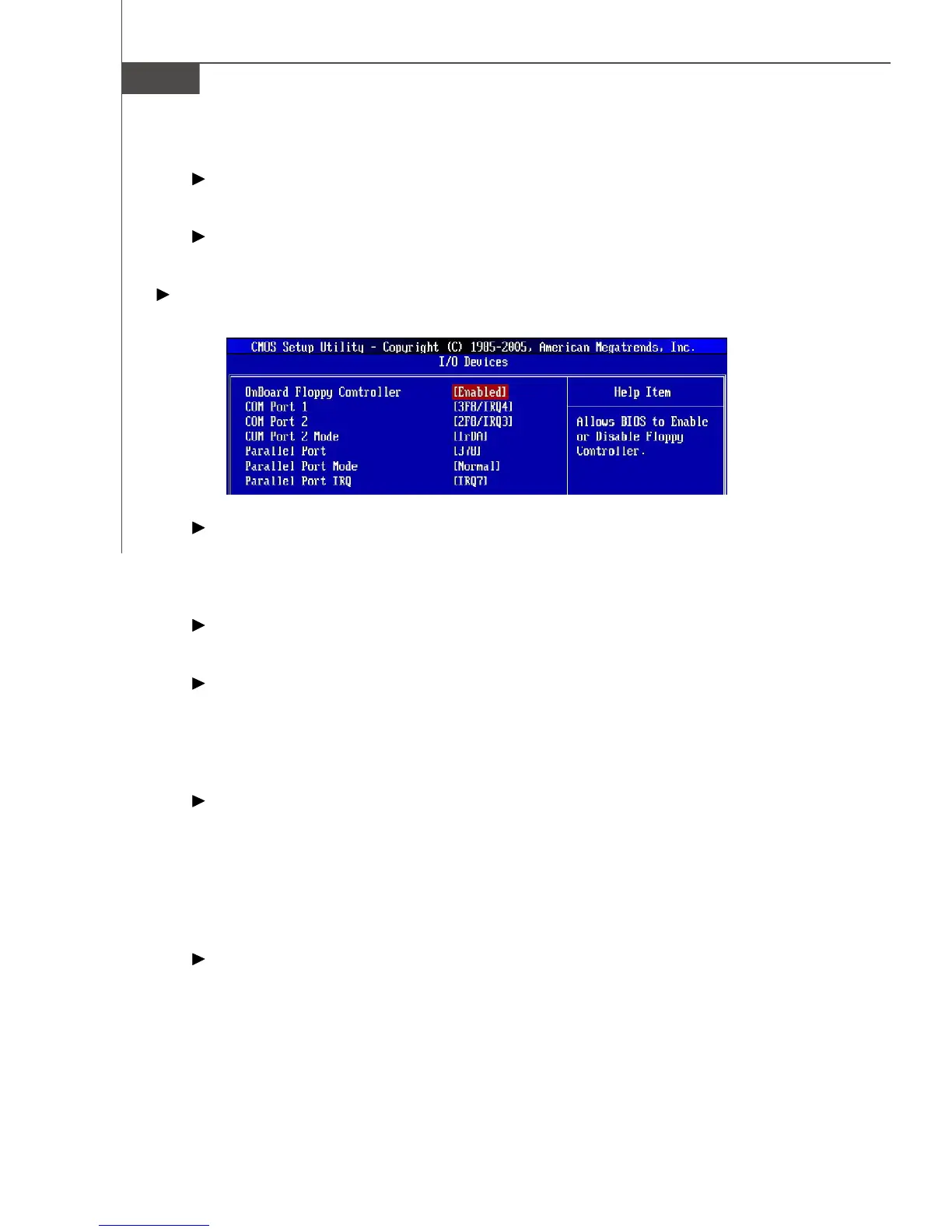
I/O Devices
Press <Enter> to enter the sub-menu and the following screen appears:
Onboard Floppy Controller
Select [Enabled] if your system has a floppy disk controller (FDD) installed on the
system board and you wish to use it. If you install add-on FDC or the system has
no floppy drive, select [Disabled] in this field.
COM Port 1/2
Select an address and corresponding interrupt for the first serial port.
COM Port 2 Mode
This setting allows you to specify the operation mode for serial port 2. Settings
are:
[IrDA] IrDA-compliant Serial Infrared Port
[ASKIR] Amplitude Shift Keyed Infrared Port
Parallel Port
There is a built-in parallel port on the on-board Super I/O chipset that provides
Standard, ECP, and EPP features. It has the following options:
[Disabled]
[3BC] Line Printer port 0
[278] Line Printer port 2
[378] Line Printer port 1
Parallel Port Mode
[SPP] Standard Parallel Port
[EPP] Enhanced Parallel Port
[ECP] Extended Capability Port
[ECP + EPP] Extended Capability Port + Enhanced Parallel Port


 To Next Page