1-23
MS-7798
Chapter 1
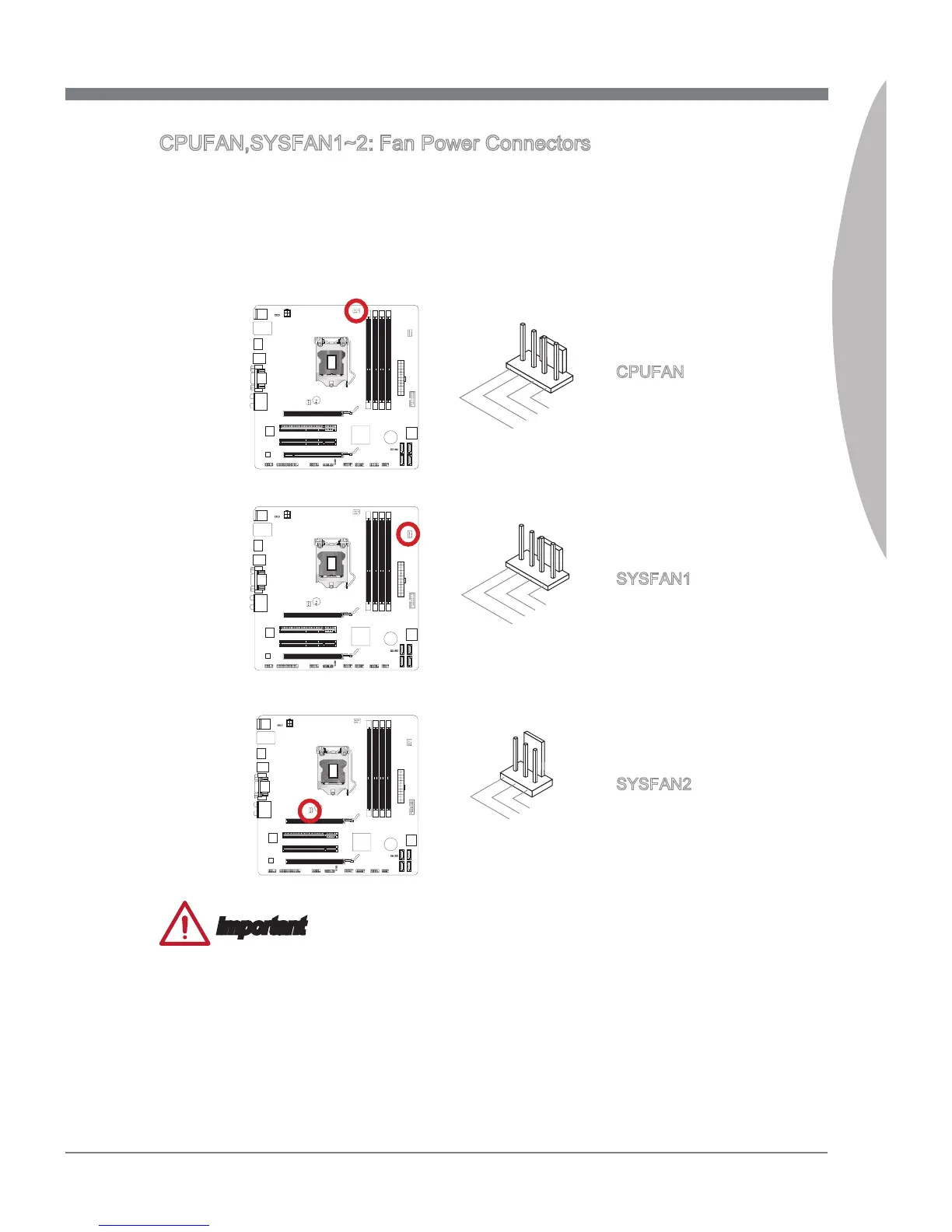
CPUFAN,SYSFAN1~2: Fan Power Connectors
The fan power connectors support system coolng fans wth +12V. If the manboard has
a System Hardware Montor chpset on-board, you must use a specally desgned fan
wth a speed sensor to take advantage of the CPU fan control. Remember to connect
all system fans. Some system fans may not connect to the manboard and wll nstead
connect to the power supply drectly. A system fan can be plugged nto any avalable
system fan connector.
SYSFAN2
Important
Please refer to your processor’s ocal webste or consult your vendor to nd recom-
mended CPU coolng fans.
The CPUFAN connector supports Smart Fan Control wth lnear mode. The Control
Center II utlty can be nstalled to automatcally control the fan speeds accordng to
the CPU’s temperature.
If there are not enough ports on the manboard to connect all system fans, adapters
are avalable to connect a fan drectly to a power supply.
Before rst boot up, ensure that there are no cables mpedng any fan blades.
•
•
•
•


 To Next Page