English
9
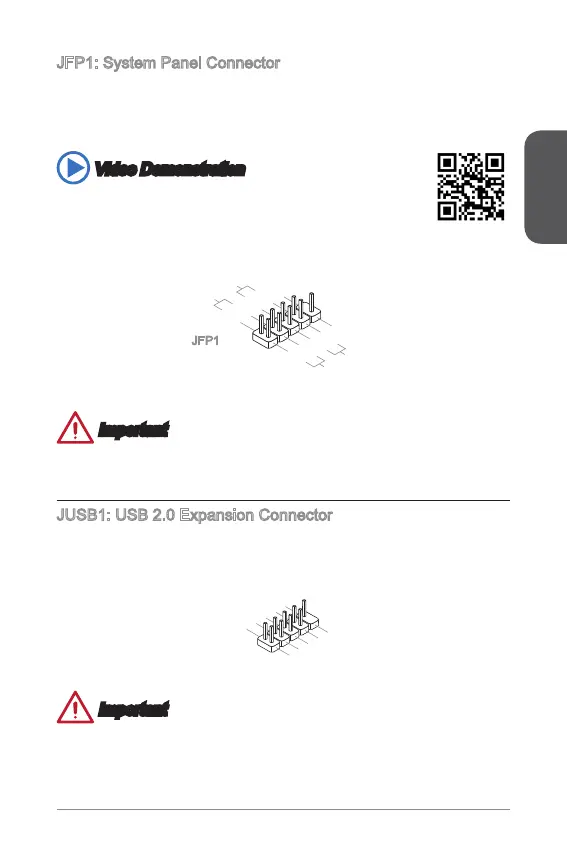
JFP: System Panel Connector
These connectors connect to the front panel switches and LEDs. The JFP
connector is compliant with the Intel
®
Front Panel I/O Connectivity Design Guide.
When installing the front panel connectors, please use the optional M-Connector to
simplify installation. Plug all the wires from the computer case into the M-Connector
and then plug the M-Connector into the motherboard.
Video Demonstration
Watch the video to learn how to Install front panel connectors.
http://youtu.be/DPELIdVNZUI
1.
+
3.
-
10. No
Pi
n
5.
-
Res et
S
wit ch
HDD
LE
D
P
owe r
Swi tch
P
owe r
LE
D
7.
+
9.R eserv e
d
8.
-
6.
+
4.-
2.+
JFP
Important
On the connectors coming from the case, pins marked by small triangles are positive
wires. Please use the diagrams above and the writing on the optional M-Connectors
to determine correct connector orientation and placement.
JUSB: USB 2.0 Expansion Connector
This connector is designed for connecting high-speed USB peripherals such as USB
HDDs, digital cameras, MP3 players, printers, modems, and many others.
1
.
V
C
C
3
.
U
S
B
0
-
1
0
.
NC
5
.
U
S
B
0
+
7
.
G
r
o
u
n
d
9
.
N
o
P
i
n
8
.
G
r
o
u
n
d
6
.
U
S
B
1
+
4
.
U
S
B
1
-
2
.
V
C
C
Important
Note that the VCC and GND pins must be connected correctly to avoid possible
damage.



 To Next Page
 Loading...