1-6 1-7
Overview
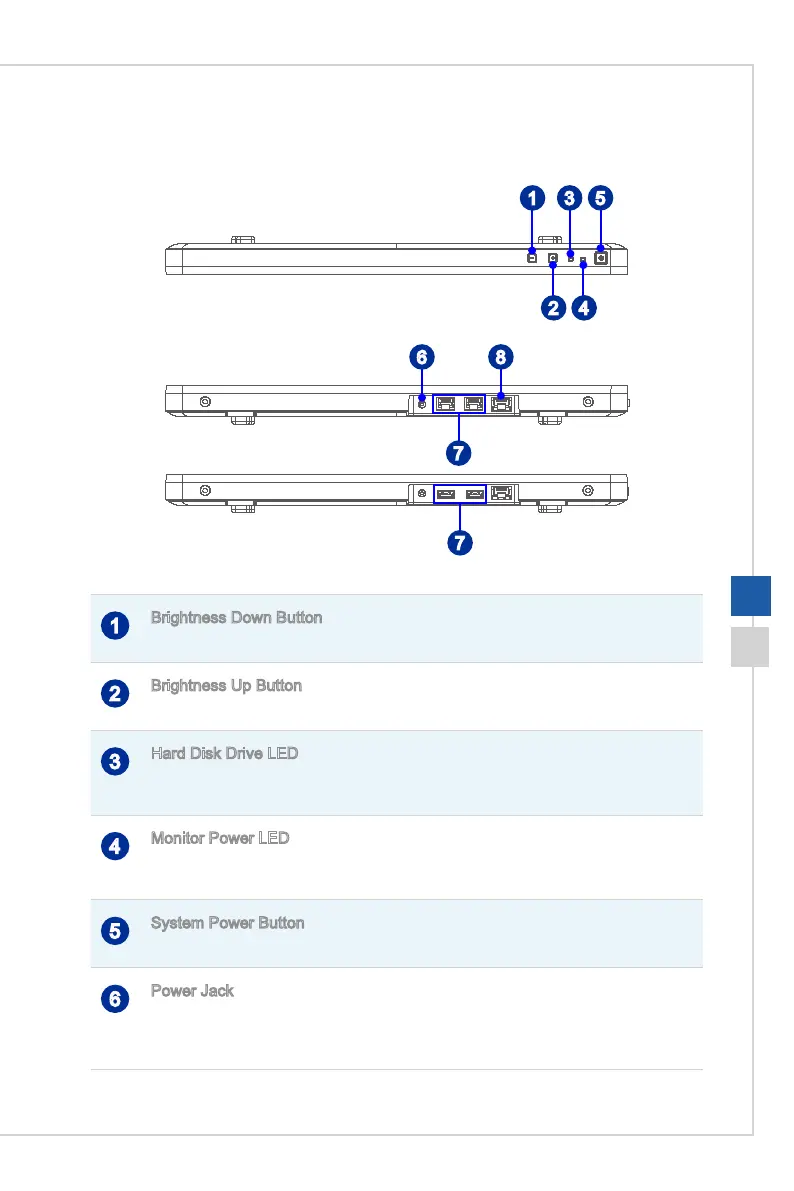
h Top and Bottom View
1 3
5
2 4
6 8
7
7
1
Brightness Down Button
Press this button to tune the brightness down�
2
Brightness Up Button
Press this button to tune the brightness up�
3
Hard Disk Drive LED
This indicator shows the activity status of the HDD. It ashes when the system is
accessing data on the HDD and remains o when no disk activity is detected.
4
Monitor Power LED
The power LED glows when the monitor is turned on and goes o when the monitor is
shut down�
5
System Power Button
Press the system power button to turn the system on or o.
6
Power Jack
The AC/DC adapter converts AC power to DC power for this jack� Power supplied
through this jack supplies power to the PC� To prevent damage to the PC, always use
the supplied power adapter�




 To Next Page