13
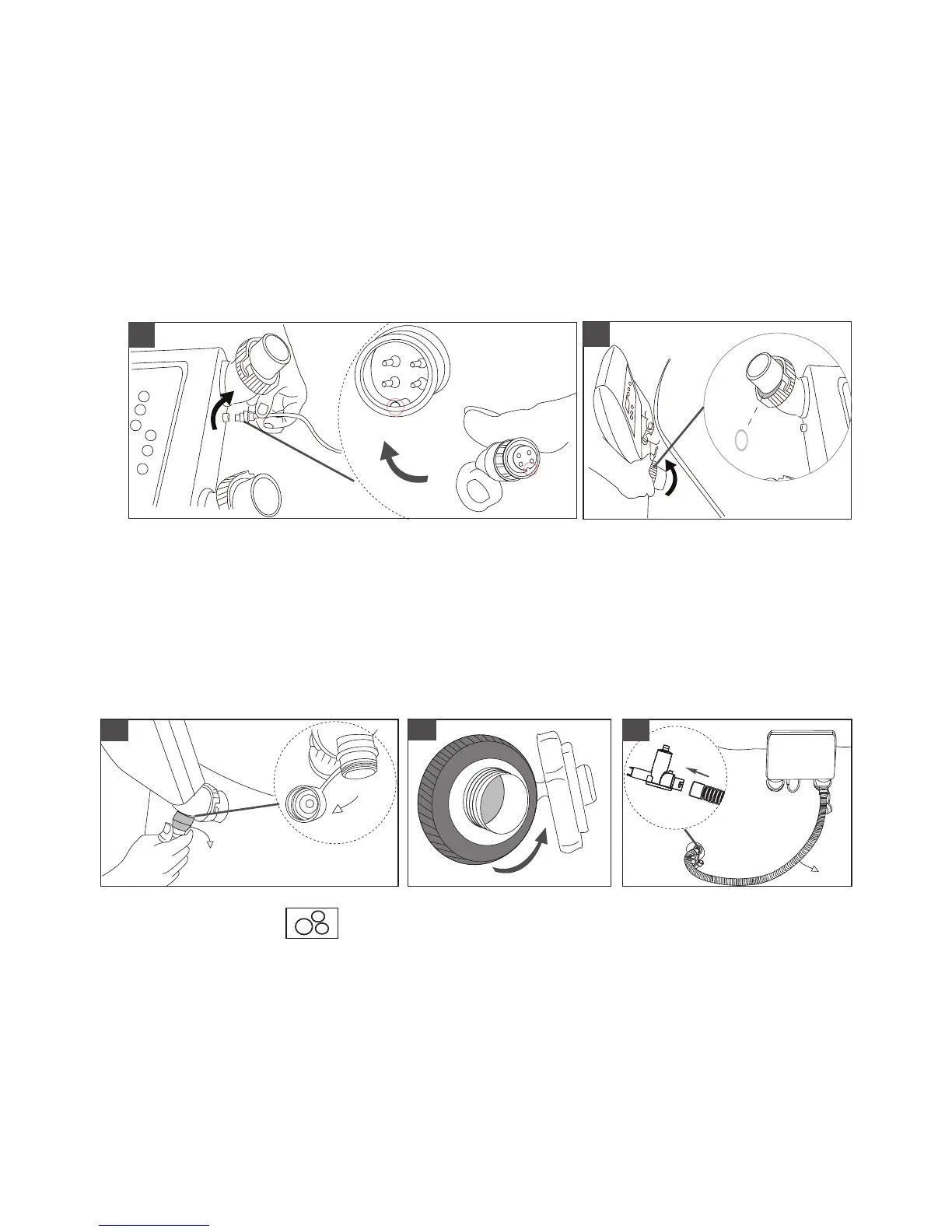
Connect the digital cable on the control panel. "ON/OFF" button shows red if the connection correctly,
No bent or wet for the pin inside male connector which will cause failure connection.
Connect the control panel to the spa tub. Fasten and secure the rings to the pipe adapter on the spa tub.
Make sure the rubber O-rings are properly placed on the air pipes.
CAUTION: Lost of the O-rings may result spa and the bubbling function working improperly, and also
cause the air pump rusted.
NOTE: For spa models has PVC leather covers, make sure the spa cover is onto the spa tub properly
before connecting the control panel. The two holes on the leather cover must be positioned correctly to the
pipes of control panel air pipes.
3.
4.
Spa Inflation
5.1 Unscrew the air valve cap (a) on the control panel to reveal the air blower inflation outlet and connect
one end of the inflation hose (b) to the outlet. See Figure 5.1
5.2 Unscrew the air valve cap on the spa pool and reveal the stem for inflation.
5.3 Connect the other end of the inflation hose (b) to the manometer (c) first and then insert to the air
valve.
5.
3
4
O-rings
11
5.1
5.2
5.3
(a)
(b)
(b)
(c)
5.4 Press the Bubble button to inflate the spa tub until it is firm to tough.
CAUTION: Do not over inflate. Over inflation may cause spa leakage and void the warranty.
5.5 Pay attention to the Manometer. The Yellow section appears when the spa is properly inflated. The
Green section shows when water filling is completed. Repeat previous steps if more air is necessary.
CAUTION: The Red section shows when the spa is over inflated. Press the black button (a) on the
manometer to release some air until it points the green section.
IMPORTANT: During spa use, the manometer shall only shows the Green section at all times.



 To Next Page