TAEevo M05-M10
11
MAINTENANCE AND OPERATING MANUAL
The data inside this manual are not binding and they can be modified by the manufacturer without notice. All rights reserved.
protection devices. To reduce this overload, a chiller outlet valve can be gradually (but not totally!) closed to reduce the flow of
water passing through it. Open the valve as the water temperature in the hydraulic circuit reaches the working value.
If the thermal load is lower than that produced by the chiller, the water temperature drops until it reaches the set point.
With operating pump, if the unit is in normal operation, the water should be at mid-slot in the receptacle.
C
HAPTER
7
E
LECTRONIC
CONTROL
BOARD
7.1 Introduction
The main function of the electronic control board are:
• complete management of the alarms;
• control of the temperature at evaporator outlet.
The electronic control board allows to control the following devices:
•pump;
• compressor;
• alarm signalling devices.
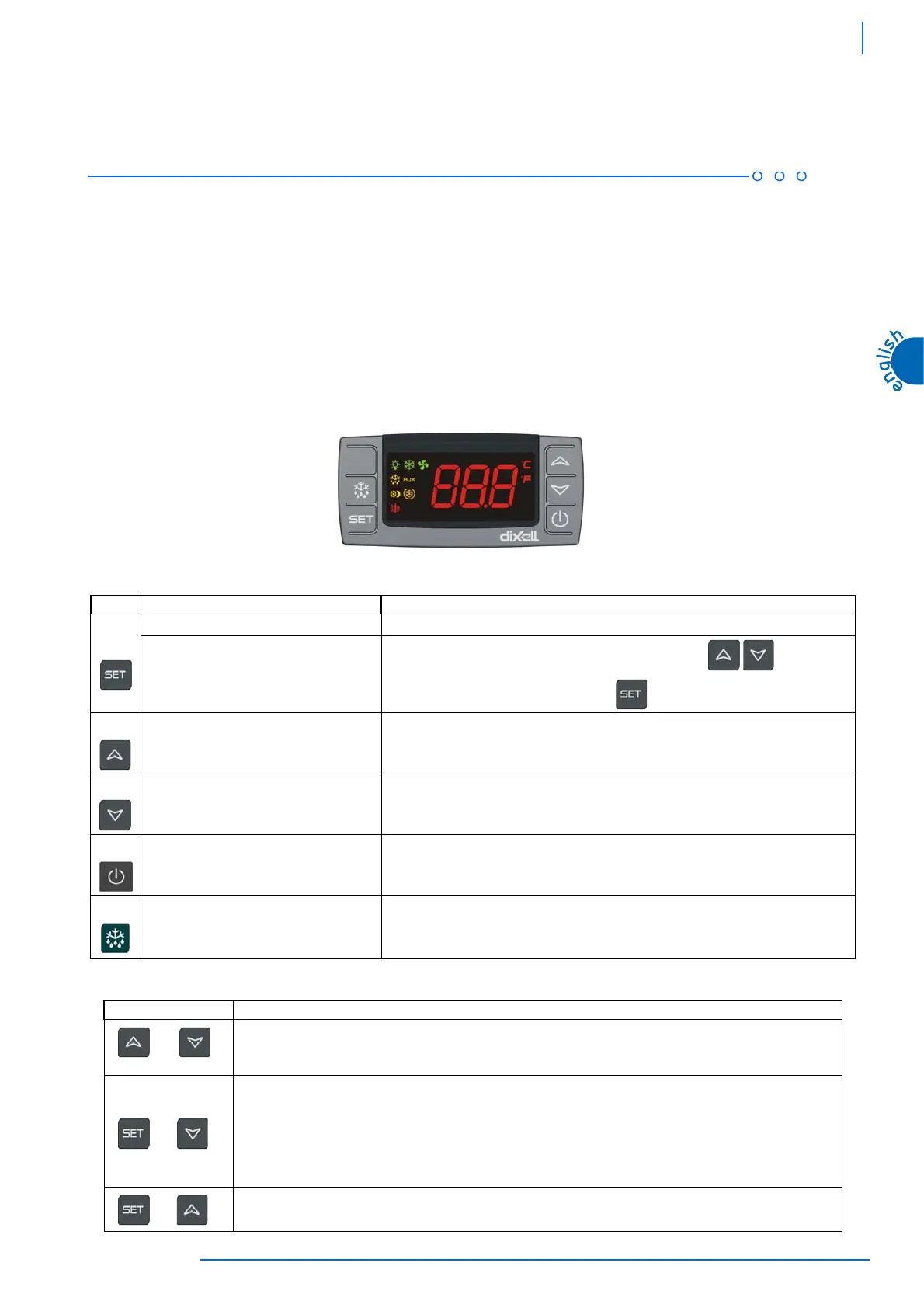
7.2 User interface-key functions
7.2.1 Key combinations
Key Action Function
Pressed once
The set-point will be displayed
Pressed for 3 seconds
Chiller set-point modification, the °C LED flashes, use keys
to change the
set-point. To save the parameter press key or simply wait 15 sec.
Pressed once
Shows maximum temperature value
In the programming phase scrolls through the parameter codes or increases their value
Pressed once
Shows minimum temperature value
In the programming phase scrolls through parameter codes or decreases their value
Pressed once
Switches device on/off
Pressed once
Starts a defrost cycle (not active function)
Key Function
Lock/ unlock the keypad:
Hold down both keys until the message "POF" is displayed. Repeat the procedure to unlock, the message "Pon" is
displayed
To access the hidden menu:
Open programming mode by holding down the key combination for 3 seconds (access is granted to Pr1
parameters);
In programming mode (Pr1) press the key combination for at least 7 seconds: the message "Pr2" is displayed
(access is granted to Pr2 parameters in the hidden menu)
Each parameter can be moved from Pr2 to Pr1 and vice versa.
To quit the programming area
+
+
+




 To Next Page