8 User Manual | MTI 424, 423, & 421
Unpacking and Set-up
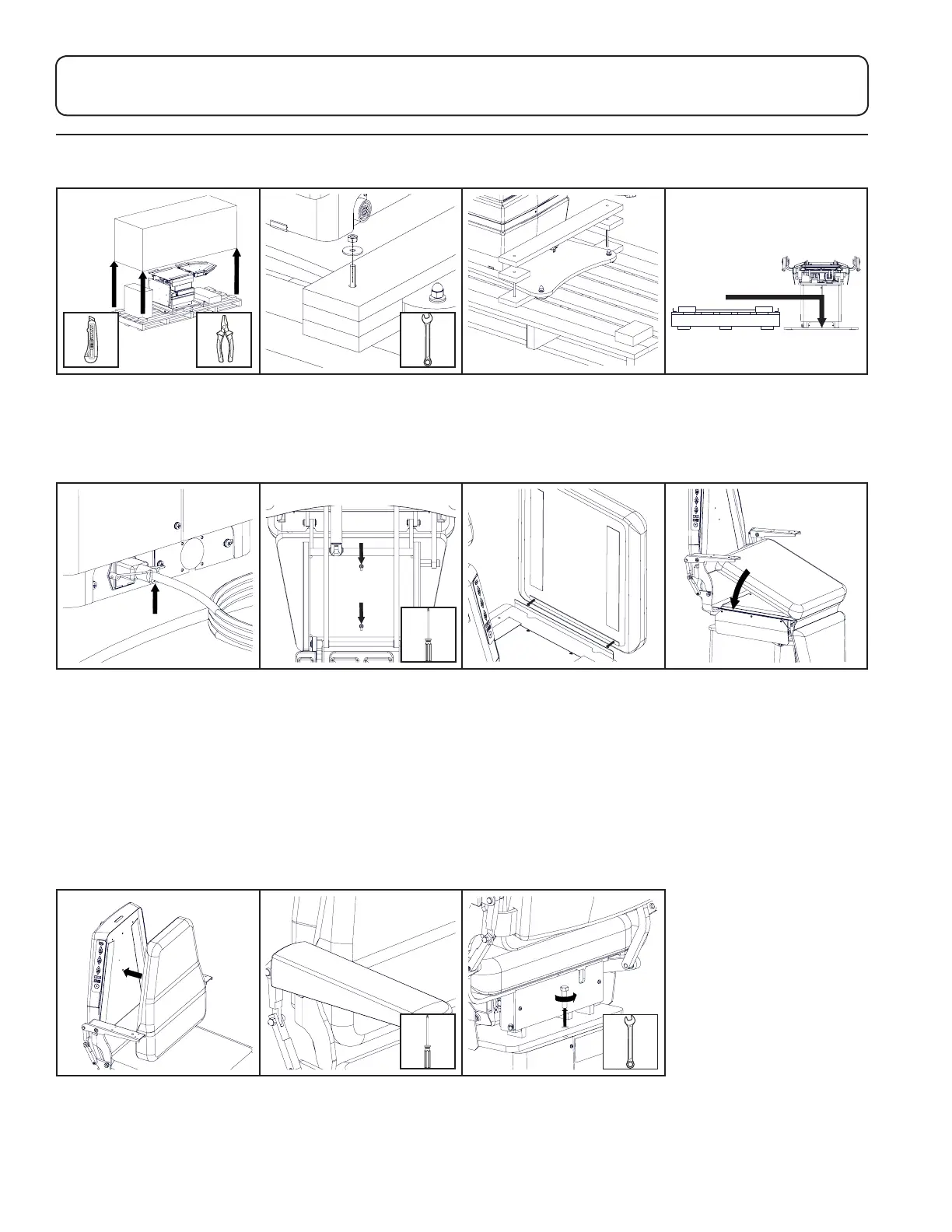
1. Remove shipping straps,
shipping box, and other
boxes from the pallet.
2. Remove (4) shipping bolts
with 7/16" end wrench.
3. Remove braces from the
top of the baseplate.
4. Slide chair o pallet. To
move equipment, lift only
from the equipment’s main
structure. Recycle or re-use
pallet.
Underside of foot section
5. Insert power cord at the
base of the chair and secure
with the clip. Plug the power
cord into the provided
surge protector. Plug the
surge protector into an
appropriately marked
receptacle.
6. Raise the foot section
(press the back down button
or use manual handle for
421 models). Attach the
upholstery flap to the foot
cushion. Align the screws
on the foot cushion with
the slotted holes in the foot
section, slide the cushion
in place, and tighten the
screws from underneath.
7. Attach the flap on the top
of the foot cushion to the
Velcro
®
on the seat cushion.
8. Align the seat cushion
with the seat section of
the chair and press into
place. Verify the cushion is
centered.
9. Align the back cushion
with the back section of
the chair and press into
place. Verify the cushion is
centered.
10. Attach the flip-up arm
upholstery following the
instructions provided in the
upholstery kit.
11. Remove the swivel bolt in
the back of the chair with a
9/16” end wrench.
Keep bolt for use while chair
is not powered.


 To Next Page