10 User Manual | MTI 424, 423, & 421
Manual Backrest Operation
This section only applies to the 421 Model Exam Chair.
To position the backrest, pull up or down on the lever
on the back of the chair, position the backrest to the
desired location, then release the lever (Figure 1).
Figure 1
Flip-up Armrest Operation
To raise the armrest: press the joint of the arm
backwards while lifting the front of the arm (Figure 2).
Figure 2
To lower the armrest, swing the arm down. The joint
will lock in place when fully lowered.
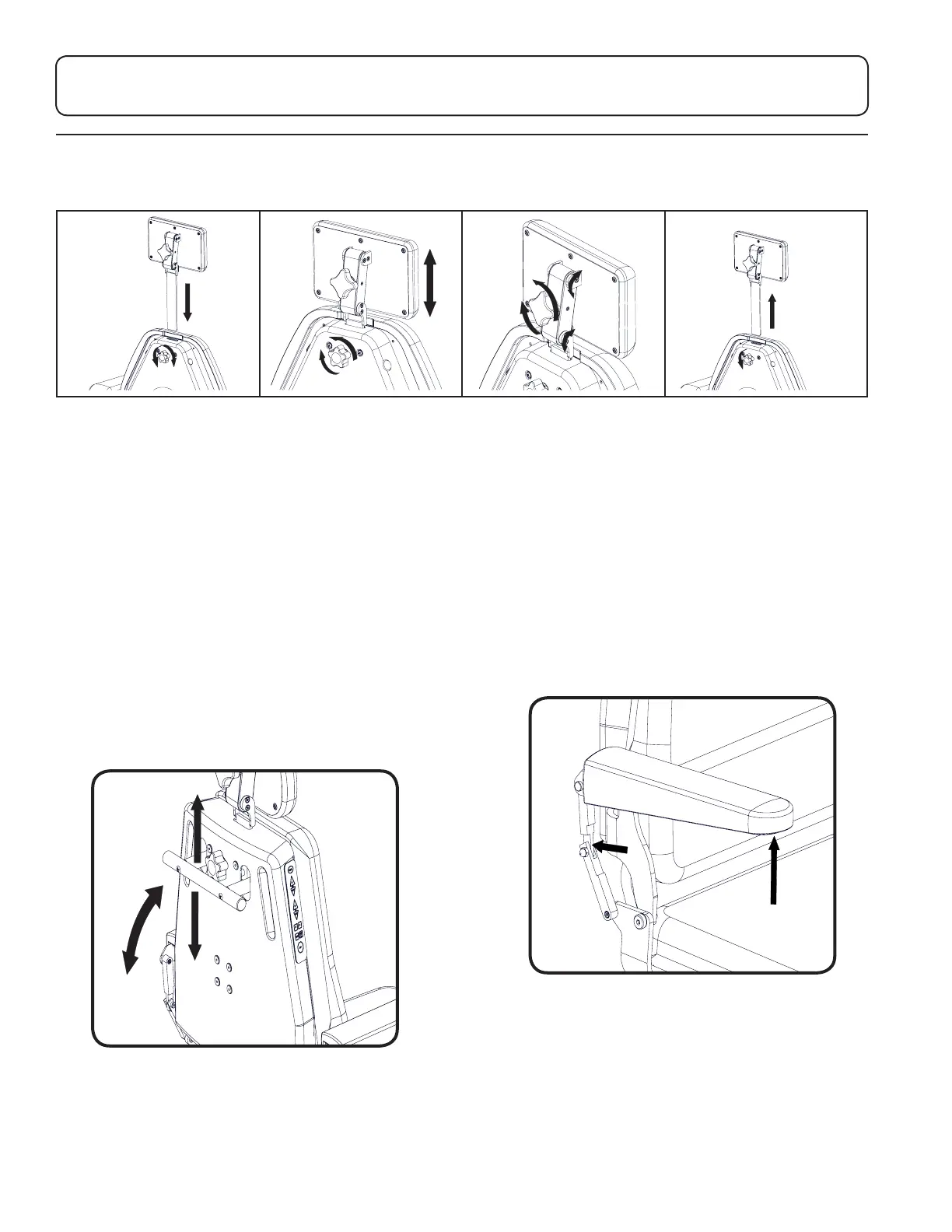
Headrest Operation
Articulating and Non-Articulating Headrests
1. To install the headrest:
A. To loosen, turn the knob
on the back of the chair
counterclockwise.
B. Insert the headrest
through the slot in the top
of the backrest.
C. To secure, turn the knob
clockwise.
2. To adjust the height of
the headrest:
A. To loosen, turn the knob
on the back of the chair
counterclockwise.
B. Adjust the height of the
headrest.
C. To secure, turn the knob
clockwise.
3. To adjust the angle of the
headrest (Articulating only):
A. To loosen, turn the knob
on the back of the headrest
counterclockwise.
B. Adjust the position and
angle of the headrest.
C. To secure, turn the knob
clockwise.
4. To remove a headrest:
A. To loosen, turn the knob
on the back of the chair
counterclockwise.
B. Pull the headrest
completely out of the back.


 To Next Page