EasyManua.ls Logo

MTI RAPIDDOC PRO KIOSK - User Manual

MTI RAPIDDOC PRO KIOSK
11 pages
Print Icon
To Next Page IconTo Next Page
Loading...
RAPIDDOC
®
PRO KIOSK INSTALLATION GUIDE
1
MTI P/N 063-00180 rev E ©2021 MTI All Rights Reservedwww.MTIGS.com | T:801.653.3807
OVERVIEW
185-00528 Through-Hole Mounting Accessory (Sold separately)
Materials in Box
Mounting
Plate
Use only power supply with output ratings 24VDC
max., 2.7A max., of PS2 or LPS
Alcohol Wipes (10)
(4) Mounting Screws,
6 X 5/8”,100º
Flt Hd Phl, Zinc
(5) Screws
M3x8mm Long,
Flat-Head-Phil
Threaded
Pipe
Adhesive
Pad
PSA with paper
release liner this
surface only.
Nut
(2) Security Screws,
Metric, M4 X 10mm
Round Hd, Torx, W/Lock Washer
Red Handle Tool
Authorization Card
If lost or
stolen, contact
customer
service for
replacement.
The socket-outlet (power adaptor) shall
be installed near the EQUIPMENT and
shall be easily accessible.
Access Card (5)
RapidDoc
®
Kiosk
C.A. Cover
(Minimal Cables)
C.A. Cover
(No Cables)
Cable Access
(C.A.)
“If the Kiosk is not mounted to a
counter or table it may fall,” causing
damage to the Kiosk or a person.
USB cables may be disconnected as
it moves around a surface. See page
9 for mounting instructions.
The applied nameplate is located at
the bottom of the product.
Equipment is only suitable for
mounting at heights < 2 meters.
See page 9 for mounting
instructions.
-CONTROLLED DOCUMENT- 063-00180 E-0 Status: Approved ECO-112676
ECO-112676
Question and Answer IconNeed help?

Do you have a question about the MTI RAPIDDOC PRO KIOSK and is the answer not in the manual?

Overview

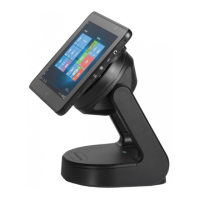
The RapidDoc® Pro Kiosk is a versatile device designed for secure tablet display and management, offering both desktop and through-hole mounting options. It integrates RFID technology for secure tablet access and removal, making it suitable for various commercial and public environments where tablet security and controlled access are paramount.

Function Description

The primary function of the RapidDoc® Pro Kiosk is to securely hold and display a tablet, while also providing controlled access for removal. It features an RFID module that allows authorized users to undock the tablet using an Access Card. The kiosk also supports manual tablet removal using a specialized Red Handle Tool, providing a backup method for access. It includes cable routing options for both through-hole and tabletop setups, ensuring a tidy and secure installation. The device is equipped with USB ports, Ethernet connectivity (for Pro versions), and a power input, facilitating tablet charging and data communication. LED status indicators provide visual feedback on the tablet's docking status, removal readiness, and access card registration process.

Important Technical Specifications

  • Power Supply: Requires a power supply with output ratings of 24VDC max., 2.7A max., of PS2 or LPS. The power adaptor must be installed near the equipment and be easily accessible.
  • Mounting: Supports both tabletop (VHB adhesive) and through-hole mounting. The through-hole mounting requires a 3-inch diameter hole.
  • Mounting Height: Equipment is only suitable for mounting at heights less than 2 meters.
  • Operating Temperature: 0 - 40 °C.
  • RFID Module: Registers up to 20 Access Cards. If a 21st card is registered, the first registered card is deregistered.
  • Connectivity (Pro version only): Six USB ports and Ethernet.
  • Security: Features security screws (M4 x 10mm, Round Hd, Torx, W/Lock Washer) for securing the kiosk to the mounting plate.
  • Dimensions (Mounting Plate Template): 3.9376 inches from the center to the drill holes in both X and Y directions.
  • FCC Compliance: Class B digital device, compliant with Part 15 of FCC Rules. It is designed to provide reasonable protection against harmful interference in residential installations.

Usage Features

  • Tablet Docking and Undocking: The tablet is docked by placing it onto the kiosk base. Undocking can be done via RFID by placing an authorized Access Card on the RFID module until a click is heard, or manually using the Red Handle Tool.
  • RFID Access Control: An RFID Authorization Card is used to register up to 20 individual RFID Access Cards. Once registered, these Access Cards can be used to unlock the tablet.
  • LED Status Indicators:
    • Solid Green LED: Tablet docked.
    • Solid Red LED: Tablet removed.
    • Flashing Green with audible click: Tablet ready for removal.
    • Flashing Yellow-Green and Red: Ready to register an Access Card.
    • Flashing Red (multiple undock attempts): If an Access Card is swiped more than 10 times within 2 minutes, the LED will flash Red, and undock attempts will be disabled for 2 minutes.
  • Cable Management: Includes options for through-hole cable routing (for a clean, hidden cable setup) and tabletop cable routing, ensuring cables are neatly organized and secured.
  • Installation Flexibility: Can be mounted using VHB adhesive for tabletop applications or securely bolted down using the through-hole mounting accessory for permanent installations.
  • Cable Access Covers: Two types of cable access covers are provided: one for minimal cables and another for no cables, allowing for a clean aesthetic regardless of the cable configuration.

Maintenance Features

  • Cleaning: Alcohol wipes are included for cleaning surfaces prior to VHB adhesive mounting, ensuring optimal adhesion.
  • Access Card Management: The system allows for the registration and deregistration of Access Cards. In case an Authorization Card is lost or stolen, customer service should be contacted for replacement. If an Access Card is lost or stolen, the remaining cards can be re-registered, and a new card can be ordered and registered.
  • Lid Removal and Replacement: The lid can be easily removed to access internal components for maintenance or cable routing adjustments. Care must be taken not to damage the RFID cable during removal.
  • Security Screw Access: The Red Handle Tool is specifically designed to engage the security screws, facilitating secure mounting and removal of the kiosk from its baseplate.

MTI RAPIDDOC PRO KIOSK Specifications

General IconGeneral
BrandMTI
ModelRAPIDDOC PRO KIOSK
CategoryRacks & Stands
LanguageEnglish