RAPIDDOC
®
PRO KIOSK INSTALLATION GUIDE
2
MTI P/N 063-00180 rev E ©2021 MTI All Rights Reservedwww.MTIGS.com | T:801.653.3807
1
1
1
2
2
2
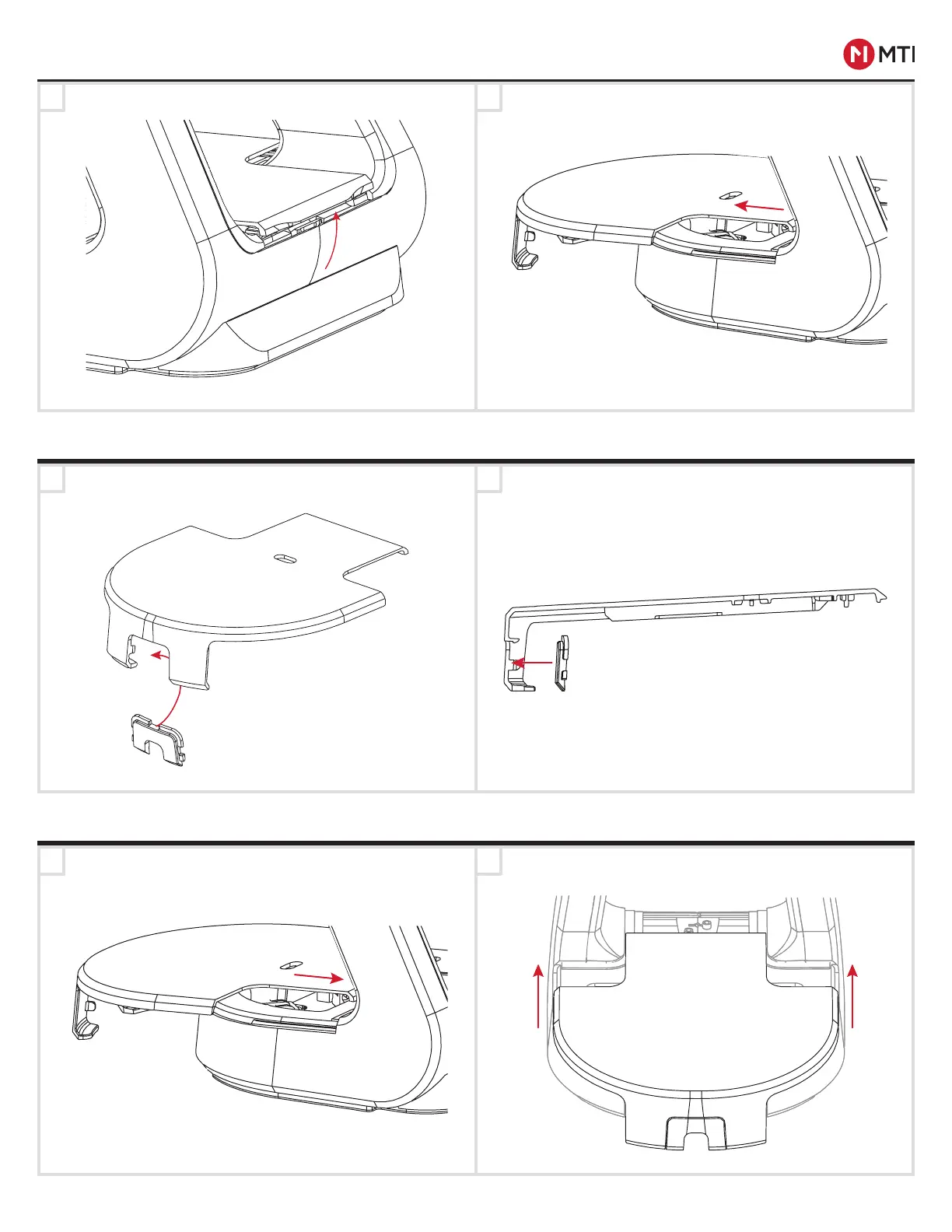
CABLE ACCESS COVER
REMOVING THE LID
Tuck the RFID cable into the void in the base and
place the lid on the kiosk base.
Slide the lid into place and press down on the lid.
REPLACING THE LID
Lift up the front of the lid (above the ArmorActive logo). Slide the lid back, using care when removing the lid as
not to damage the RFID cable.
Lift up the front of the lid (above the ArmorActive logo). Slide the lid back, using care when removing the lid as
not to damage the RFID cable.
With the lid off of the kiosk base, place the Cable
Access Cover into the opening from the inside.
Press until it clicks into place.
-CONTROLLED DOCUMENT- 063-00180 E-0 Status: Approved ECO-112676
ECO-112676


 To Next Page