RAPIDDOC
®
PRO KIOSK INSTALLATION GUIDE
5
MTI P/N 063-00180 rev E ©2021 MTI All Rights Reservedwww.MTIGS.com | T:801.653.3807
1
3
2
4
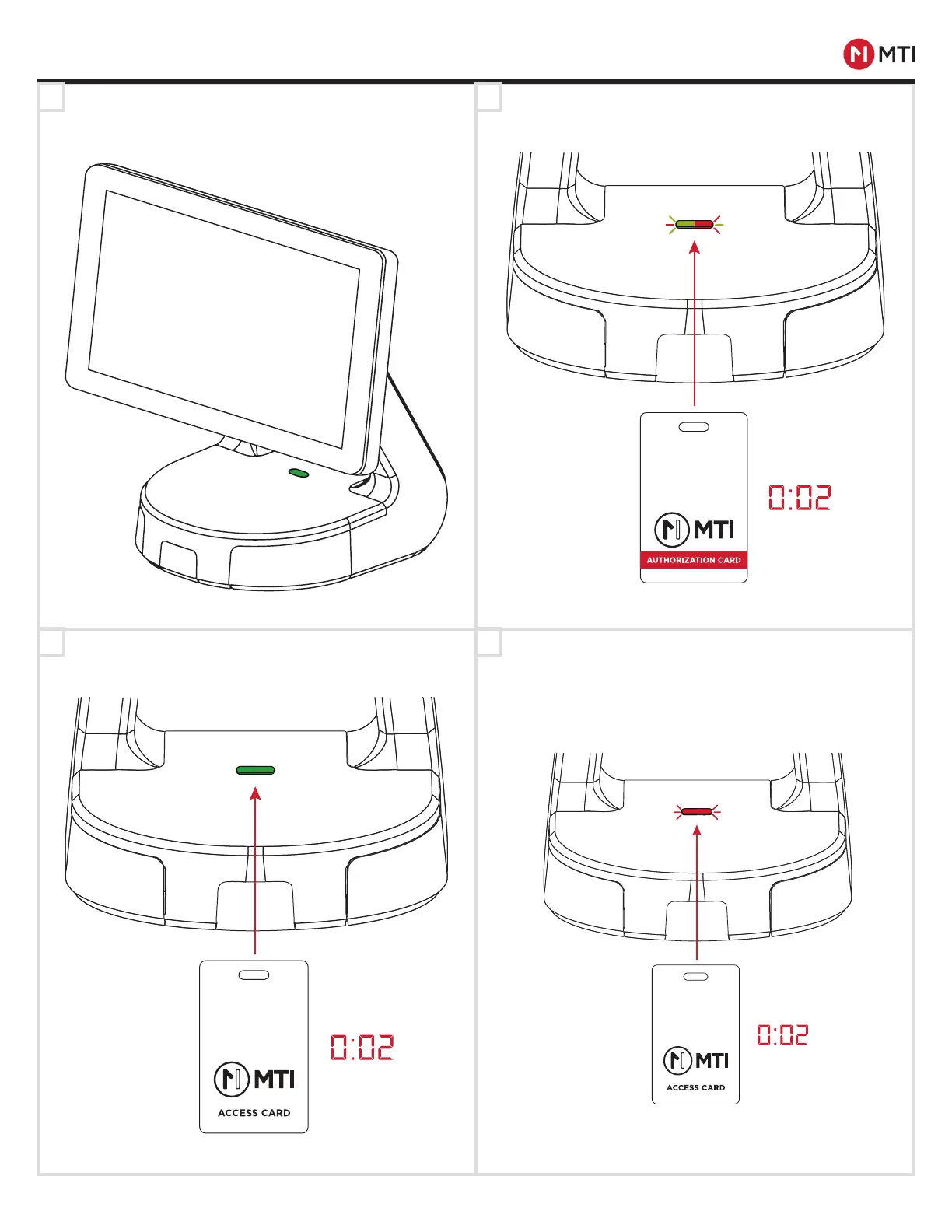
Make sure the RapidDoc
®
RFID Module is powered and
ready.
Place the RFID Authorization Card on the RFID Module
until the LED flashes.
If no Access Card is detected, the Base will return to
normal condition waiting for registered Access Card to
unlock the Base. The Base can register a maximum of
20 Access cards. The process will need to be repeated
for each card. If a 21st card is registered, the first regis-
tered card will be deregistered.
Place a RFID Access card on the RFID Module until
LED flashing stops and returns to solid green.
IF AUTHORIZATION CARD IS LOST OR STOLEN,
CONTACT CUSTOMER SERVICE FOR REPLACEMENT.
ACCESS CARD REGISTRATION
-CONTROLLED DOCUMENT- 063-00180 E-0 Status: Approved ECO-112676
ECO-112676


 To Next Page