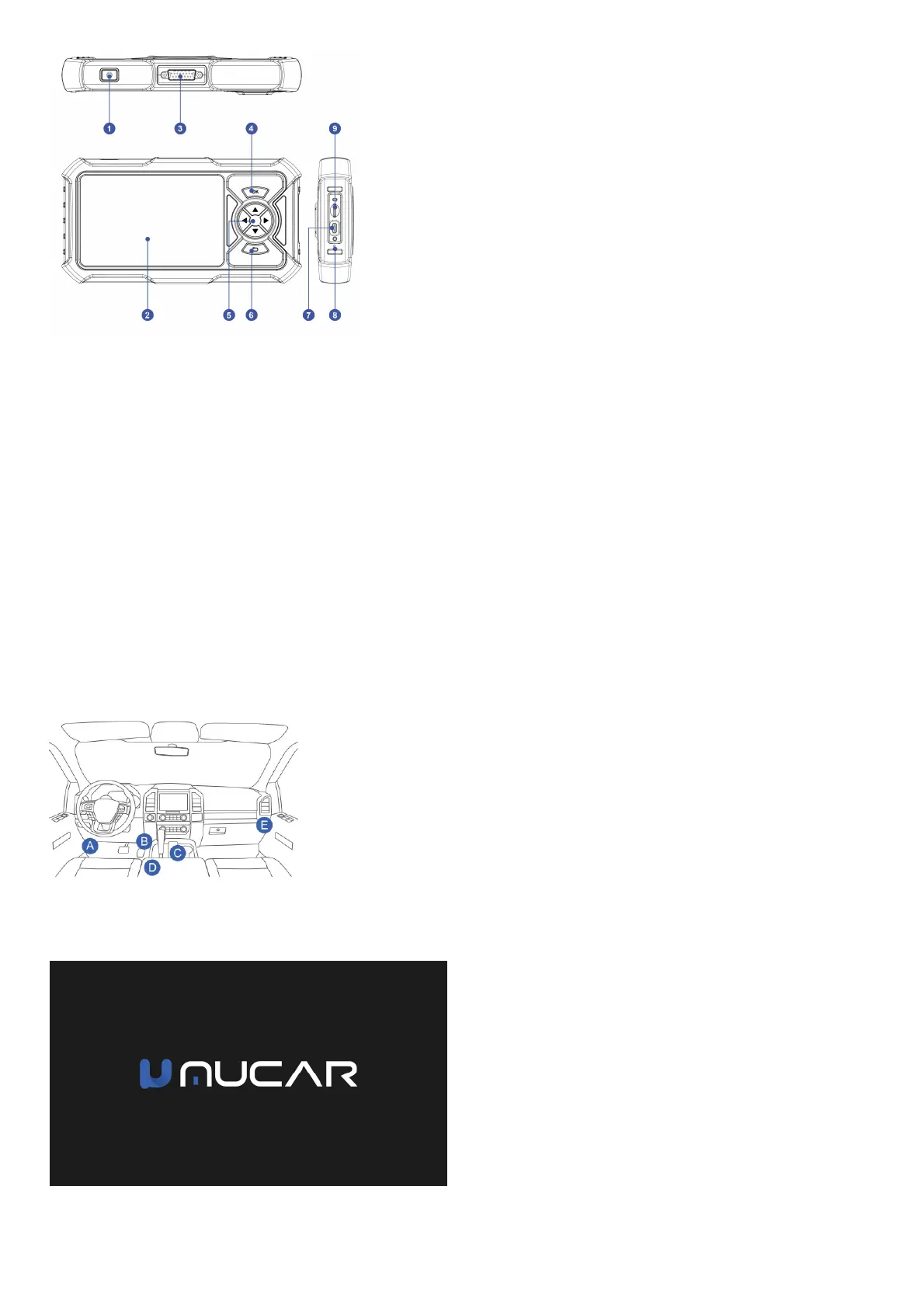
• 1. Power/Screen Lock Button: Long press for 5 seconds to turn on or off.
• 2. Touch Screen: 5 inches (480*854 resolution).
• 3. Diagnostic cable interface: Diagnostic cable interface: plug in the diagnostic cable to connect to the car OBD connector.
• 4. OK Button: Confirm button.
• 5. Selection Buttons: Up, down, left and right direction selection.
• 6. TF Card Slot: Support expandable SD memory card (please purchase by yourself).
• 7. TYPE-C interface: Support 5V-1.2A charging voltage (please do not exceed this range).
• 8. Reset Button: Power on and off reset.
• 9. Return Button: Return to the previous step.
05 Technical Specifications
Display: 5" display.
Working Environment: 0~50℃ (32~122℉ ).
Storage Environment: -20~60℃ (-4~140℉ ).
Working voltage: input 5V2A (2.5A max).
Supported Protocols: ISO 14230-4 KWP,ISO 15765-4 CAN,ISO 9141-2 ISO,SAE J1850 VPW,SAE J1850 PWM
06 How To Use
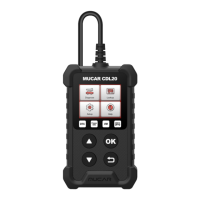
4.1 Data Link Connector (DLC) Location
The DLC (Data Link Connector or Diagnostic Link Connector) is typically a 16pin connector where diagnostic code readers interface with the vehicle’s onboard computer. The
DLC is usually located 12 inches from the center of the instrument panel (dash), under or around the driver’s side for most vehicles. If Data Link Connector is not located under
dashboard, a label should be there telling location. For some Asian and European vehicles, the DLC is located behind the ashtray and the ashtray must be removed to access
the connector. If the DLC cannot be found, refer to the vehicle’s service manual for the location.
Usually, the OBD port is located under the dashboard, above the pedal on the driver’s side. The five locations shown lite the picture are common OBDII port locations.
4.2 Turn on the MUCAR CDE900 PRO
Hold the Power button for 5 seconds to turn the MUCAR CDE900 PRO on. The tablet will start initializing and enter the following interface.
*Note: Don’t connect or disconnect any test equipment with the ignition on or engine running.
4.3 Language Setting


 To Next Page