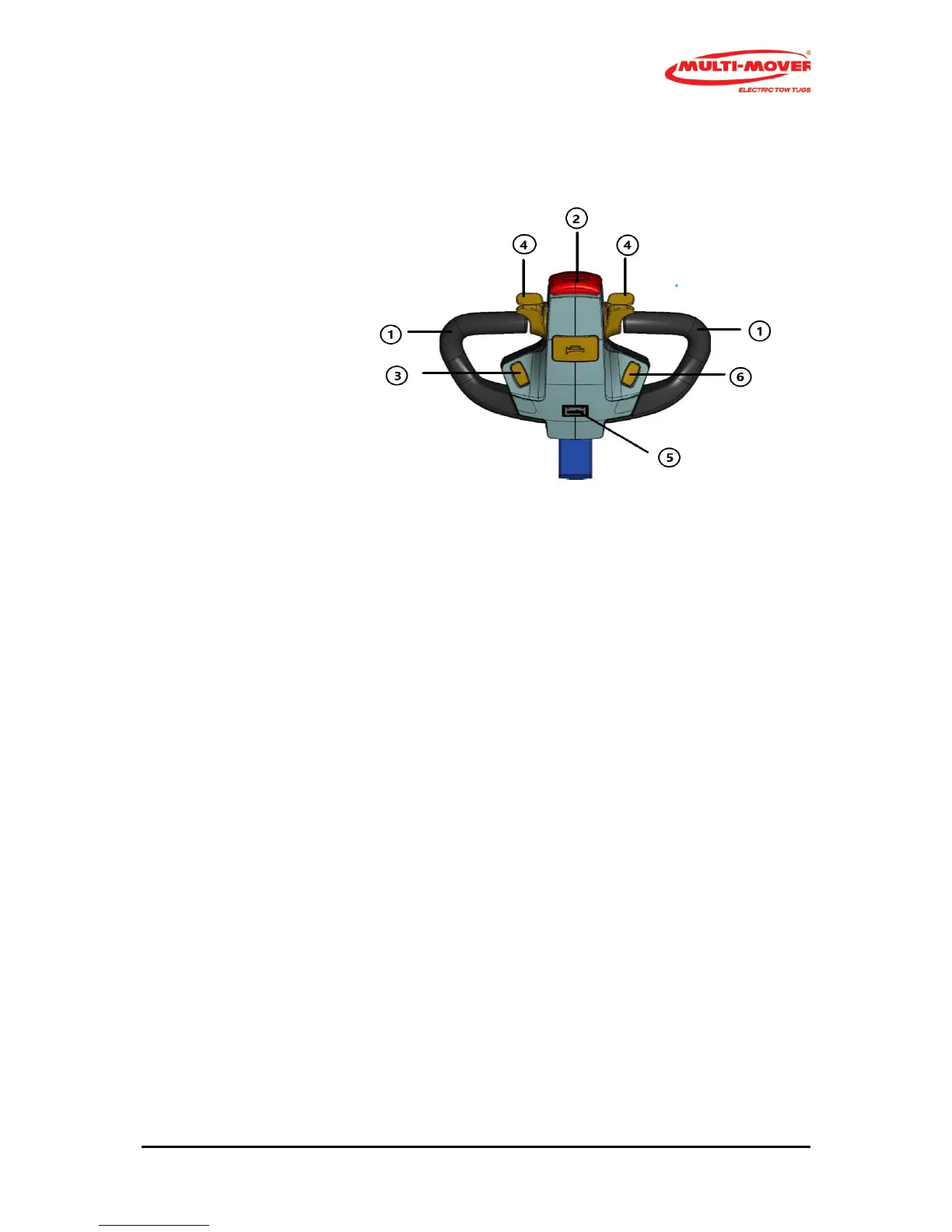
Steering handle (Tiller head) (Abb. 2)
1 Steering handle (black)
2 Emergency stop (red)
3 On/Off switch
4 Drive switch forwards and backwards
5 Battery indicator
6 Potentio meter
Steering handles (1)
The steering handle (1) with bar is a fixed part of the Multi-Mover M, moving to the left means
driving to the left, and vice versa.
Safety stop switch (2)
When pressing the safety switch (risk of getting jammed), the Multi-Mover M will stop immediately.
In order to start again, the drive switch must first be placed in the neutral position.
Drive switches (4), left and right from the centre
By rotating the drive switch ( 4) to the front with your thumb, the driving direction will first be
switched on and then, when rotated further, the Multi-Mover M will start to drive. The central
position is the neutral position.
By rotating it downwards, the Multi-Mover M will reverse.
Caution! Only switch to forward or reverse if the Multi-Mover M is standing still.
The BDI blinks if the EM brake button is off, see fig 1.4


 To Next Page