Measurement Speed
The instrument provides three types of measurement speed:
"Low" speed is 4 reading/s; "Mid" speed is 16 reading/s; "High" speed is 65 reading/s.
In DCV, ACV, DCI, ACI and 2-wire / 4-wire resistance measurements, the measurement
speed is selectable.
Basic Measurement Functions
Measuring DC Voltage
This section describes how to configure DC voltage measurements.
Operating Steps:
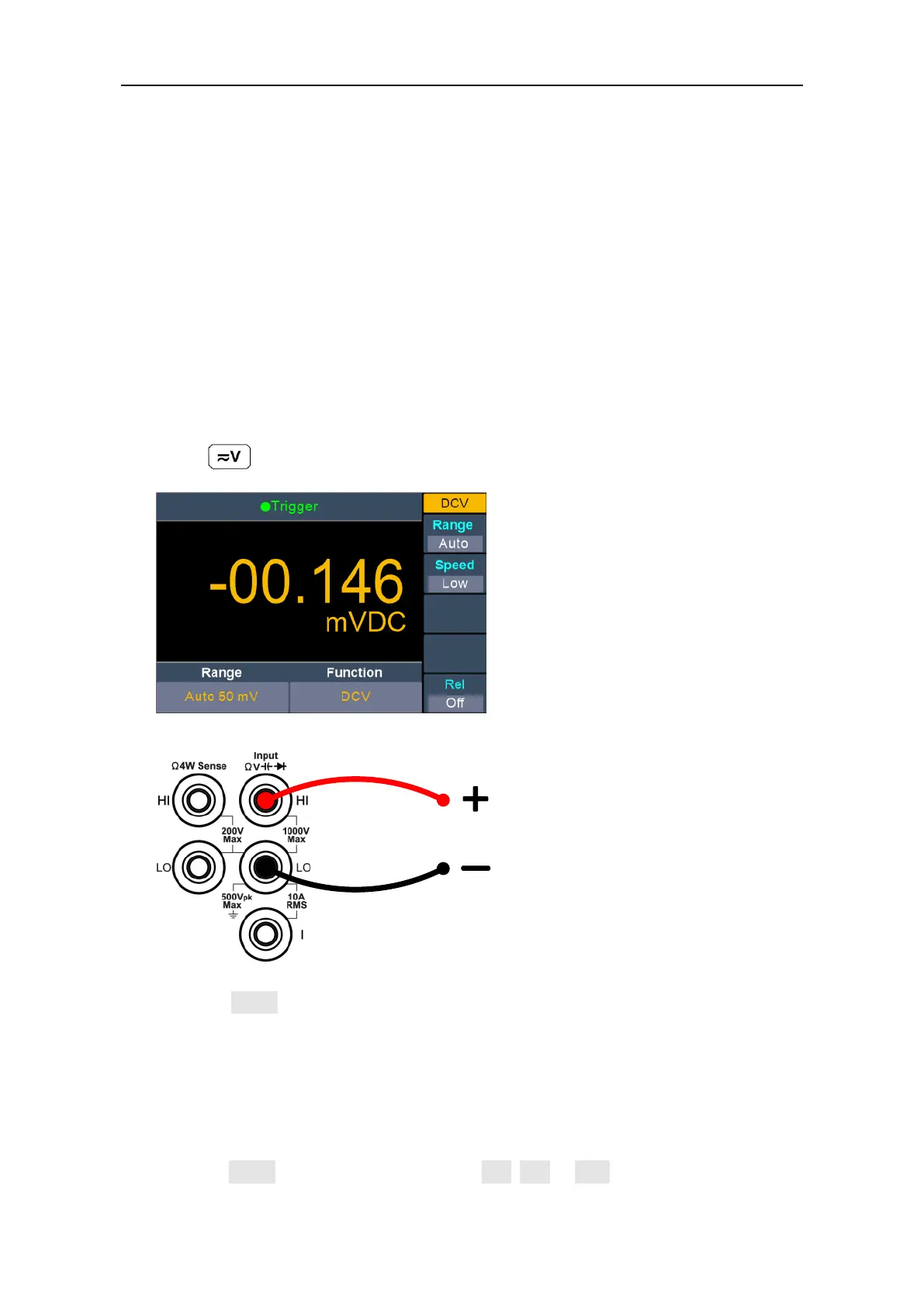
1. Enable the DCV measurement.
Press on the front panel to enter DCV measurement mode.
2. Connect the test lead.
3. Set the range.
Press the Range softkey to set the range. Auto range automatically selects the range
for the measurement based on the input.
Note:
1000 V input protection is available in all ranges.
10% over range for all ranges except 1000 V range.
If the reading exceeds 1050 V in 1000 V range, "overload" will be displayed.
4. Set the measurement speed.
Press the Speed softkey to switch between Low, Mid or High. See page 14 ”
Measurement Speed”.


 To Next Page