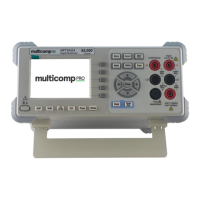
This document describes the Multicomp PRO MP730889 Digital Multimeter, a 55,000-count instrument designed for various electrical measurements.
Function Description
The Multicomp PRO MP730889 is a versatile digital multimeter capable of measuring DC and AC voltage, DC and AC current, resistance, continuity, diode characteristics, capacitance, frequency, period, and temperature. It features a dual display function, allowing for simultaneous viewing of two measurement results. The device also includes data record functions (manual and auto record) and mathematical operations (Max/Min, dB/dBm, and relative value).
Important Technical Specifications
The multimeter has a 55,000-count display.
DC Voltage:
- Ranges: 50.000 mV, 500.00 mV, 5.0000 V, 50.000 V, 500.00 V, 1000.0 V
- Resolution: 0.001 mV to 0.1 V
- Accuracy: ± (0.05% to 0.1%) of reading + 5 to 10 LSB
- 10% over range on all ranges, except 1000 V DCV.
- For each additional volt over ± 500 VDC, add 0.02 mV of error.
True RMS AC Voltage:
- Ranges: 500 mV - 750 V
- Frequency Range: 20 Hz - 1 kHz
- Accuracy: ± (0.5% to 1%) of reading + 30 LSB (depending on frequency)
- Specifications are for amplitude of sine wave input > 5% of range. 0.1% errors will be added when the range of input sine wave is 1% to 5%.
DC Current:
- Ranges: 500 uA, 5000 uA, 50 mA, 500 mA, 5 A, 10 A
- Resolution: 0.01 uA to 0.001 A
- Accuracy: ± (0.15% to 0.5%) of reading + 10 to 20 LSB
- 10% over range on all ranges, except 10 A DCI.
- 30 seconds OFF after 30 seconds ON is recommended for continuous current higher than DC 7 A.
True RMS AC Current:
- Ranges: 500 uA - 500 mA, 5 A - 10 A
- Accuracy: ± (0.5% to 1.5%) of reading + 20 LSB
- 10% over range on all ranges, except 10 A ACI.
- 30 seconds OFF after 30 seconds ON is recommended for continuous current higher than AC RMS 7 A.
Resistance:
- Ranges: 500 Ω, 5 KΩ, 50 KΩ, 500 KΩ, 5 MΩ, 50 MΩ
- Resolution: 0.01 Ω to 0.001 MΩ
- Accuracy: ± (0.15% to 1%) of reading + 5 to 10 LSB
- 10% over range on all ranges, except 50 MΩ resistance.
- Specifications are for 2-wire ohms using the relative operation of math. Without relative operation, add 0.2 Ω additional error in 2-wire ohms function.
Diode:
- Range: 3.0000 V
- Resolution: 0.0001 V
- Accuracy: ± (1% + 10 LSB)
Continuity:
- Range: 1000 Ω
- Resolution: 0.1 Ω
- Adjustable threshold
Frequency:
- Range: 10.000 Hz - 60 MHz
- Accuracy: ± (0.2% + 10 LSB)
- Except for special marks, when frequency ≤ 10M Hz, the specification is applicable to >1V AC input voltage, when frequency > 10 MHz, the specification is applicable to >3V AC input voltage.
Capacitance:
- Ranges: 50 nF - 500 uF, 5 mF - 50 mF
- Accuracy: ± (2.5% to 5%) of reading + 10 LSB
- 10% over range on all ranges, except 50 mF capacitance.
- Specifications are for using the relative operation of math. Aging of non-film capacitor may generate additional errors. Specifications are for from 5% to 110% on ranges.
Temperature:
Record Interval: 15 mS – 9999.999 S
Record Length: 1,000 points
General Specifications:
- Display Screen: 3.7-inch TFT LCD with resolution 480*320
- Operating Environment: Full temperature from 0°C to 50°C, 80% RH and 40°C, non-condensing
- Storage Environment: -20°C to 70°C
- Remote Interface: USB Device
- Programmer Language: Standard SCPI, compatible with commands of main stream multimeters
- Warm Up Time: 30 minutes
- Dimension (W×H×D): 200 x 86.5 x 64 (mm)
- Weight: 0.45 kg
Usage Features
- User Interface: The device features a clear LCD display with softkeys for easy navigation. The main display shows the primary measurement, while a secondary display can show a related function (e.g., frequency during AC voltage measurement).
- Range Selection: Users can choose between auto-ranging and manual ranging. Manual range allows for precise control over the measurement scale.
- Measurement Speed: The multimeter offers selectable measurement speeds (Low, Mid, High) to balance between speed and accuracy. "Low" speed is 4 readings/s, "Mid" is 16 readings/s, and "High" is 65 readings/s.
- Relative Value: This feature allows the multimeter to subtract a pre-specified value from the actual measurement, displaying only the difference. This is particularly useful for reducing errors caused by test leads in resistance measurements or for comparing values.
- Data Hold: The "Run/Stop" button can be used to freeze the current reading on the display.
- Mathematical Operations: The device supports Max/Min, dB/dBm, and relative value calculations on measurement results.
- Data Recording: Both manual and auto record functions are available. Manual record saves current readings to internal storage, while auto record captures data at specified intervals. Up to 1,000 points can be recorded.
- Utility Menu: This menu provides access to system settings such as language, backlight, clock, default settings, and serial port communication parameters.
- Power On: The instrument connects to an AC supply via the provided power cord. A warning emphasizes proper grounding to avoid electric shock.
- Measurement Connections: Detailed diagrams illustrate how to connect test leads for various measurements (DC/AC voltage, DC/AC current, resistance, continuity, diode, capacitance, frequency/period, and temperature).
- Continuity Test: Includes an adjustable threshold for beeper activation and displays "Open" when resistance exceeds 1000Ω.
- Diode Test: Measures forward pressure drop and beeps if the voltage is below 0.7 V (if beeper enabled).
Maintenance Features
- General Care: Avoid direct sunlight exposure for the LCD. Keep product surfaces clean and dry.
- Cleaning: Disconnect from AC mains power and all test leads before cleaning. Use a wet soft cloth, avoiding corrosive chemical agents or scuffing the LCD. Ensure the instrument is completely dry before powering on again.
- Fuse Replacement: The line fuse (250 V, F1AL) is located in a plastic box below the power line input on the rear panel. Instructions are provided for safe replacement, emphasizing the use of the correct fuse type and disconnecting all power before servicing.
- Troubleshooting: A dedicated section addresses common issues such as no display on power-on (check power, line fuse) and unchanging current readings (check test lead connection, measurement function). It advises contacting service personnel if problems persist after basic checks and resetting.

 Need help?
 General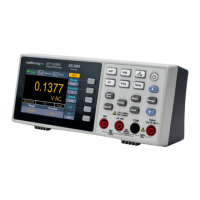

 To Next Page