Multicomp-pro
Measurement Speed
The instrument provides three types of measurement speed:
"Low" speed is 4 reading/s; "Mid" speed is 16 reading/s; "High" speed is 65 reading/s.
In DCV, ACV, DCI, ACI and resistance measurements, the measurement speed is
selectable.
Basic Measurement Functions
Measuring DC Voltage
This section describes how to configure DC voltage measurements.
Operating Steps:
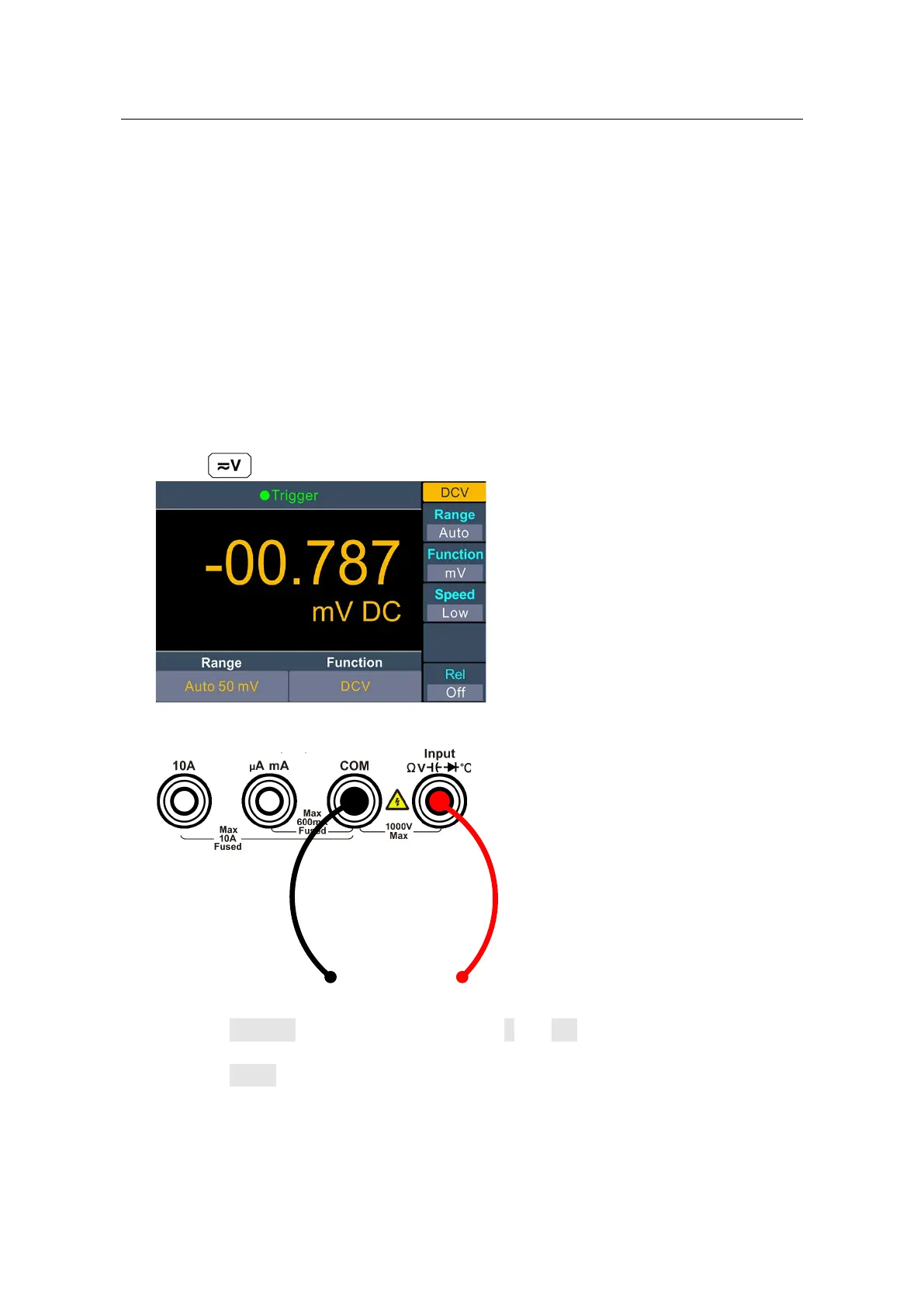
1. Enable the DCV measurement.
Press on the front panel to enter DCV measurement mode.
2. Connect the test lead.
3. Set the function.
Press the Function softkey to switch between V and mV.
4. Set the range.
Press the Range softkey to set the range. Auto range automatically selects the range
for the measurement based on the input.
Note:
1000 V input protection is available in all ranges.
10% over range for all ranges except 1000 V range.
If the reading exceeds 1050 V in 1000 V range, "overload" will be displayed.


 To Next Page