Multicomp-pro
5. Set the measurement speed.
Press the Speed softkey to switch between Low, Mid and High. See page 15 ”
Measurement Speed”.
6. Set the relative value.
Press the Rel softkey to turn on or off the relative operation. For relative operation,
the multimeter subtracts the pre-specified value of REL operation from the actual
measurement result and displays the result. See page 28, Relative Value.
Measuring AC Voltage
This section describes how to configure AC voltage measurements.
Operating Steps:
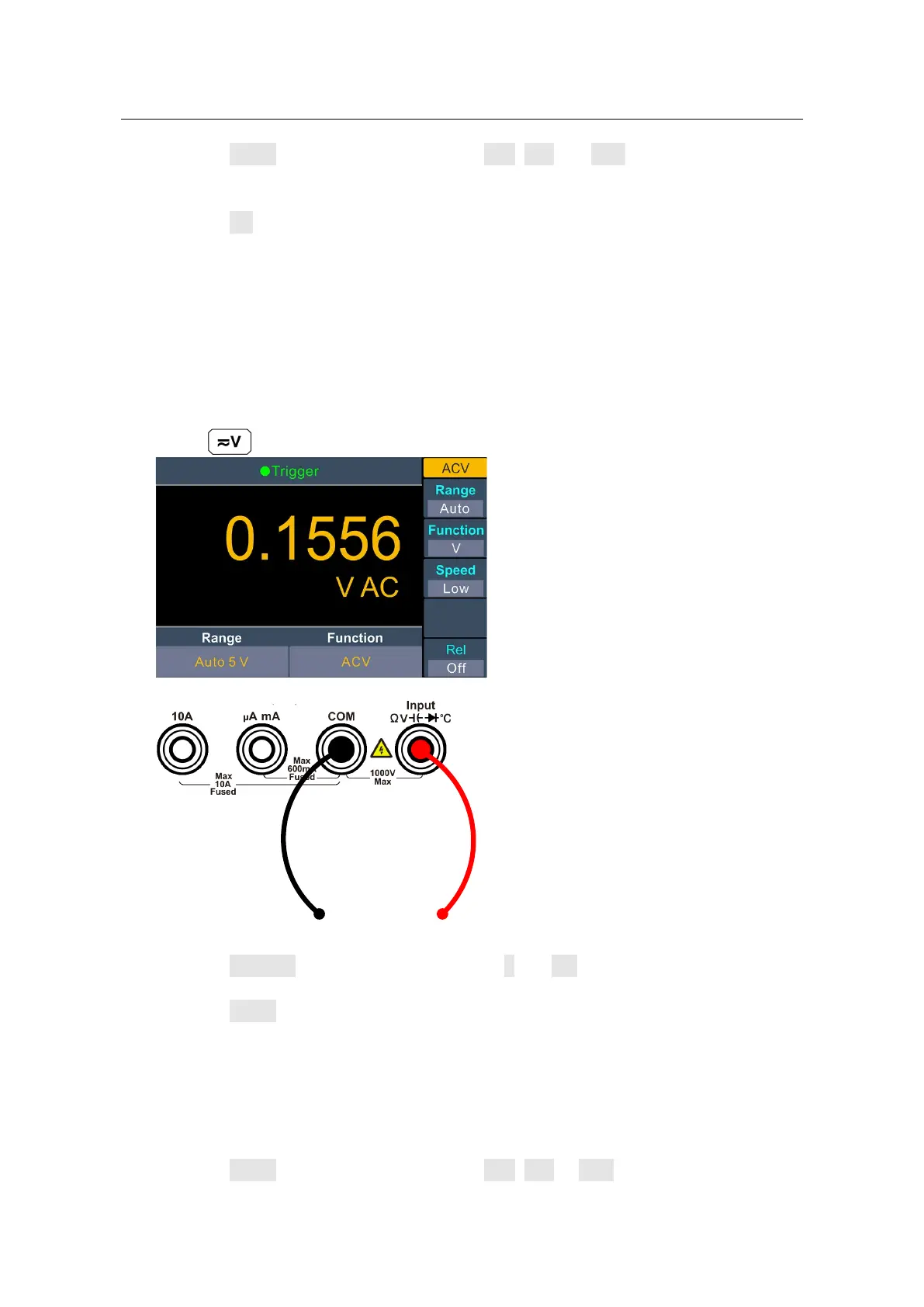
1. Enable the ACV measurement.
Press on the front panel, press it again to enter ACV measurement mode.
2. Connect the test lead.
3. Set the function.
Press the Function softkey to switch between V and mV.
4. S
et the range.
Press the Range softkey to set the range. Auto range automatically selects the range
for the measurement based on the input.
Note:
750 V input protection is available in all ranges.
10% over range for all ranges except 750 V range.
If the reading exceeds 787.5 V in 750 V range, "overload" will be displayed.
5. Set the measurement speed.
Press the Speed softkey to switch between Low, Mid or High. See page 14,
“Measurement Speed
“.


 To Next Page