MAINTENANCE
INSTALLATION
1. Slide the motion drive belt between the stack pulley and the
belt guides (Figure 32). Install the motion drive belt on the
top pulley of the stack pulley. Make sure the "V" side of the belt
is against the pulley.
2. Push the motion drive belt through the opening between the
steering plate and the engine plate.
3. Install the end of the motion drive belt around the drive pulley
(Figure 29).
4. Tighten the belt guides at the drive pulley (Figure 30).
5.
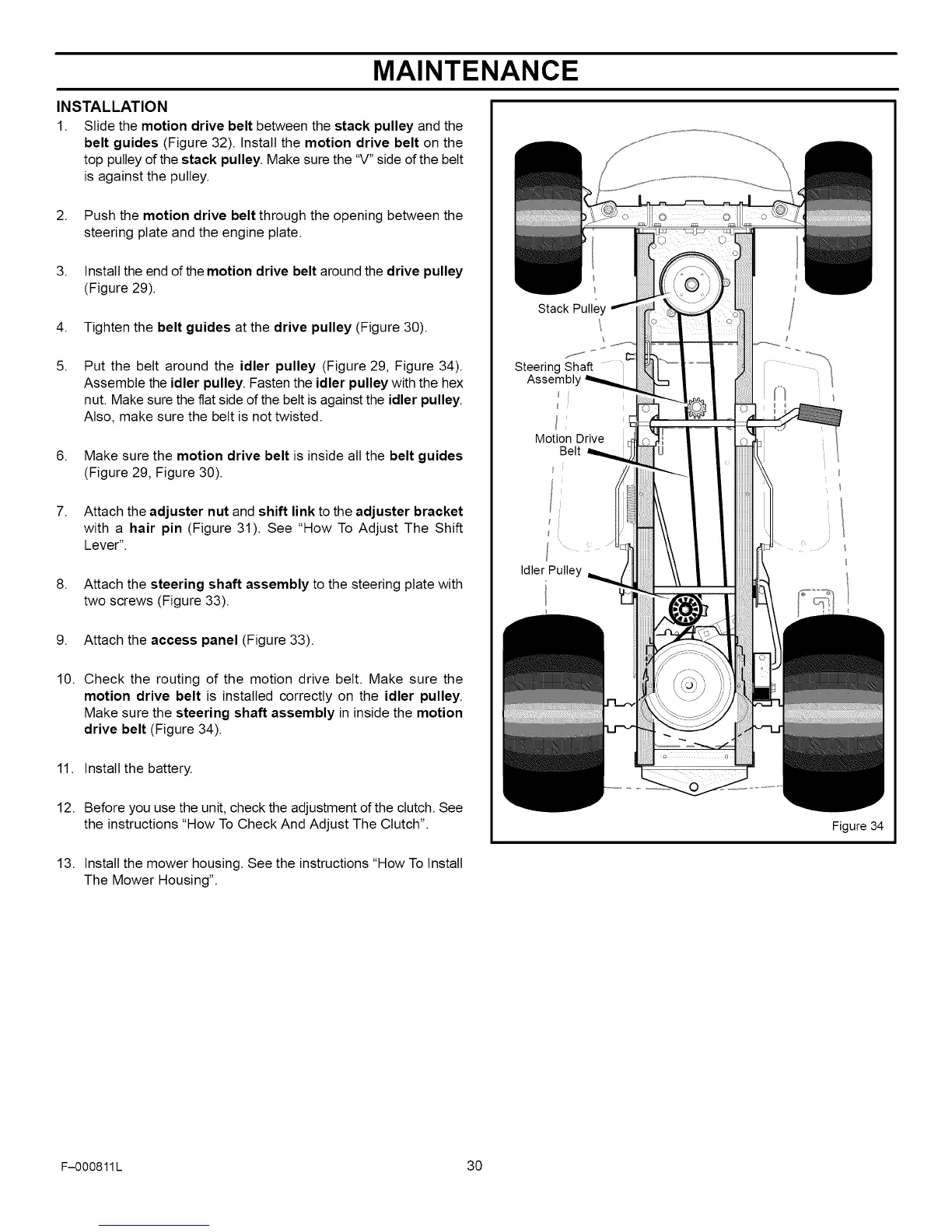
Put the belt around the idler pulley (Figure 29, Figure 34).
Assemble the idler pulley. Fasten the idler pulley with the hex
nut. Make sure the fiat side of the belt is against the idler pulley.
Also, make sure the belt is not twisted.
6. Make sure the motion drive belt is inside all the belt guides
(Figure 29, Figure 30).
7. Attach the adjuster nut and shift link to the adjuster bracket
with a hair pin (Figure 31). See "How To Adjust The Shift
Lever".
8. Attach the steering shaft assembly to the steering plate with
two screws (Figure 33).
9. Attach the access panel (Figure 33).
10.
Check the routing of the motion drive belt. Make sure the
motion drive belt is installed correctly on the idler pulley.
Make sure the steering shaft assembly in inside the motion
drive belt (Figure 34).
11. Install the battery.
12. Before you use the unit, check the adjustment of the clutch. See
the instructions "How To Check And Adjust The Clutch".
Stack Pulley
\
Steering Shaft
Assembb
Motion Drive
Belt
l
Idler Pulley
I
©
13. Install the mower housing. See the instructions "How To Install
The Mower Housing".
Figure 34
F-000811L 30



 To Next Page