EasyManua.ls Logo

Muse M-55 DV - Menu DI Configurazione

Muse M-55 DV
Print Icon
To Next Page IconTo Next Page
To Previous Page IconTo Previous Page
Loading...
IT - 7 IT - 8
RIPRODUZIONE DI UNA PERIFERICA USB



2. Premi il tasto USB





         
supportata dall’apparecchio, provate con un’altra.
RIPRODUZIONE DI FILE MP3/XVID/IMMAGINI


1. Inserite un disco nel compartimento o USB.


Premete il tasto OK
4. Premete il tasto 
Formati dischi compatibili:

VCD, VCD1.0, VCD2.0

CD-R, CD-RW
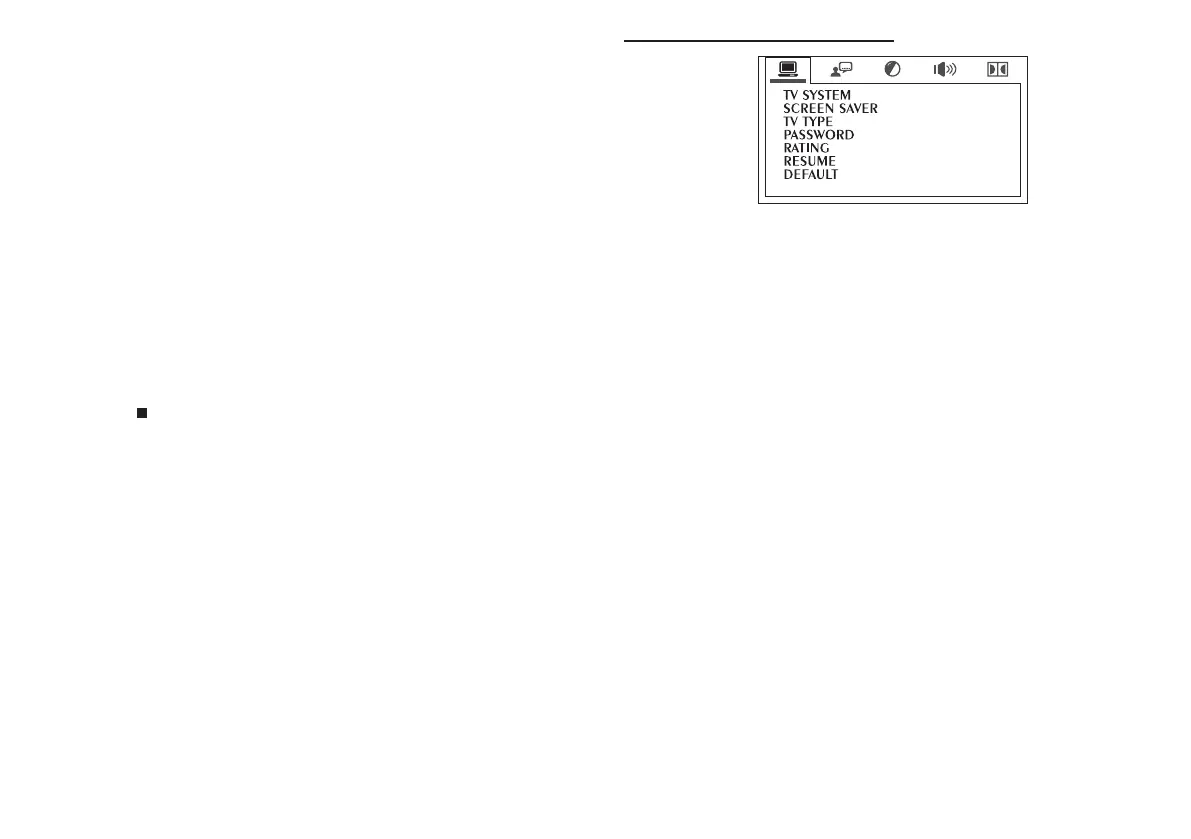
TV System (Sistema TV)
NTSC », « PAL » ou « AUTO ».
Screen Saver (Salvaschermo)
Attiva/disattiva il salvaschermo.
TY Type (Formato schermo)
4:3 Pan & Scan




dello schermo).
4:3 Letterbox


“16:9” (Schermo largo)





󰀨

Password (Parola d’accesso)



MENU DI CONFIGURAZIONE
Navigare nel menu di congurazione
1. Premete il tasto SETUP


del menu.

5. Premete il tasto OK

7. Premete il tasto SETUP
General Setup Page (Pag. Cong. Generale)

Related product manuals