EasyManua.ls Logo

Muse M-55 DV - DVD Player

Muse M-55 DV
Print Icon
To Next Page IconTo Next Page
To Previous Page IconTo Previous Page
Loading...
 
DVD PLAYERGB
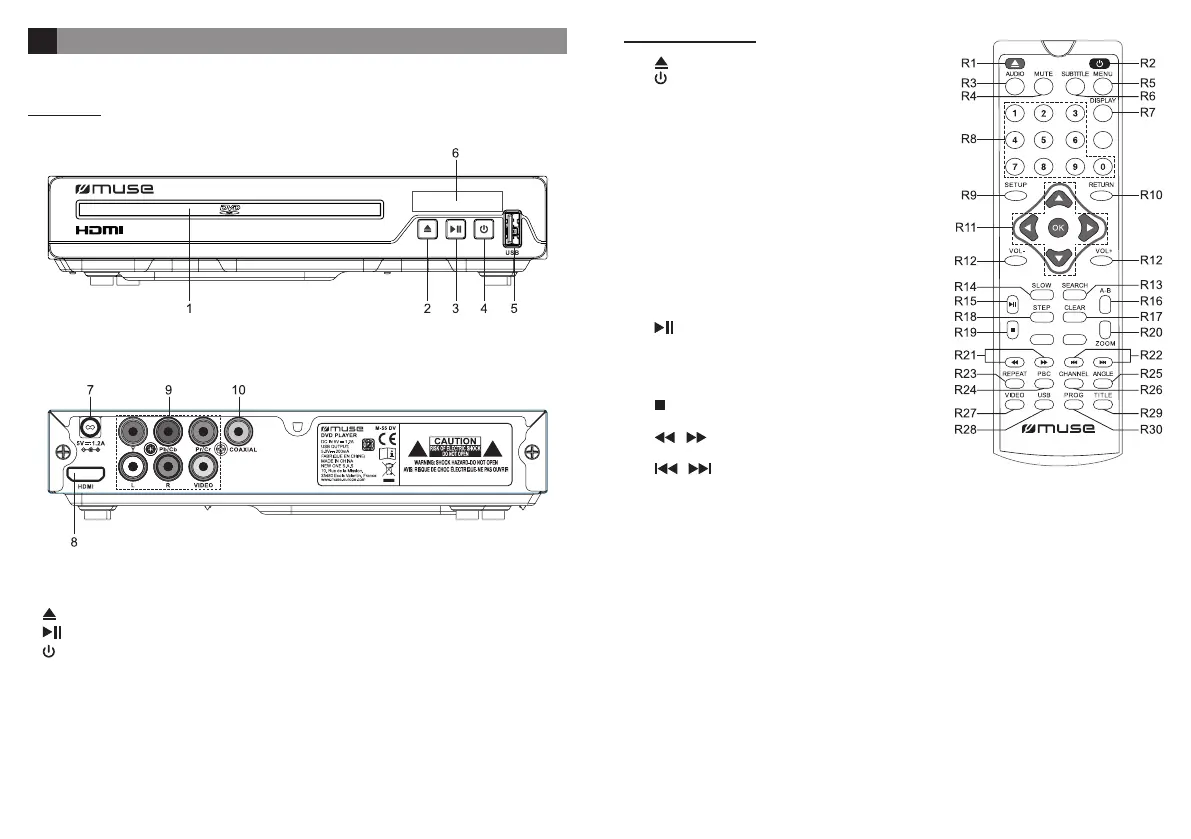
LOCATION OF CONTROLS
MAIN UNIT
1. CD compartment
2. : To open / close the disc tray
3. : Play/ Pause
4. 󰀨


7. AC/DC adaptor / Power out
8. HDMI Out
9. Component & Composite Out
10. Coaxial Out
REMOTE CONTROL
R1. : To open / close the disc tray
R2. 
R3. AUDIO
R4. MUTE: To mute or restore sound.
R5. MENU: Return to DVD root menu.
R6. SUBTITLE  

R7. DISPLAY󰀨
R8. Number keys
R9. SETUP: To enter and exit the setup menu.
R10. RETURN: Return to root menu
       
menu.
OK
R12. VOL-/+: To adjust the volume
R13. SEARCH
R14. SLOW
R15. : 
R16. A-B
R17. CLEAR: Clear previously selected data or search

R18. STEP
R19. 
R20. ZOOM
R21. / 

R22. / : To directly access the previous or next

R23. REPEAT
R24. PBC: Return to PBC menu (VCD).
R25. ANGLE
R26. CHANNEL: To switch between Mono L, Mono R, Mix Mono or Stereo channel (CD & VCD)
R27. VIDEO: To select video output mode.
R28. USB
R29. TITLE
R30. PROG
INVALID KEY

Related product manuals