The MXR Joshua Ambient Echo is a versatile one-stop shop for creating iconic soundscapes, designed to transport your tone through the decades, from the warm, psychedelic trips of the '60s and '70s to the expansive, ethereal ambience of '80s soundscapes. This pedal condenses the capabilities that once required a full rack processor into a modern, user-friendly format, coming pre-dialed and ready to inspire.
Function Description:
The Joshua Ambient Echo is an effects pedal that provides a wide range of echo and ambient effects. Its core function is to generate primary echoes, with the ability to add secondary echoes, modulate the echo trails, and blend in octave signals for rich, atmospheric textures. The pedal is designed for ease of use, allowing musicians to quickly access a broad palette of ambient tones.
Usage Features:
Controls and Knobs:
The pedal features several intuitive controls to shape your sound:
- DELAY knob: Adjusts the tempo of the primary echoes. Turning it clockwise increases the tempo, while counterclockwise decreases it.
- REGEN knob: Sets the number of echoes, allowing for short, distinct repeats or long, decaying trails.
- MOD knob: Controls the intensity of the modulation effect applied to the echoes. This can be fine-tuned to adjust both the depth and rate of modulation.
- VOICE knob: Blends in -1, +1, and +2 octave signals, adding harmonic richness and depth to the ambient sound.
- MIX knob: Adjusts the overall volume of the effect signal, allowing you to balance it with your dry instrument signal.
- DIVISION knob: Selects the rhythmic ratio of primary echoes to the tempo, offering options like 1/4 note, dotted 1/8 note, 1/8 note, 1/8 note triplet, and double echo with an 1/8 note and dotted 1/8 note.
- FOOTSWITCH: This large blue LED-indicated switch toggles the effect on/bypass. By default, it operates in true bypass mode, but when Trails Mode is engaged, it switches to buffered bypassing. The footswitch also serves as a tap tempo switch; pressing and holding it for one second engages tap tempo mode, allowing you to tap your desired rhythm.
- ECHO 2 button: Adds secondary echoes at a 1/4 note tempo. When illuminated blue, it indicates that secondary echoes are active. Pressing and holding this button while turning the DIVISION knob allows you to change the secondary echo's division.
- TRAILS button: Toggles the effect Trails mode on/off. When illuminated red, Trails mode is engaged, allowing echoes to gradually fade out according to the REGEN setting even after disengaging the pedal, rather than stopping abruptly.
Connectivity and Advanced Operation:
- CTR jack: This versatile jack allows for an expression pedal to control settings or a tap switch to set the tempo of echoes.
- Expression Pedal Control: An expression pedal (like the DVP5 Volume (X)™8 Pedal) can be used to seamlessly blend between two different setting configurations. By setting the CTR switch to TAP/EXP, connecting a TRS cable from the expression pedal, and adjusting knob and mode button settings in both heel-down and toe-down positions, you can create smooth transitions between two distinct sounds.
- Off-Board Tap Switch: An off-board tap switch (such as the M231 MXR TRS Split + Tap) can control the tempo of echoes. With the CTR switch in TAP/EXP position and a mono patch cable connecting the tap switch to the CTR jack, you can tap your desired rhythm.
- Freeze Mode: When using an off-board tap switch, holding down the switch will freeze the echo lines at maximum feedback, preventing any new signal from engaging with the echo until the switch is released, creating sustained ambient textures.
- Stereo Output: The Joshua Ambient Echo supports stereo operation. By running a TRS splitter cable from the OUTPUT jack to your chosen inputs, pressing and holding the ECHO 2 button, and rotating the VOICE knob fully clockwise, you can engage stereo output mode. The ECHO 2 and TRAILS buttons will flash to confirm. To revert to mono, follow the same steps and rotate the VOICE knob counterclockwise.
- Right Channel Audio Output: The CTR jack can also function as a right channel audio output. By setting the CTR switch to its right position and connecting an instrument cable from the CTR jack to a separate output source, you can achieve a split output, with the ring connection on the OUT jack being muted.
Advanced Settings (Fine-Tuning):
The pedal offers deeper customization by pressing and holding the ECHO 2 or TRAILS buttons while adjusting specific knobs. These advanced settings allow for fine-tuning various functions, though it's recommended to understand their impact as they can significantly alter the pedal's overall sound.
- DELAY Knob (with ECHO 2 held): Adjusts LED flashing behavior (hard or soft flashing).
- MOD Knob (with ECHO 2 held): Disables symmetrical regeneration, which by default ensures dual echo signals fade out at the same rate.
- VOICE Knob (with ECHO 2 held): Engages or disengages stereo mode.
- REGEN Knob (with ECHO 2 held): Adjusts the number of secondary signal's echoes relative to the primary signal's regeneration.
- TAP Knob (with ECHO 2 held): Selects the rhythmic division of the secondary echo signal (e.g., 1/8, dotted 1/8, 1/16).
- MIX Knob (with ECHO 2 held): Increases or decreases the mix of the secondary echo signal relative to the first.
- DELAY Knob (with TRAILS held): Makes the TRAILS LED flash at the primary 1/4 note tempo or remain solid.
- MOD Knob (with TRAILS held): Allows independent adjustment of modulation depth (hold TRAILS and rotate MOD) and rate (release TRAILS and rotate MOD).
- VOICE Knob (with TRAILS held): Controls a high-cut filter, reducing high-end frequency range from 12kHz down to 200Hz.
- REGEN Knob (with TRAILS held): Adjusts reverb decay, increasing or decreasing it. This disconnects reverb decay from being controlled by the DELAY knob until a factory reset.
- TAP Knob (with TRAILS held): Adjusts the compression threshold, raising or lowering it from the default midpoint.
- MIX Knob (with TRAILS held): Increases or decreases the mix of reverb.
Maintenance Features:
Power Requirements:
The MXR Joshua Ambient Echo requires a 9-volt power supply with a minimum of 300mA. It is compatible with Dunlop ECB003 9-volt adapters or MXR Iso-Brick™ Pro, Iso-Brick™, and Mini Iso-Brick™ power supplies. This pedal cannot be powered by a battery.
Restore Defaults:
To return all parameters to their factory default settings, simply press and hold both the ECHO 2 and TRAILS buttons simultaneously for five seconds. The main LED will flash to confirm the reset, ensuring you can always revert to the original settings if you experiment with advanced configurations.

 Need help?
 General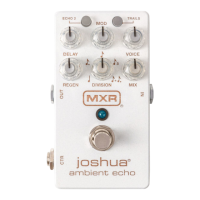

 To Next Page