M309 | MXR
®
Joshua
®
Ambient Echo 3
Basic Operation
The MXR
®
Joshua
®
Ambient Echo requires 9 volts
(300mA) and can be powered by the Dunlop
ECB003 9-volt adapter or the MXR
®
Iso-Brick
™
Pro,
Iso-Brick
™
, and Mini Iso-Brick
™
power supplies. This
pedal cannot be powered by a battery.
Power
1. Run a cable from your instrument to the Joshua Ambient
Echo’s INPUT jack and run another cable from the Joshua
Ambient Echo’s OUTPUT jack to your amplier.
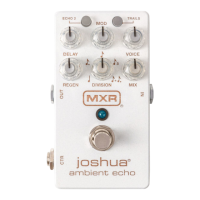
2. Start with all knobs except VOICE and DIVISION
at 12 o’clock. Set VOICE and DIVISION knobs fully
counterclockwise. Turn the eect on by depressing the
footswitch.
3. Rotate DELAY knob clockwise to increase tempo of echoes
or counterclockwise to decrease it.
4. Rotate MOD knob clockwise to increase the intensity of the
modulation eect or counterclockwise to decrease it.
5. Rotate VOICE knob clockwise to mix in a blend of -1, +1,
and +2 octave signals.
6. Rotate REGEN knob clockwise to increase number of
echoes or counterclockwise to decrease it.
7. Rotate DIVISION knob clockwise to cycle through rhythm
settings: ¼ note, dotted ⅛ note, ⅛ note, ⅛ note triplet, double
echo with an ⅛ note, and dotted ⅛ note.
8. Rotate MIX knob clockwise to increase overall volume of
eect signal or counterclockwise to decrease it.
9. To engage a second echo at a 1/4 note division, push the
ECHO 2 button. To change the second echo’s division, press
and hold the ECHO 2 button, and turn the DIVISION knob to
select your new preference.
10. Push the TRAILS button to allow your echoes to gradually
fade out according to your REGEN setting rather than
stop abruptly when disengaging the pedal. This button will
illuminate red when Trails mode is engaged.
Directions


 To Next Page