Need help?
Do you have a question about the My Weigh XL and is the answer not in the manual?
Insert 4 AA batteries into the battery compartment on the bottom (underside) of the scale. Ensure correct polarity.
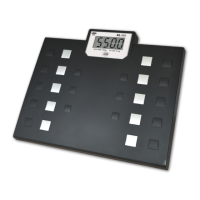
Step onto the platform. The scale will say "Hello". Step off and wait for reading. Step on again for measurement.
The scale powers off automatically after about 10 seconds of no operation.
Use the switch on the bottom of the platform to toggle the speaker function on or off.
Press the kg/lb button on the front of the scale to select the desired unit (LB or KG).
 General
| Readability | 0.2 lb / 0.1 kg |
|---|---|
| Display | LCD |
| Auto Shut-off | Yes |
| Units | lb / kg / st |
| Weight Units | lbs/kg |

 To Next Page