11
It supports multi-tasking, so you can listen to music while navigation is on.
Navigation instructions take precedence over other sound applications.
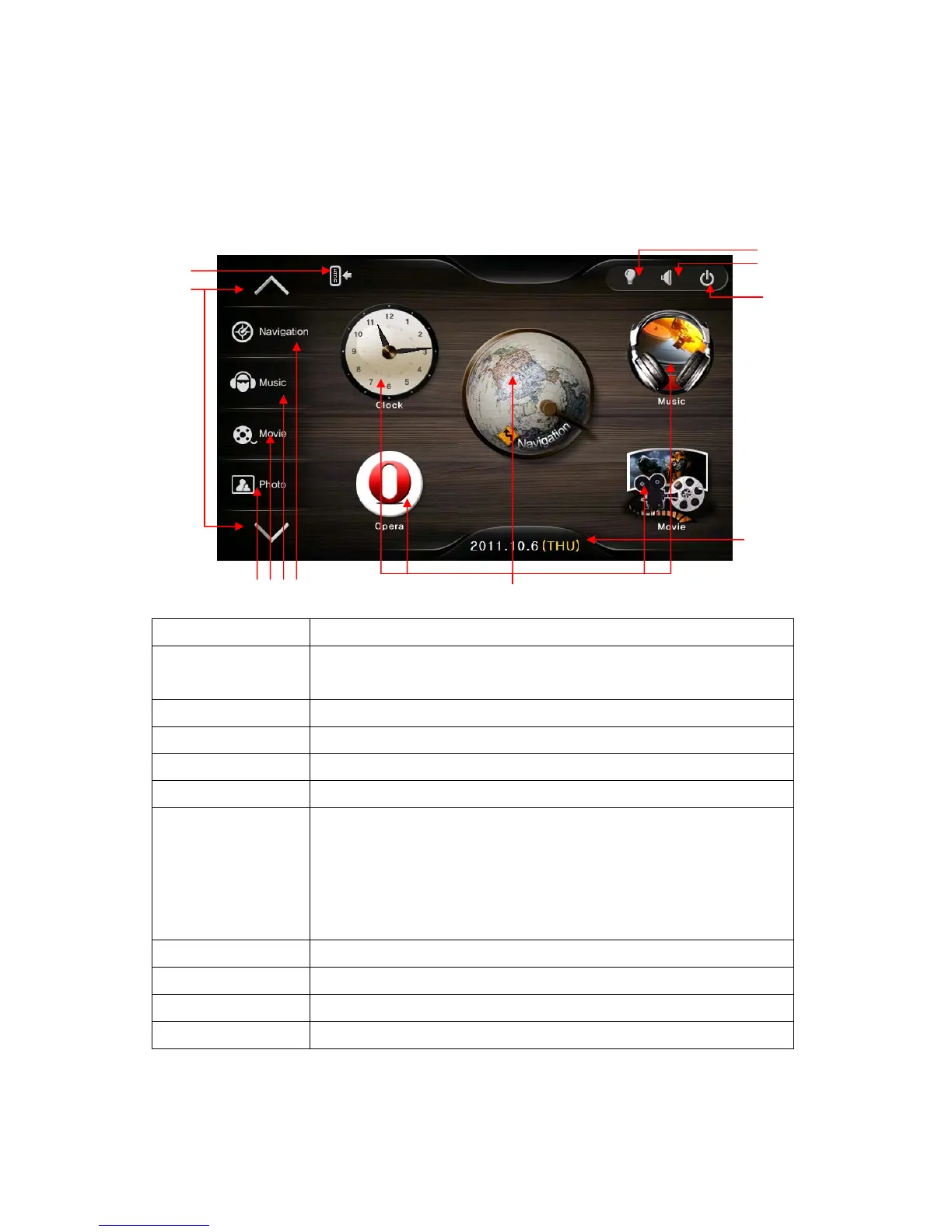
Configuration of Main Menu Screen
1.Hide/show bar An icon for hiding and showing main menu
2. Left Menu bar page
movement key
Move to pre/next page of left menu bar
3. Photo An icon to call Image viewer
4. Movie An icon to call Video Player
5. Music An icon to call Audio Player
6. Navigation An icon to call Navigation
7. Quick Menu
Clock: Start the clock
Opera: An icon start Internet Explorer
Navigation : An icon start Navigation
Music: An icon An icon start the Audio Player
Movie: An icon start the Video Player
8. Brightness Control brightness.
9. Volume Control Volume.
10. Power on/off An icon for power on/off status.
11. Time Shows current date & time
*Note: * You can move an icon in left menu bar to wallpaper by dragging.
①
②
③④⑤⑥
⑦
⑧
⑨
⑩
⑪


 To Next Page