15
Video conversion
1. Resolution : 640x480
2. Frame per second : 15-20 fps
3. Bit rate : 150 Kbps, (250 kbps for fast moving pictures)
4. Codec : divx4
Audio conversion
5. Bit rate : 64kbps
6. Sampling rate : 44KHz
7. Mode : stereo
8. Codec : mp3
5) To Close
Press the close button to close and get back to main menu.
Using the Image Viewer
1) Getting Started
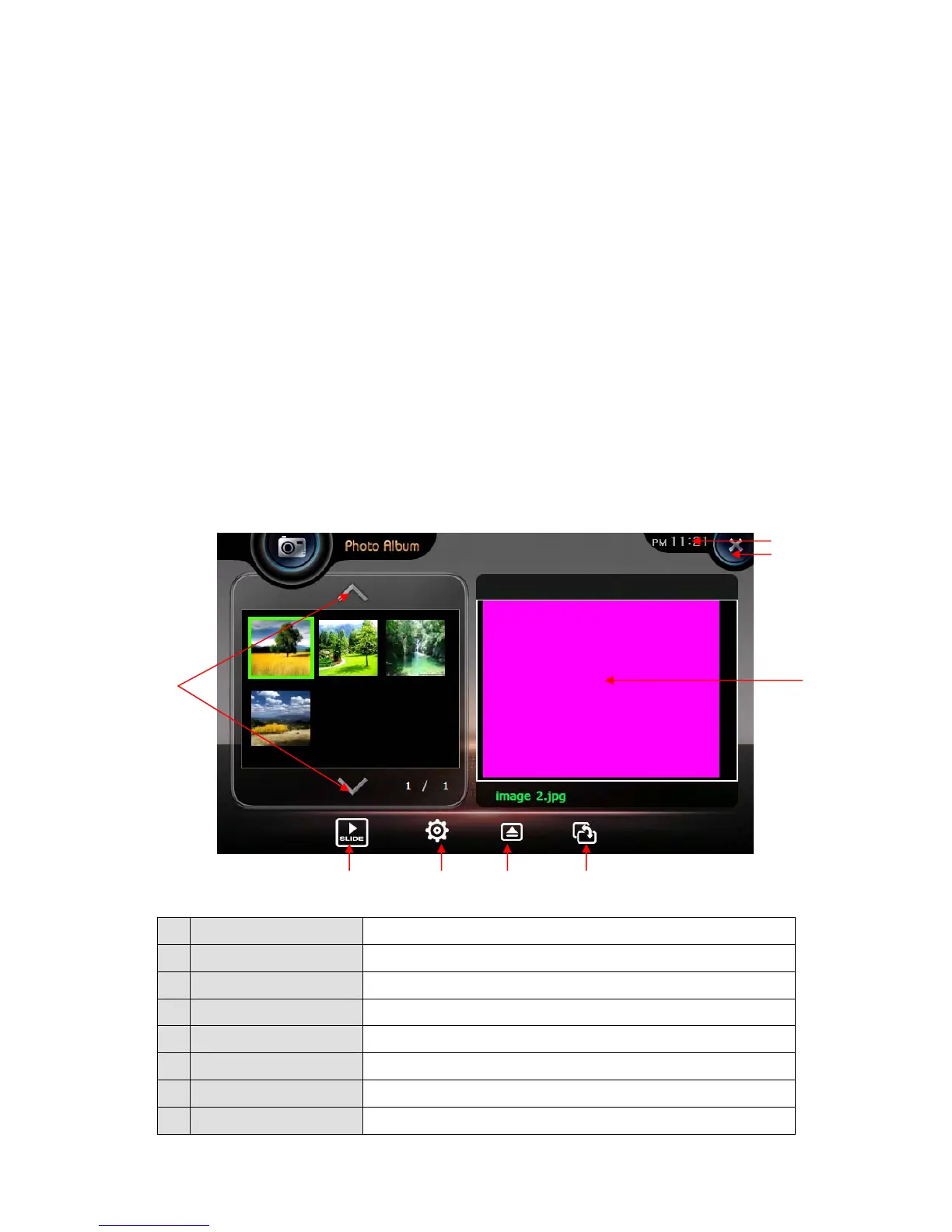
Launch this function by pressing Image Viewer icon picture in the Main Menu.
2) Configuration of Screen
1. Screen It shows images.
2. Play List Page Change play list page
3. Play slide show Show images in the play list one by one.
4. Slide setting Time setting for slideshow
5. Open Open an image on the memory card.
6 Rotate Rotate the image to 90° clockwise.
7. Time Shows current time.
8. Close Close the viewer and return to main menu.
①
②
③ ④ ⑤ ⑥
⑦
⑧


 To Next Page