9
Installing VR3 in Your Vehicle
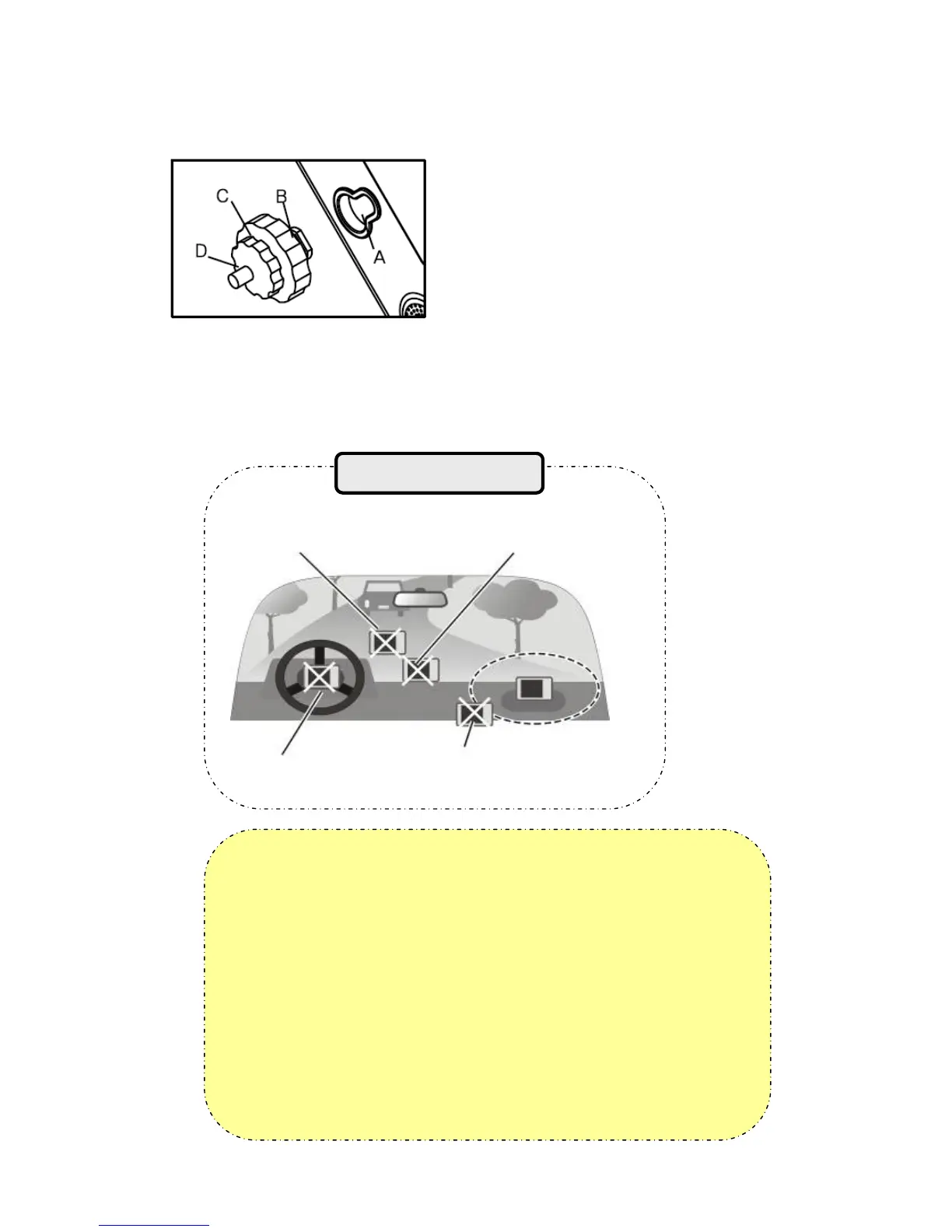
① Press the suction cup against windscreen
② Push and connect the projection B of cradle into A until securely fixed
③ Turn “C” in clock wise for fixing the device.
④ Turn “D” in clock wise to hold the device from releasing.
⑤ After installation, make sure the device is fixed firmly and then use it.
Please make sure that the suction cup of the cradle is securely fixed to
the windscreen, as it may become detached due to severe vibration of
vehicle during travel.
When adjusting angle of the GPS receiver, make sure that it has a clear
and horizontal view of the sky.
If power from the cigarette jack is not connected, VR3 will not work.
Owing to high number of thefts, please remove your VR3 from view
when you leave you car.
Please start your vehicle before connecting the cigarette jack.
Do not install where driver’s view is
blinded.
Do not install on the unsafe
dashboard.
Do not install in front of airbag
system.
Do not install where airbag is expanded.
Cautions during installation of vehicle


 To Next Page