RC4 decoder V2.0. - October 2017 © MYLAPS rights reserved 14
4.6. Information display status of the decoder
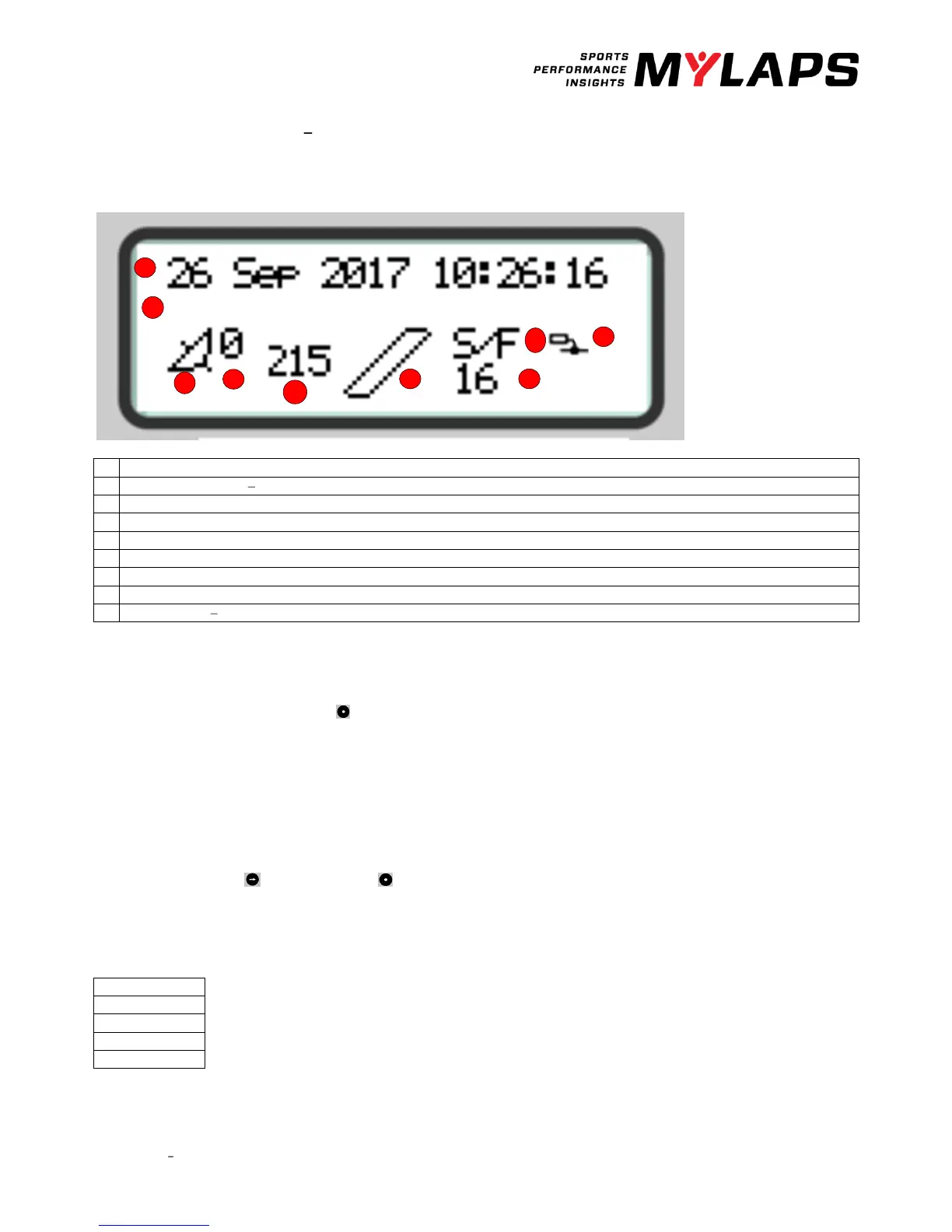
When the decoder is connected, this is the start screen of the information display.
Decoder date/time, UTC when synchronized to GPS.
Timeline name. S/F start or finish
Blinks when connecting to Mylaps Practice, steady when connected to MYLAPS Practice
Background noise indication
Indication that hits are received, remains black when a transponder is being received by the loop.
Strength of last received transponder.
Number of received GPS satellites.
Links when GPS receiver attached, steady when decoder is locked to UTC time.
Message line You will see errors or warnings. E/g DNS error
4.7. RC4 decoder menu
By clicking on the acknowledge button you will cycle through the status screens:
• Active IP Address
• MAC Address/serial number
• Firmware version
• Stored passings
Main menu
By clicking on the Select and Acknowledge buttons you can choose which information you want to see on the display.
Here you find all detailed information and the menu options.
Click on the select button to see the main menu.
With the select button you go from top to bottom.


 To Next Page