Control Panel
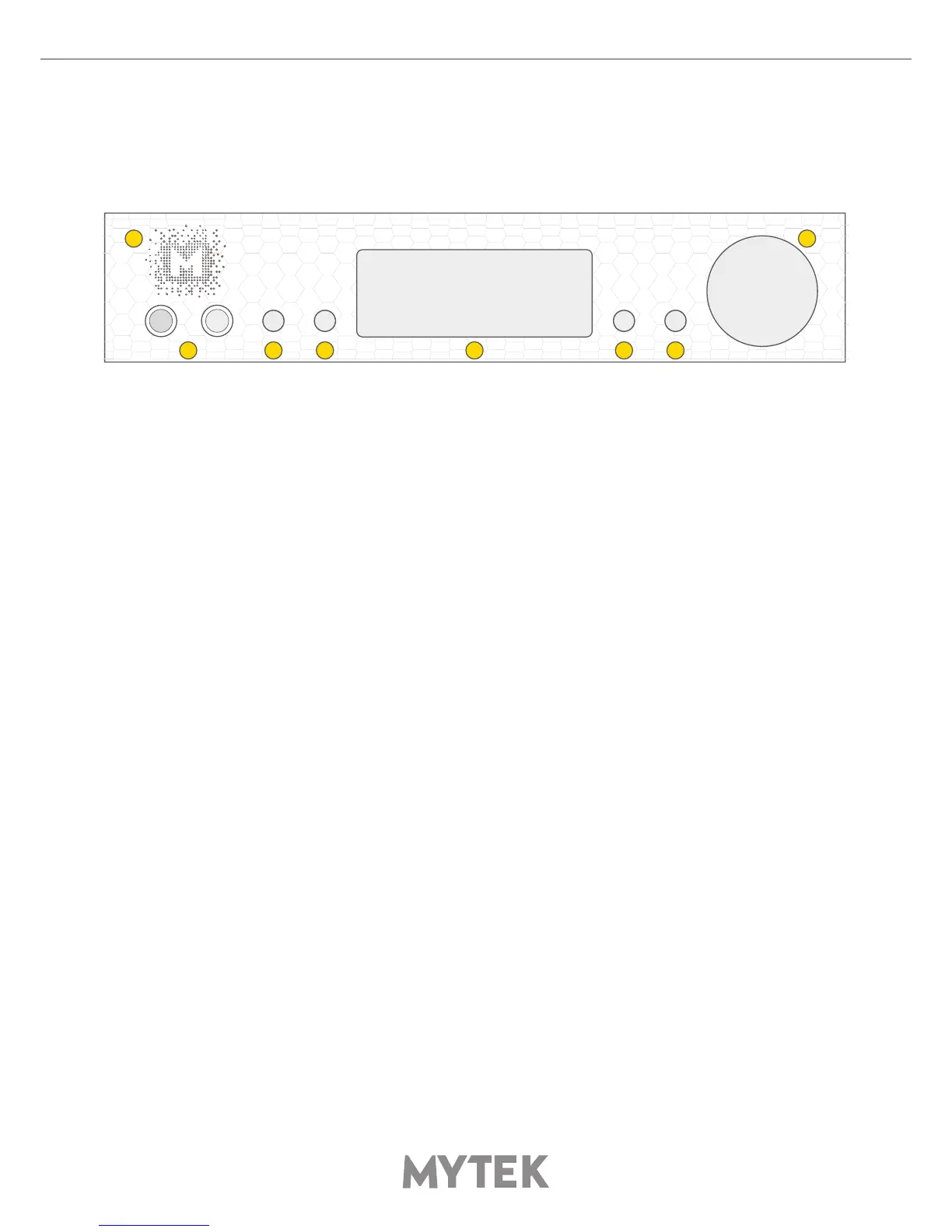
2. Headphone Output Section, Dual Mono, with Balanced Operation mode [500mA, 6 Watts]. Left jack
connects unbalanced phones in absolute phase. Right jack connects unbalanced phones in absolute
out of phase. A special 2x 1/4” jack to 4 pin FXLR allows for connection of single balanced headpones.
Balanced headphones will play twice as loud (+6dB) as unbalanced headphones with output voltage
swing of +/- 12V and output impedance below 0.5 Ohm
3,4,6,7. Functional button enables the user to quickly choose an option, change and congure the
device’s settings.
5. OLED display
8. Rotary Encoder Knob. This encoder is both a knob and a button. It’s primary function is to control
the volume level. It also functions as MENU navigation for conguring device’s options
Press and hold the main knob to turn the Brooklyn Bridge on or o.
1 8
2 3 4 5 6 7


 To Next Page