Compatibility
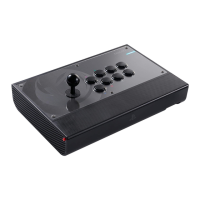
The DAIJA can be used with the SONY PlayStation®4, the SONY
PlayStation
®3 or on a Windows® PC (X-Input only)*. To choose the
respective mode, use the platform selection switch (13) on the right
side of the DAIJA.
I PlayStation®4
Plug the DAIJA’s USB plug into a free USB port on your PS4™ system.
Power on your system and press the “PS” button on your DAIJA. The LED player
status indicator will light up, similar to the colour indicator on the DUALSHOCK®4
wireless controller. Please note the player status indicator can react to in-game
action, if supported by the software.
Note: The LED indicator does not interact with the PlayStation Camera.
You are now ready to play.
Note: Please note that certain games, which usually require the use of two joysticks on one controller,
cannot be played with the DAIJA. It also does not support the following functions of the DUALSHOCK®4
wireless controller: analogue joysticks, analogue triggers, vibration motors, integrated speaker and Six-Axis
motion sensor.
I PlayStation®3
Plug the DAIJA’s USB plug into a free USB port on your PS3™ system.
Power on your system.
You are now ready to play.
Note: Please note that certain games, which usually require the use of two joysticks on one controller,
cannot be played with the DAIJA. It also does not support the following functions of the DUALSHOCK®3
wireless controller: analogue joysticks, analogue triggers, vibration motors and Six-Axis motion sensor.
I PC
Plug the DAIJA’s USB plug into a free USB port on your PC
*
.
The DAIJA supports the X-Input protocol and is a Plug’n’Play device*. Upon rst
time connection it might be possible that a driver is required to be installed.
The installation process will start automatically and might require some seconds
to nish. When done, you will see the Corresponding Windows message.
You are now ready to play.
*Compatible with Windows™ 7/8/10.
PC compatibility not tested nor endorsed by Sony Interactive Entertainment Europe.



 To Next Page