
 Need help?
Do you have a question about the Nacon DAIJA and is the answer not in the manual?
Manufacturer guarantees the product for 2 years against defects in material or workmanship.
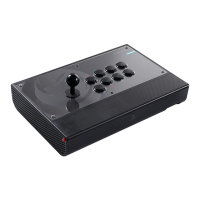
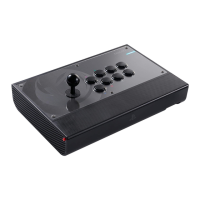
Lists all items included in the DAIJA Arcade Stick package.
Guide on connecting the DAIJA for enhanced gaming performance.
Details all the buttons, ports, and indicators on the DAIJA Arcade Stick.
Instructions for connecting and using the DAIJA with a PS4 system.
Instructions for connecting and using the DAIJA with a PS3 system.
Instructions for connecting and using the DAIJA with a PC, including driver information.
Steps to open the DAIJA's top lid using release buttons.
Procedure for replacing arcade stick buttons, including cable connections.
Steps for replacing the joystick, requiring a screwdriver.
Guide to swapping the joystick head using a key or screwdriver.
Instructions for customizing the front plate design by downloading templates.
Explains how to set the joystick mode (Left, Right, D-Pad).
Guidance on proper disposal of the product for environmental protection.
Lists essential usage guidelines to prevent damage or injury.
Recommendations for comfortable use and avoiding pain during long sessions.
Contact details for customer support via email and website.
 General
| Connection Type | Wired |
|---|---|
| Cable Length | 3 meters |
| Touchpad | Yes |
| Type | Arcade Stick |
| Compatibility | PC, PS4, PS5 |
| Joystick Type | Sanwa joystick |
| Additional Features | Headset Jack |


 To Next Page