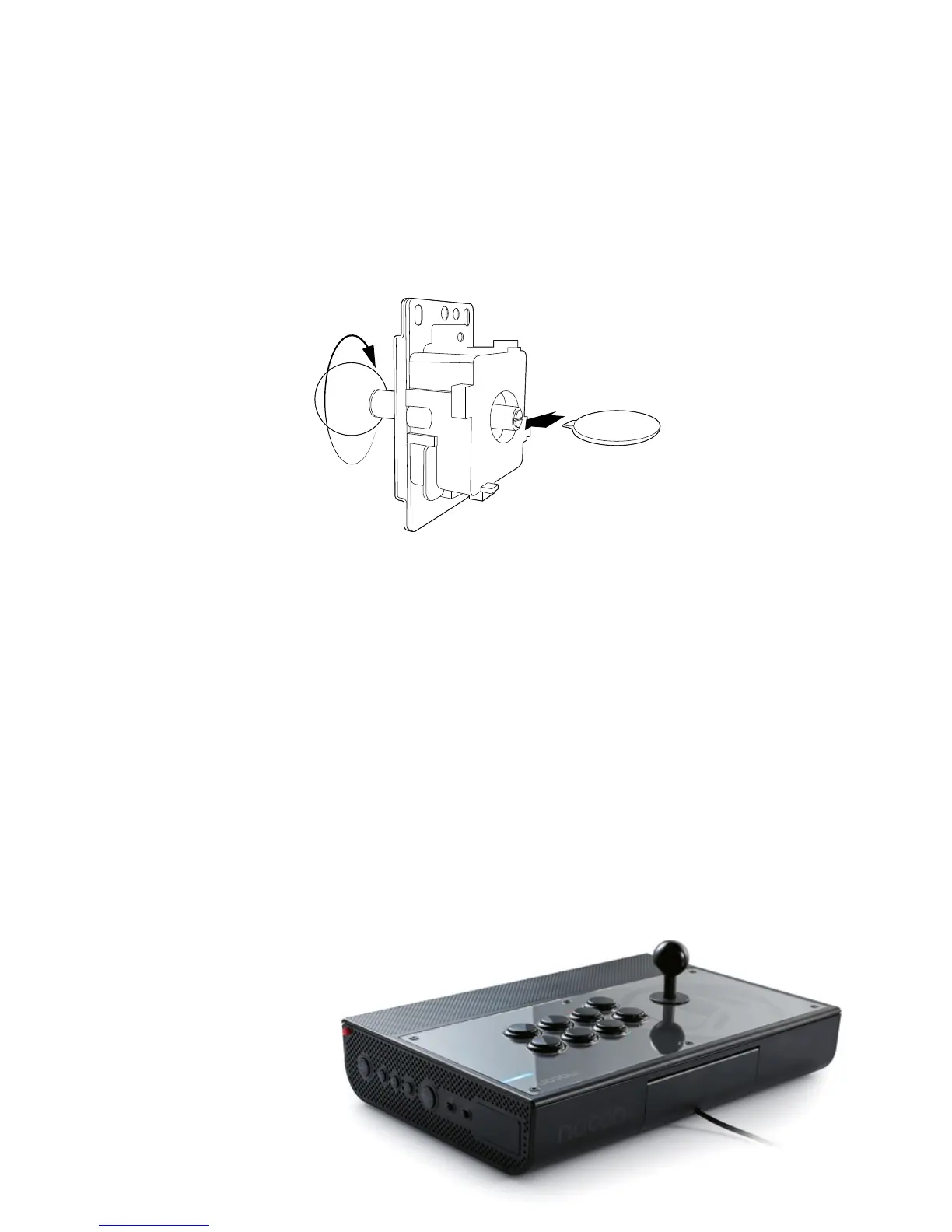
4 To change the joystick head
Depending on the game and the player, a different type of joystick head might
be preferred and that’s why the DAIJA comes supplied with a second, differently
shaped head. The head can be exchanged simply by unscrewing it from the joystick.
Note that you will need to use the supplied key or a regular flat head type
screwdriver to hold the axis in place when you are unscrewing the joystick head.
5 To change the front plate design
To give your DAIJA a more personal note, you can change your front design.
At www.nacongaming.com you can download the template le to create your own
front plate. Once printed, just change the original design sheet underneath the
front plate. This is held by 6x hex type screws. The required screw driver is included
and can be found inside the DAIJA. Before it can be removed, you will also have to
remove all the action buttons and the joystick head (see points 2 and 4).
Joystick mode selection
Use the mode selection switch (12) to select if the joystick of the
DAIJA functions in left joystick, right joystick or D-Pad mode.
Please note that analogue joystick functions are not supported.



 To Next Page