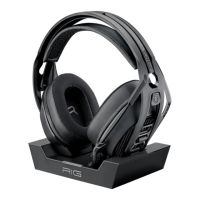
Need help?
Do you have a question about the Nacon RIG 800 PRO HD and is the answer not in the manual?
Options for adjusting headset fit using S, M, and L sizes for optimal comfort.
Illustrates two distinct methods for charging the headset.
Explains how to interpret the charging status indicators on the headset.
Shows different connection methods and advises on adjusting PC audio settings.
Instructions for powering the headset on and off.
Procedure for safely disconnecting the headset adapter.
Details on how to mute the microphone and adjust the master volume.
Explanation of how to adjust microphone monitoring levels for clear communication.
Warning about potential hearing damage from prolonged high volume listening.
Information on proper disposal of electrical equipment and batteries.
 General
| Product type | Headset |
|---|---|
| Product color | Black |
| Wearing style | Head-band |
| Virtual surround | Yes |
| Recommended usage | Gaming |
| Sound pressure level (max) | 111 dB |
| Package type | Box |
| Battery type | Built-in battery |
| Continuous audio playback time | 24 h |
| Microphone type | Boom |
| Microphone frequency | 100 - 10000 Hz |
| Impedance | 32 Ω |
| Driver unit | 40 mm |
| Ear coupling | Circumaural |
| Headphone frequency | 20 - 20000 Hz |
| Connectivity technology | Wireless |


 To Next Page