EasyManua.ls Logo

NAD 3030 - Alignment Procedures; Idle Current Alignment; Power Meter Alignment

NAD 3030
10 pages
Print Icon
To Next Page IconTo Next Page
To Previous Page IconTo Previous Page
Loading...
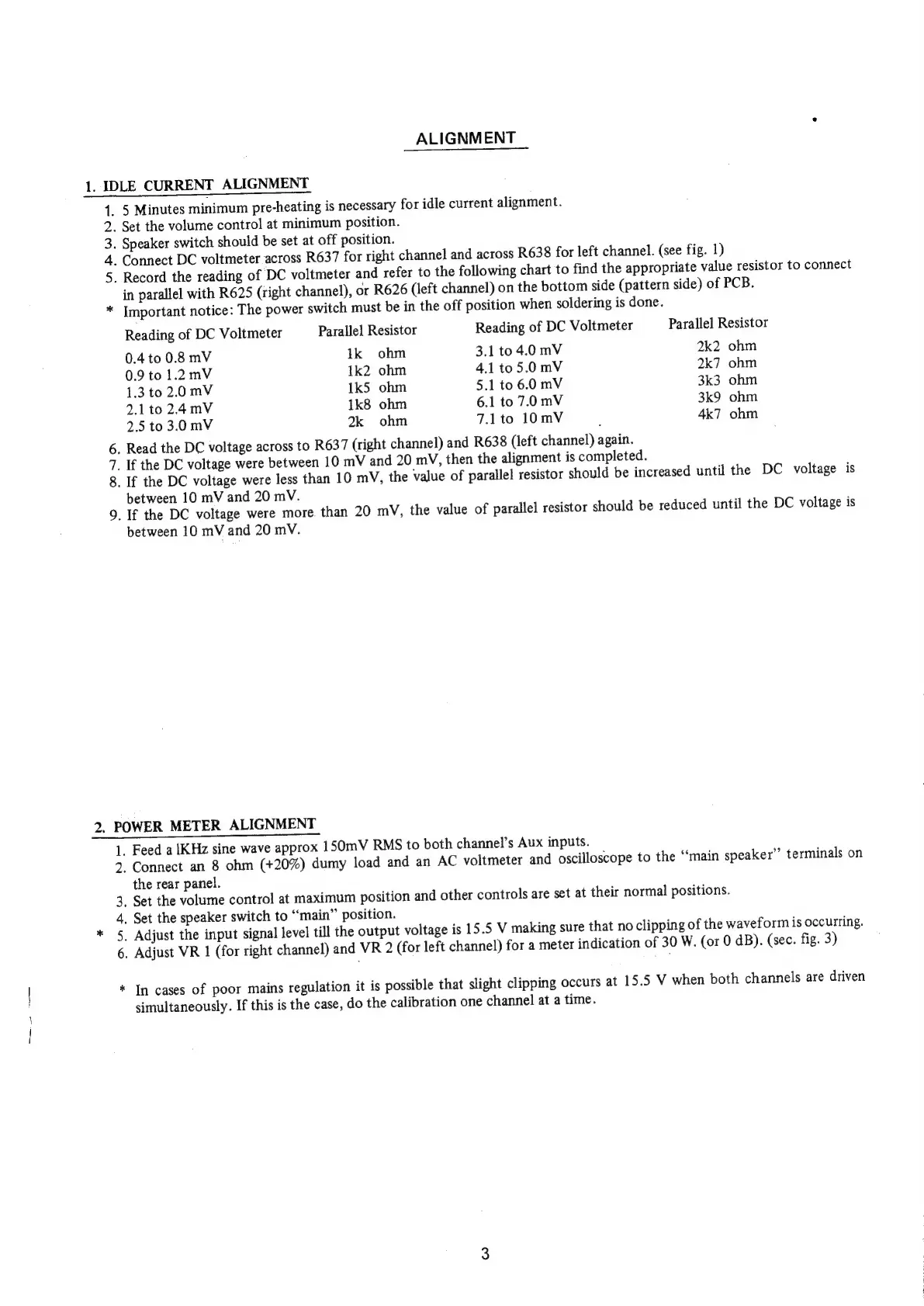
ALIGNMENT
1.
IDLE
CURRENT
ALIGNMENT
ARWNo
¥
Numb
WwW
*
5
Minutes
minimum
pre-heating
is
necessary
for
idle
current
alignment.
.
Set
the
volume
control
at
minimum
position.
.
Speaker
switch
should
be
set
at
off
position.
-
Connect
DC
voltmeter
across
R637
for
right
channel
and
across
R638
for
left
channel.
(see
fig.
1)
.
Record
the
reading
of
DC
voltmeter
and
refer
to
the
following
chart
to
find
the
appropriate
value
resistor
to
connect
in
parallel
with
R625
(right
channel),
or
R626
(left
channel)
on
the
bottom
side
(pattern
side)
of
PCB.
Important
notice:
The
power
switch
must
be
in
the
off
position
when
soldering
is
done.
Reading
of
DC
Voltmeter
Parallel
Resistor
Reading
of
DC
Voltmeter
Parallel
Resistor
0.4
to
0.8
mV
ik
ohm
3.1
to
4.0
mV
2k2
ohm
0.9
to
1.2mV
1k2
ohm
4.1
to
5.0
mV
2k7
ohm
1.3
to
2.0
mV
1k5
ohm
5.1
to
6.0
mV
3k3
ohm
2.1
to
2.4mV
1k8
ohm
6.1
to
7.0mV
3k9
ohm
2.5
to
3.0
mV
2k
ohm
7.1to
10mV
4k7
ohm
.
Read
the
DC
voltage
across
to
R637
(right
channel)
and
R638
(left
channel)
again.
_
If
the
DC
voltage
were
between
10
mV
and
20
mV,
then
the
alignment
is
completed.
_
If
the
DC
voltage
were
less
than
10
mV,
the
value
of
parallel
resistor
should
be
increased
until
the
DC
voltage
is
between
10
mV
and
20
mV.
_If
the
DC
voltage
were
more
than
20
mV,
the
value
of
parallel
resistor
should
be
reduced
until
the
DC
voltage
is
between
10
mV
and
20
mV.
2.
POWER
METER
ALIGNMENT
1.
Feed
a
IKHz
sine
wave
approx
150mV
RMS
to
both
channel’s
Aux
inputs.
2;
Connect
an
8
ohm
(+20%)
dumy
load
and
an
AC
voltmeter
and
oscilloscope
to
the
“main
speaker”
terminals
on
the
rear
panel.
_
Set
the
volume
control
at
maximum
position
and
other
controls
are
set
at
their
normal
positions.
.
Set
the
speaker
switch
to
“main”
position.
.
Adjust
the
input
signal
level
till
the
output
voltage
is
15.5
V
making
sure
that
no
clipping
of
the
waveform
is
occurring.
.
Adjust
VR
1
(for
right
channel)
and
VR
2
(for
left
channel)
for
a
meter
indication
of
30 W.
(or
0
dB).
(sec.
fig.
3)
In
cases
of
poor
mains
regulation
it
is
possible
that
slight
clipping
occurs
at
15.5
V
when
both
channels
are
driven
simultaneously.
If
this
is
the
case,
do
the
calibration
one
channel
at
a
time.

Related product manuals