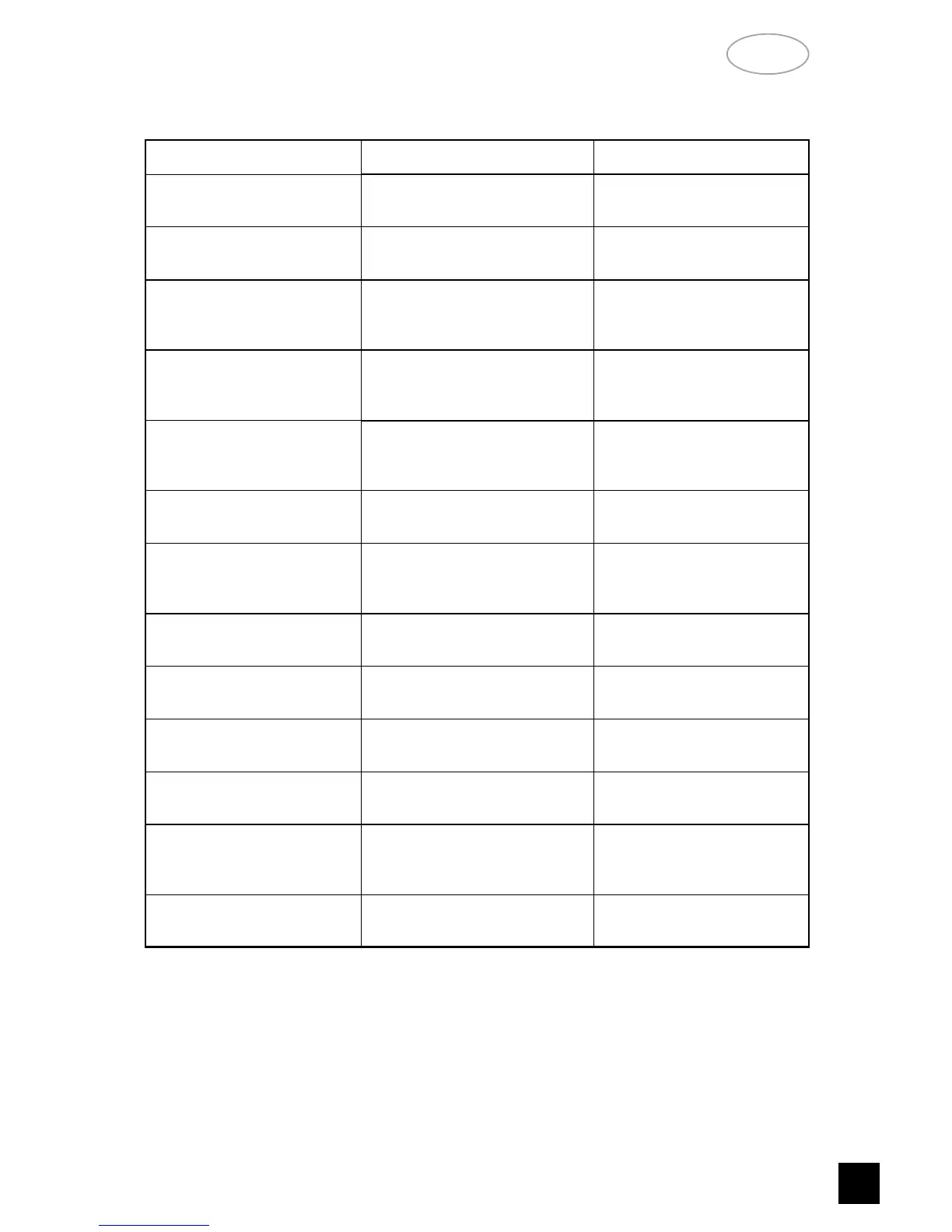
• Insufficient aerial signal.
• No Power when the
POWER button is set to ON.
• Poor or no power plug
connection at the AC outlet.
• Power not switched on.
• Insert power plug firmly
into the AC outlet.
• Disc play does not start. • The disc is loaded upside down.
• The disc is too dirty.
• Reload the disc with the
label side UP.
• Clean the disc.
• No Sound.
• Incorrect audio cable
connections.
• Station not selected or weak
signal.
• Check inputs and speakers
connection to L 40.
• Re-tune.
• Thermal cut out operated.
• Switch off and reduce volume
setting.
• Switch on after the unit has
cooled down.
• Internal fuse blown; consult
dealer.
• No sound in one channel.
• Volume Control balance not
even.
• Input lead disconnected or
damaged.
• Reset balance Control to
centre detent position.
• Check leads and connections.
• Sound skips. • The L 40 is subject to vibration
or physical shock from external
sources.
• Change the installation
location.
• Remote control does not
work.
• Batteries in Remote Control
have expired.
• Object obscuring remote
sensor on the player.
• Replace batteries.
• Remove any objects directly
in front of the display window.
• A humming noise can be
heard.
• Loose cable connection. • Check cable connections.
• Weak bass; diffuse
stereo image.
• Speakers connected to the
power amplifier wired out of
phase.
• Check the "+" and "-"
connections to both
speakers.
• Noisy, reception,hiss. • Weak signal. • Check station tuning.
• Adjust or replace antenna.
• Reception distorted. • Multi-path or interference
from another station.
• Check station tuning.
• Adjust or replace antenna.
• Reception with whistling,
buzzing noises.
• Interference from other
computers, games consoles.
• Check station tuning.
• Switch off or move the
source of electrical noise.
• No station found in Search
Mode.
• Check aerial connection.
• Adjust position of ribbon
antenna.
SYMPTOM
POSSIBLE CAUSE CORRECTION
NA
D
13
GB
TROUBLESHOOTING


 To Next Page