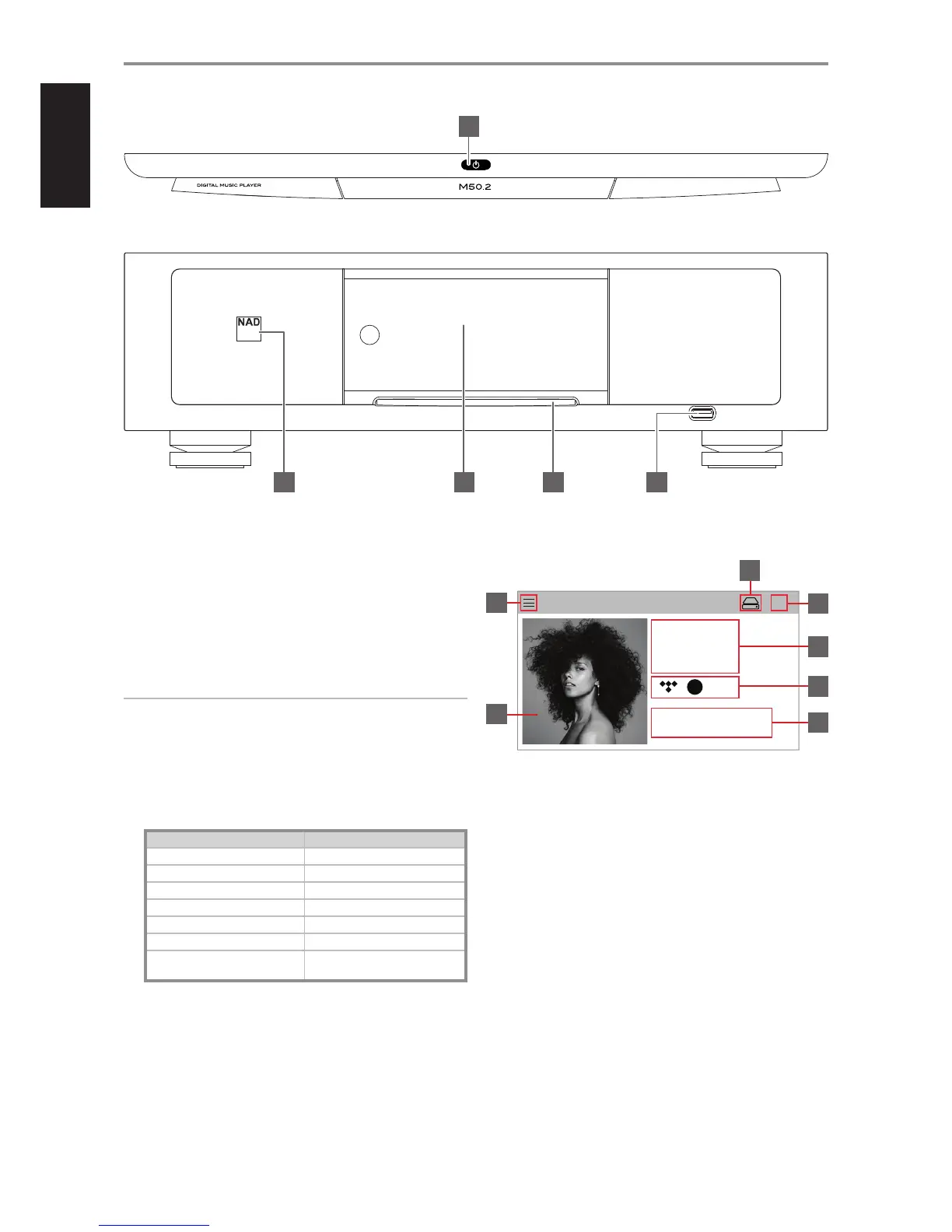
1 o (STANDBY) BUTTON
• Touch the o (Standby) button on top side of the front panel
to switch ON the M50.2 from standby mode. Press and hold
o(Standby) button until M50.2 switches back to standby mode.
• One press or touch of the o (Standby) button will not switch the
M50.2 to standby mode. This is intended to avoid unintentionally
setting the M50.2 to standby mode if one happens to just touch or
press the o (Standby) button at operating mode.
• The Status indicator will change to amber color at standby mode.
IMPORTANT NOTES
For the o (Standby) button to activate, the following must occur:
a The supplied power cord from the M50.2 must be plugged in to a
power source.
b The rear panel POWER switch must be set to ON.
2 STATUS INDICATOR
This is an indicator of network connectivity. Below is a table of the LED
blink codes and their corresponding descriptions.
LED BLINK CODE DESCRIPTION
Alternate ashing red and green Upgrade mode
Red Powering up, rebooting
Solid green Hotspot mode
Solid red Booting up
Solid red Cannot boot up; drive error
Solid white Indexing
Solid blue
Connected to network – ready to use
with BluOS App
3 DISPLAY (TOUCH PANEL DISPLAY)
• Display visual information about current music or media source.
• Touch control functions are also displayed depending upon the
source or media.
SAMPLE DISPLAY SCREEN
A Large Album Artwork Display (Now Playing)
1 New screen is opened showing Main Menu options (refer to Main
Menu display below).
2 Large album art cover.
3 Internal hard drive indicator.
4 Disc loaded in the disc slot is ejected.
5 Information about album, artist and music name.
6 Logo or icon for music service provider or media source input
(analog, optical, coaxial, audio, Bluetooth, USB)
7 Playback controls for applicable media (song, title, le, music station
and others).
0 Skip to next media.
u/j Play or pause current media.
9 Skip back to previous media.
IDENTIFICATION OF CONTROLS
FRONT PANEL
© NAD M50.2
4 5
1
2 3


 To Next Page