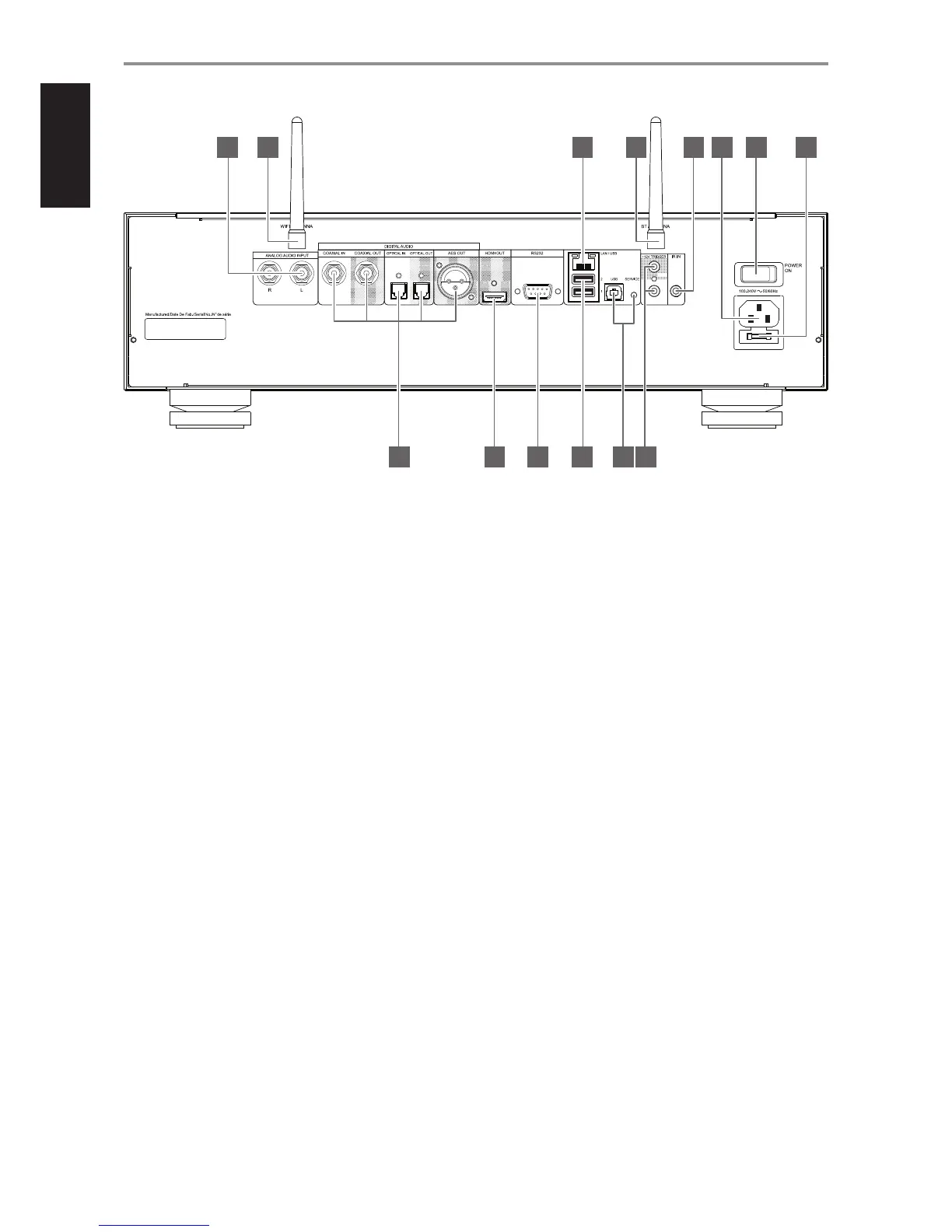
1 ANALOG AUDIO INPUT
• Input for line level sources such as CD player, tuner or any
compatible devices. Use a twin RCA-to-RCA lead to connect the
source device’s left and right “Audio Output” to this input. The source
will appear as an Analog Input in the navigation drawer of the BluOS
Controller App.
2 WIFI ANTENNA TERMINAL
• Connect supplied wireless antenna to this WIFI antenna terminal.
3 DIGITAL AUDIO
COAXIAL IN, OPTICAL IN
• Connect to corresponding optical or coaxial digital audio output
of sources such as CD or BD/DVD players, digital cable box, digital
tuners and other applicable components. The source will appear
as an Optical Input or Coaxial Input in the navigation drawer of the
BluOS Controller App.
COAXIAL OUT, OPTICAL OUT
• Connect to corresponding optical or coaxial digital audio input
of compatible devices such as receivers, computer soundcards or
other digital processors.
4 HDMI OUT
• Connect to compatible devices with HDMI input.
• Primarily output audio component and supports 24/192 HD Audio
in PCM’s native I2S format.
• Connected display device will show similar image or information
reected in the touch panel display.
5 RS 232
NAD is a certied partner of AMX and Crestron and fully supports these
external devices. Check out the NAD website for information about
AMX and Crestron compatibility with NAD. Contact your NAD audio
specialist for more information.
• Connect this interface using RS-232 serial cable (not supplied) to
any Windows compatible PC to allow remote control of the M50.2
via compatible external controllers.
• Refer to the NAD website for information about RS232 Protocol
documents and PC interface program.
6 USB 1, USB 2 (Type A)
• Connect USB mass storage device to any or both of these USB Type
A input terminals.
• Typical USB mass storage device compatible with M50.2 include
portable ash memory devices and external hard drives (FAT32
recommended).
• A notication will be shown in BluOS Controller App if a USB
device is inserted. Click on USB in the navigation drawer to browse
content.
7 LAN
LAN connection must be setup for wired connection to be established.
Set up a Wired Ethernet broadband router with broadband internet
connection. Your router or home network should have a built-in DHCP
server to consummate the connection.
• Using a standard straight-through Ethernet cable (not supplied),
connect one end of the Ethernet cable to the LAN port of your
wired Ethernet broadband router and the other end to M50.2’s LAN
port.
8 SERVICE/USB
• This is not for consumer use. Only authorized service personnel can
access this USB port and SERVICE button.
• USB (Type B) port and SERVICE button are for servicing purposes
only.
9 BT (BLUETOOTH) ANTENNA TERMINAL
• Connect supplied wireless antenna to this BT antenna terminal.
IDENTIFICATION OF CONTROLS
REAR PANEL
© NAD M50.2
IN
OUT
CAUTION:
REPLACE WITH SAME TYPE T2AL 250V FUSE
ATTENTION:
UTILISER UN FUSIBLE DE RECHANGE
DE MEME TYPE DE T2AL 250V
4 5 6 8 10
1 2 7 9 11 12 13 14
3
8


 To Next Page