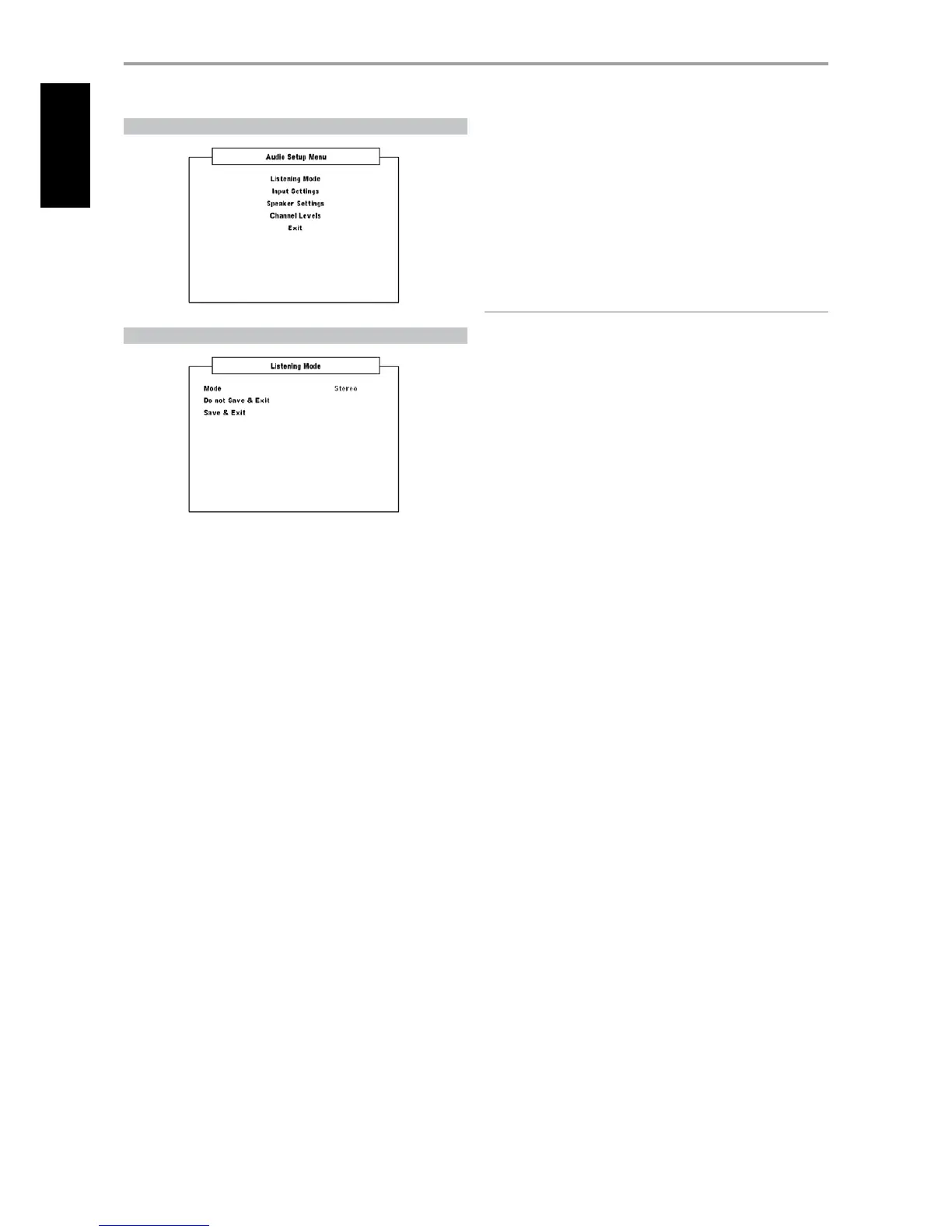
AUDIO SETUP MENU
LISTENING MODE
The VISO TWO oers distinct SURROUND MODES tailored for dierent types
of recordings or program material. With a two-channel (Stereo) source, the
following listening modes can be selected:
DOLBY® VIRTUAL SPEAKER DVS
Dolby Virtual Speaker technology creates a highly compelling 5.1-channel
listening experience from as few as two speakers, making it an ideal
entertainment solution for locations where space for multiple-speaker
setups is limited.
Dolby Virtual Speaker models the sound of a playback system into two
dierent listening environments, based on acoustic measurements of real
rooms:
DVS Reference is a small, well-damped room appropriate for both
movies and music-only recordings.
DVS Wide is a larger room, more like a concert hall or movie theatre.
STEREO
All output is directed to the front left/right channels. Low frequencies are
directed to the subwoofer if one is present in the Speaker settings. Select
“Stereo” when you wish to listen to a stereo (or monaural) production, such
as music CD or FM broadcast, without surround enhancement. Stereo
recordings whether in PCM/digital or analog form and whether surround-
encoded or not encoded, are reproduced as recorded. Multi-channel digital
recordings (Dolby Digital and DTS) are reproduced in “Stereo Downmix”
mode via the front left/right channels only as Lt/Rt (left/right-total) signals.
The following Listening Modes require a specially encoded signal that
must be present in digital format to be decoded by the VISO TWO. These
modes are automatically switched on when the appropriate data stream is
detected. The desired data stream must sometimes be selected in the setup
menu of the source media.
DOLBY DIGITAL
Dolby Digital is the multi-channel digital signal format developed in the
Dolby laboratories. Discs bearing the double-D symbol were recorded with
up to 5.1 channels of digital signals, reproducing a much better sound
quality, with dynamic and spatial sound sensations that are much better
than in the previous Dolby Surround.
DYNAMIC RANGE CONTROL DYN RANGE
You can select the eective dynamic range (subjective range from soft
to loud) for playback of Dolby Digital soundtracks. For fully cinematic
eect, always select 100% - the default. Settings of 75%, 50% and 25%
progressively reduce dynamic range, making soft sounds comparatively
louder while limiting the peak loudness of loud ones.
The 100% setting is best for late-night sessions or other times when you
wish to retain maximum dialog intelligibility while minimizing overall
volume levels. To maintain full dynamic range, set “DYN Range” to “O”.
IMPORTANT NOTICE
“DYN Range” will appear as one of the options under the “Listening Mode”
menu only if the disc being played is of Dolby Digital format. The same
applies when you select the digital audio input (coaxial or optical) as your
audio source – Dynamic range adjustment will be available at the “Listening
Mode” menu only if the detected audio is of Dolby Digital format.
DTS
The Digital Theater System Digital Surround (simply called DTS) is a multi-
channel digital signal format that can process higher data rates than with
Dolby Digital. Although both Dolby Digital and DTS are 5.1 channel media
formats, discs bearing the “DTS” symbol are thought to provide better sound
quality due to the lower audio compression required. It also oers a broader
dynamic, producing magnicent sound quality.
DOLBY® HEADPHONE
Dolby Headphone technology, compatible with any pair of conventional
headphones, accurately simulates the experience of hearing a 5.1-channel
speaker system properly set up in a listening room, minus the annoying
“listener fatigue” eect that plagues other headphone-based virtual
surround sound oerings. Dolby Headphone technology is ideal for private
playback of multi-channel entertainment without disturbing others nearby.
Dolby Headphone models the sound of a playback system into three dierent
listening environments, based on acoustic measurements of real rooms:
DOLBY HP MODE 1 is a small, well-damped room appropriate for both
movies and music-only recordings. This decoding process is known as the
Dolby Headphone “Reference Room”.
DOLBY HP MODE 2 is a more acoustically live room suited to music
listening, but also great for movies.
DOLBY HP MODE 3 is a larger room, more like a concert hall or movie
theatre.
Select DOLBY HP OFF for normal headphone audio listening.
OPERATION
USING THE VISO TWO AUDIO SETUP MENU



 To Next Page