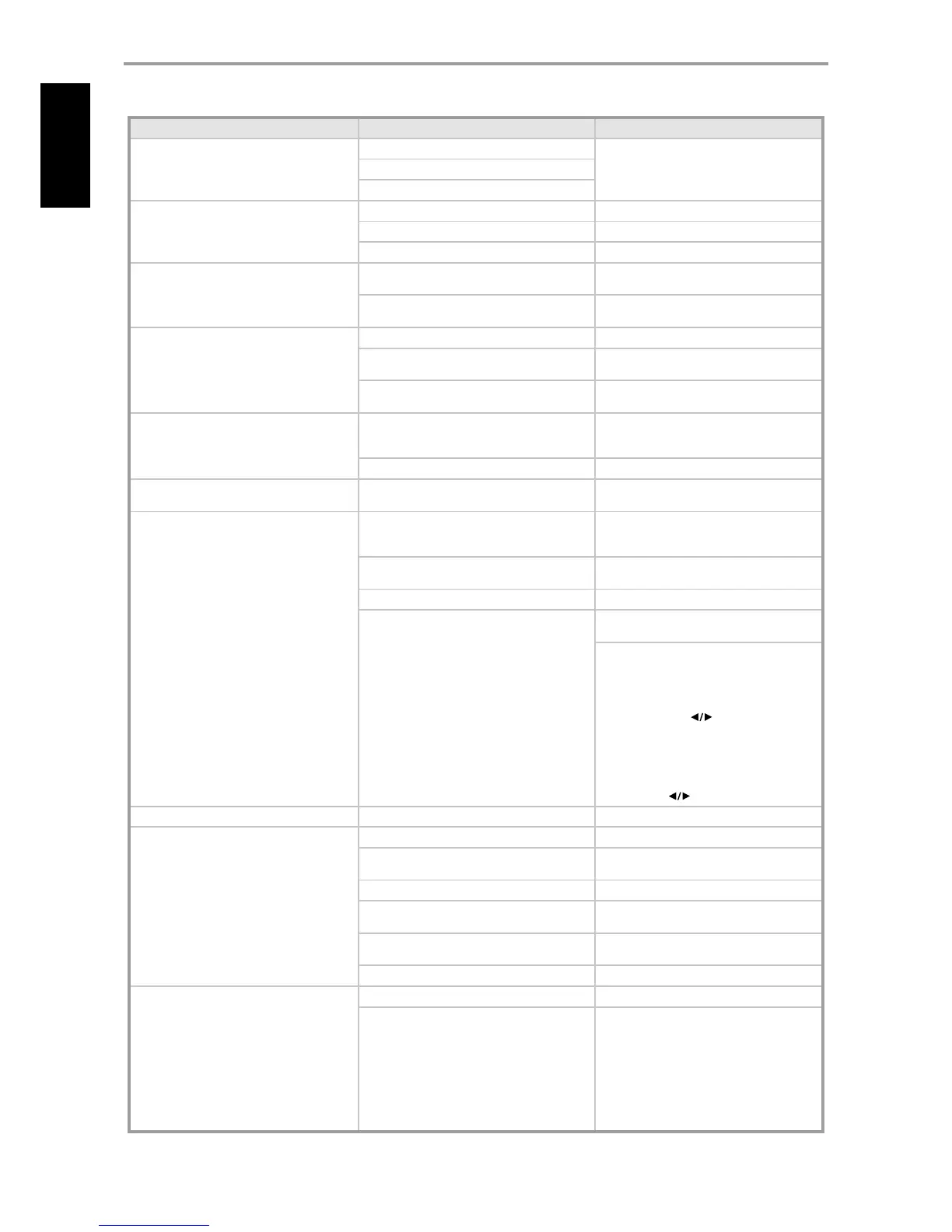
CONDITION POSSIBLE CAUSES POSSIBLE SOLUTIONS
No sound from all channels.
AC power unplugged.
•
Check AC cable connection and outlet.
•
Power not switched on.
•
Outlet has no power.
•
No sound from some channels. Faulty/missing cables.
•
Check cables.
•
Speaker connections faulty.
•
Check speaker connections.
•
“Speaker Settings” channel (s) set to “O”.
•
Check “Speaker Settings” menu.
•
No sound from Subwoofer. Subwoofer is o, not powered or improperly
connected.
•
Power-up subwoofer, check Sub’s AC outlet
or check connections.
•
Sub level set too low.
•
Correct subwoofer level by adjusting “SUB”
button at HTR 6.
•
VISO TWO does not respond to HTR 6
remote control.
Batteries are at or incorrectly inserted.
•
Check batteries.
•
IR transmitter window on remote or IR receiver
window on VISO TWO is obstructed.
•
Check IR windows and ensure clear line-of-
sight from remote to VISO TWO.
•
VISO TWO front panel is in very bright sunlight
or ambient light.
•
Reduce sunlight/room lighting.
•
VISO TWO does not respond to front panel
commands or remote control.
Microprocessor error.
•
Power down the VISO TWO via the front
panel Power switch and unplug it from the
AC outlet.
•
VISO TWO may have over heated.
•
Wait ve minutes, re-connect and power up.
•
The POWER is ON, but the internal DVD
player does not work.
No disc is inserted.
•
Insert a disc.
•
No picture. The TV is not set to receive video signal.
•
Select the appropriate video input mode
on the TV so that the picture from the
VISO TWO appears on the TV screen output.
•
The video cable is not connected securely.
•
Connect the video cable into the jacks
securely.
•
The connected TV power is turned o.
•
Power on the TV.
•
HDMI connector is plugged-in and “HDMI Res.”
is set to 720P, 1080I or AUTO.
•
Unplug HDMI cable connected to rear
panel’s HDMI OUT.
•
At DVD mode and with no disc loaded (“NO
DISC”)
1 Press and hold [DISPLAY] button. The lower
line of the VFD will show the current HDMI
resolution setting.
2 Use the remote’s [ ] keys or toggle
[MEMORY] button to select through
480P/576P, 720P, 1080I, AUTO or OFF.
Select either “480P/576P” or “OFF” to enable
component video out, composite and S-Video
output. Stop at your desired resolution setting
and release [ ] keys or [MEMORY] button.
•
The playback picture is poor. The disc is dirty.
•
Clean the disc.
•
The internal DVD player does not start
playback.
No disc is inserted.
•
Insert a disc
•
An unplayable disc is inserted.
•
Insert a playable disc (Check the disc type
colour system and Regional code).
•
The disc is placed upside down.
•
Place the disc with the playback side down.
•
The disc is not placed within the guide.
•
Place the disc correctly inside the guide on
the disc tray.
•
A menu is on the TV screen.
•
Press SETUP button of HTR 6 to turn o the
menu screen.
•
The disc is dirty.
•
Clean the disc.
•
Parental Control cannot be changed. The password entered was wrong.
•
Enter the correct password.
•
Password was forgotten.
•
Set the VISO TWO to factory default settings.
1 Place the VISO TWO into AM mode.
2 Press quickly the three front panel buttons;
[PLAY/PAUSE] then [STOP] then [DISPLAY],
holding the [DISPLAY] button for more than
7 seconds. The VISO TWO will switch itself
o then back on to DVD mode.
Note: Default password is 2580.
•
REFERENCE
TROUBLESHOOTING



 To Next Page