10
11.1 Introduction
Flash is factory pre-programmed to operate any Naim
preamplifier or cd player, the NAT 05 tuner and AV2
audio-visual processor. Additional Naim sources may be
catered for in the future. Contact your dealer or local
representative for information.
Flash is supplied without batteries fitted. To fit the
batteries, remove the battery cover with the supplied
hexagon driver and slide the batteries into the handset
body taking care with their orientation. Replace the battery
cover. Do not over-tighten the fixing screw. With batteries
fitted the handset is ready for use. Flash is designed to
switch off if unused after 10 seconds. It switches on
immediately if it is moved or a key is pressed.
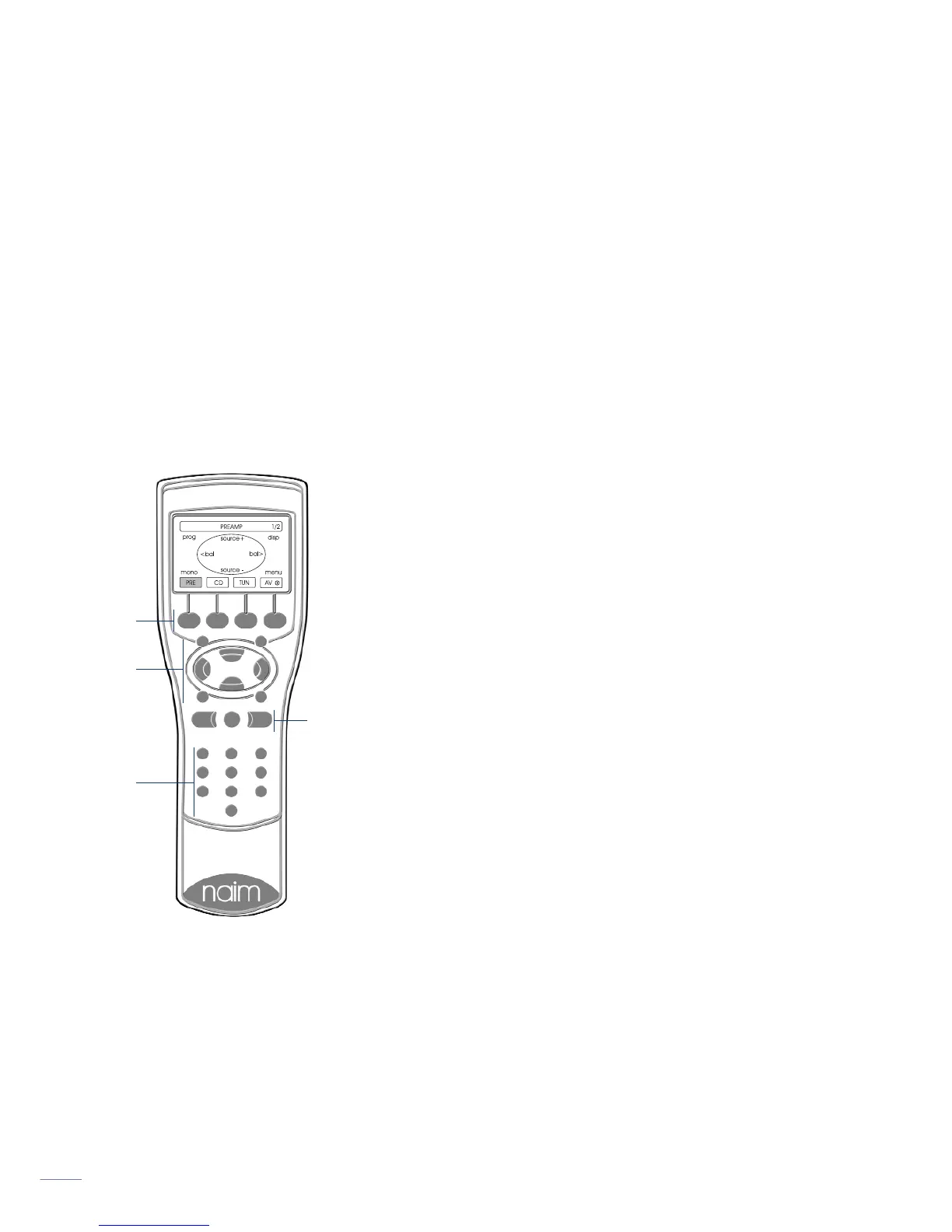
11.2 using Flash
Flash can be set to control
each equipment type through
the four preset keys beneath
the display. The selected
equipment mode is indicated
in the display above each
preset key. When a preset
key is pressed the display
and the eight master keys
and the numeric keys will
reconfigure appropriately. The
display for each equipment
type shows a representation
of the eight master keys and
their functions.
The AV preset key will also
wake an av processor from
standby. Press and hold the
AV preset key to return the
processor to standby mode.
The volume up and down and
mute keys are always
available to control the
appropriate (audio-visual or
preamplifier) volume and mute functions regardless of the
selected source equipment mode.
The Preamplifier, CD, and AV equipment modes have
multiple display “pages” (only one page is necessary for
Tuners). The first display page of each provides control of
the most commonly used functions, with subsequent pages
generally providing access to those less often used.
Selection of second and third pages within each mode is
made by pressing the appropriate preset key. The currently
Flash Handset
Preset keysMaster
keys
Volume and mute keys
Numeric keys
selected page is shown in the top right corner of the
display. Details of the master key functions within each
page is described in the following paragraphs:
PRE (preamplifier mode)
Page 1 of 2
source + Selects the next input source.
source - Selects the previous input source.
<bal Adjusts balance to the left.
bal> Adjusts balance to the right.
prog Enters programming mode on preamplifiers.
disp Selects display options on appropriately
equipped preamplifiers.
mono Sums the left and right channels.
Note: On Naim preamplifiers with no mono
facility, operates the tape monitor function.
menu Accesses a Flash setup page where source
labels can be chosen, and display preferences
can be set. Also provides access to RC5 setup.
numeric Directly selects preamplifier input channels.
Page 2 of 2
The master key functions on PRE Page Two are duplicates
of Page One. However, selection of Page Two provides
control of the record functions on appropriately equipped
preamplifiers.
CD (cd mode)
Page 1 of 2
play Begins cd play
stop Stops cd play
prev Selects the previous track or index point
next Selects the next track or index point
pause Pauses cd play
disp Cycles the cd player display through track,
time and off options.
rev Fast reverses cd
fwd Fast forwards cd
numeric Directly select CD tracks.
Page 2 of 2
The master key functions play, stop, prev, next, rev and
fwd on CD Page Two are duplicates of Page One. However,
selection of Page Two provides programming and repeat
functions.
prog Enters CD track programming mode.
rep Repeats the CD or programmed tracks.
numeric Selects CD tracks or index points for
programming.



 To Next Page