n-Vi
Control and Setup
6 Control and Setup
Once all the input and output connections are made
the n-Vi can be set up. Although the n-Vi can be
set up and controlled from its front panel, many
parameters are best set from the listening position,
so use of the NARCOM DV handset is recommended.
When initially switched on from the rear panel, the n-Vi will,
after a short delay, enter standby mode. Standby is indicated
by an illuminated front panel
button. To wake the n-Vi
press the handset
button.
The n-Vi will wake in either the factory default state, if it is
previously unused, or in the state in which it was last shut
down. Once the n-Vi is switched on, the video display and any
other associated equipment should also be switched on.
The n-Vi can be returned to its factory default settings by
pressing and holding the handset clear key with no disc loaded.
6.1 The User Interface
The n-Vi can generally be operated from its front panel or
from the
modes. The On Screen Display and Front Panel Display provide
operational feedback.
If nothing is displayed when the n-Vi and display are first
switched on some Front Panel Setup video output options may
need to be changed. See Section 8.1.
The n-Vi has two setup routines.
configures parameters that apply to system-wide setup, DVD
playback and video display.
Some On Screen Setup parameters can also be accessed
and adjusted via Front Panel Setup.
, all functions are accessed via a
cascading menu system with the handset
keys. To navigate through the top
level and second level menus use the handset
keys. To confirm a selection press the
key. To
return to the previous menu without making a selection or a
change use the
to exit from the
setup menus.
To navigate through the third level menu use the handset
keys. To increase or decrease a parameter
value use the
keys respectively. Use the
key to confirm the setting. To return to the previous menu
without making a selection or a change use the
to exit from the setup menus.
The handset clear key can be used at any time to clear any
On Screen Display.
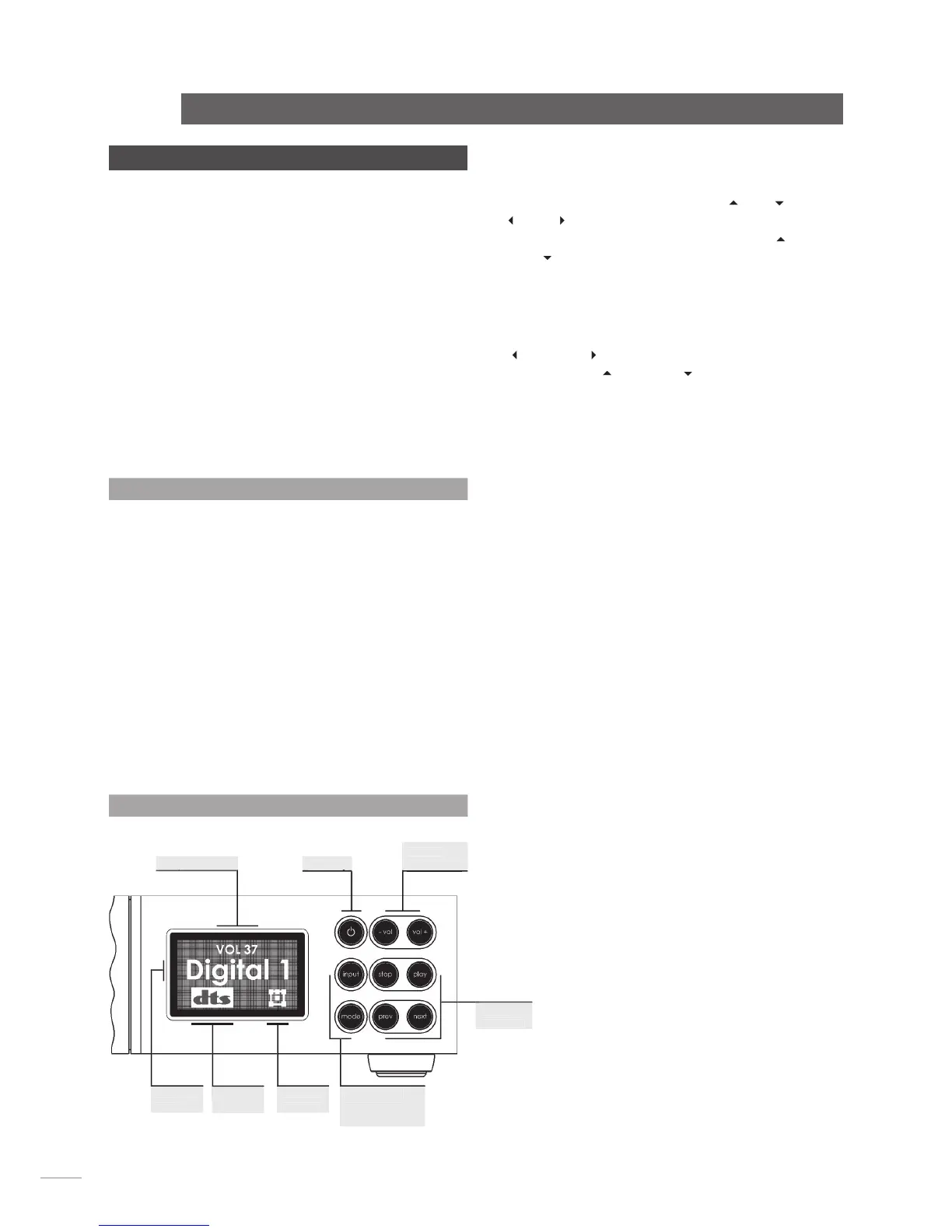
6.1.2 Front Panel Setup, Controls and Display
, functions are accessed via a
cascading menu system with front panel
commands. These buttons are illuminated in setup mode. In
normal mode the buttons revert to operating as described
below and illustrated in the diagram.
The handset navigation keys can also be used for Front
Panel setup.
Switches the n-Vi in and out of standby mode.
Selects next signal input
Selects next AV decode mode
Stops playback. Press while stopped opens drawer.
Starts playback. Press while in play pauses play.
Press while drawer open closes drawer.
Selects previous chapter or track.
Selects next chapter or track.
The n-Vi front panel display provides feedback of volume level,
input selection, decode mode, channel scheme and, if the
optional DAB/FM tuner is fitted, radio station identity and data.
The front panel display will switch off after two minutes of
inactivity.
Diagram 6.1.2
Front panel controls and display.


 To Next Page