E7
Operation - The Local Inter face
4. 2 The Home Menu
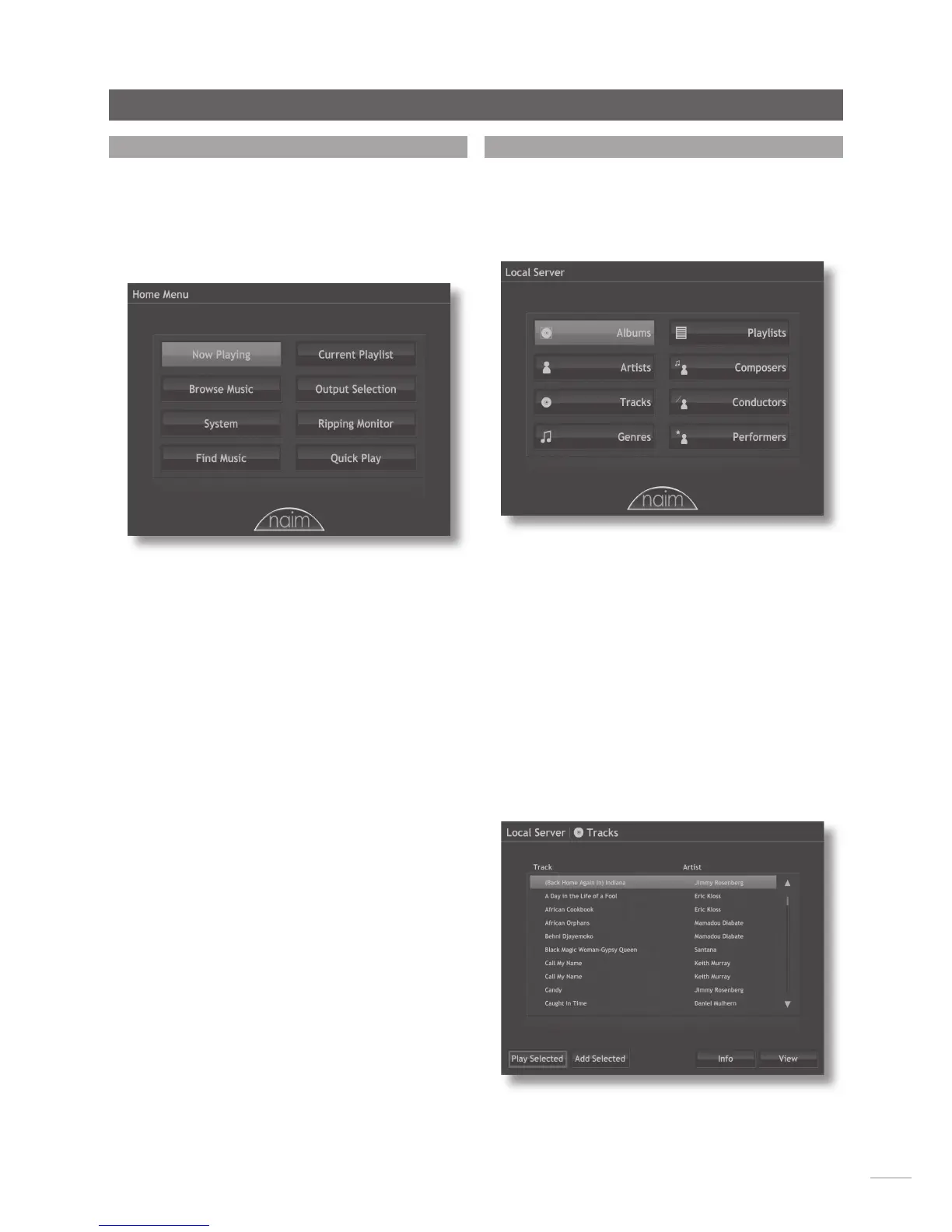
The Home menu, illustrated below, is the menu from which
all other interface menus can be accessed. Use the
handset navigation and ok keys to select each desired
one and the back key to return to a previous menu.
The handset home, browse, system and find keys can also
be used directly to select these menus.
Selecting each of the options on the Home menu provides
the following pages and functions.
Now Playing: Displays the track currently playing, its
associated information and any associated artwork.
“Transport” functions (play, stop, pause, shuffle and
repeat) are also available on the Now Playing menu. If no
track is playing the Now Playing information will be blank.
Browse Music: Provides access to the library of music
stored on the music server and on any network or USB
connected storage media.
System: Provides access to music server setup functions.
Find Music: Provides access to search functions that
enable tracks stored on the music server and on any
network or USB connected storage media to be located.
Current Playlist: Displays details of the currently playing
playlist. If no user playlist has been selected to play, the
currently playing album will be displayed along with
options to “suppress” tracks and save an edited version of
the album as a playlist.
Output Selection: Enables output selection on music servers
with multiple outputs. The currently selected output is
always shown, when appropriate, in the top right-hand
corner of the display.
Note: The Local Interface is specific to the output selected
from this menu. If output selection is not set appropriately
the Local Interface will control the “wrong” output.
Ripping Monitor: Displays progress during ripping.
Quick Play: Selects a menu offering quick playback
options.
4. 3 The Brow se Mu sic Me nu
Selecting Browse Music from the Home menu will open
the top level of the browse menu, illustrated below, and
provide access to the library of tracks held either locally
on the music server or on any available network or USB
storage device.
Albums: Displays an alphabetical list of material available
to the music server sorted by album. The menu also
provides options of Play Selected, Add Selected (to a
playlist), Show Tracks, Info and View.
Artists: Displays an alphabetical list of material available to
the music server sorted by artist. The menu also provides
options of Play Selected, Add Selected (to a playlist), and
Show Albums.
Tracks: Displays an alphabetical list, illustrated below, of
all tracks available to the music server. The page provides
options of Play Selected, Add Selected (to a playlist),
Info and View. Info displays the album, artist, genre and
artwork associated with the track while View displays the
track list and associated details of the album from which
the track is taken.


 To Next Page