EasyManua.ls Logo

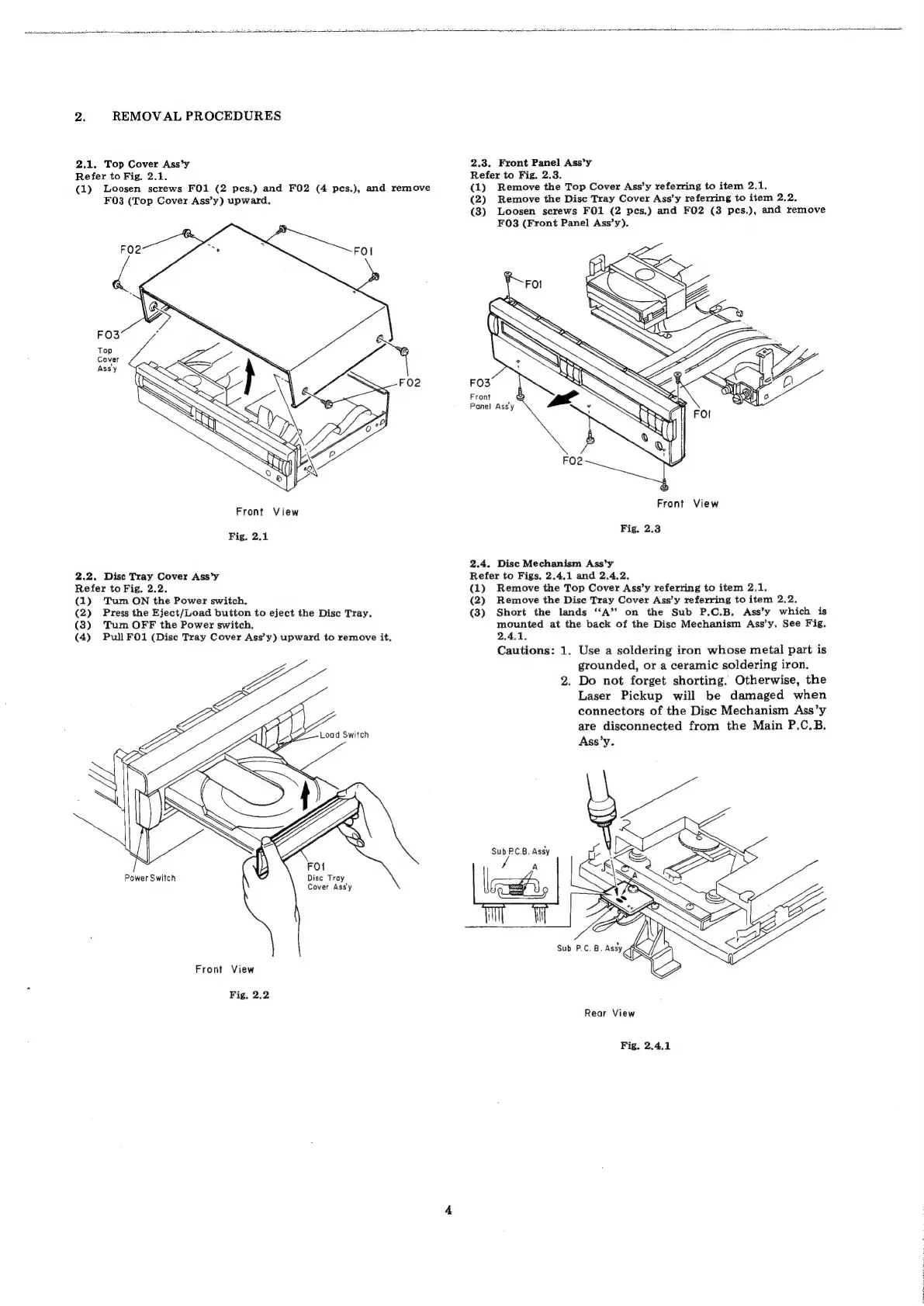
Nakamichi CD Player 4 - CD Player Removal Procedures; Top Cover Removal; Disc Tray Cover Removal; Front Panel Assembly Removal

Nakamichi CD Player 4
37 pages
Print Icon
To Next Page IconTo Next Page
To Previous Page IconTo Previous Page
Loading...
2.
REMOVAL
PROCEDURES
2.1,
Top
Cover
Ass’y
2.3.
Front
Panel
Ass’y
Refer
to
Fig,
2.1.
Refer
to
Fig.
2.3.
(1)
Loosen
screws
FO1
(2
pes.)
and
FO2
(4
pes.),
and
remove
(1)
Remove
the
Top
Cover
Ass’y
referring
to
item
2.1.
F03
(Top
Cover
Ass’y)
upward.
(2)
Remove
the
Disc
Tray
Cover
Ass’y
referring
to
item
2.2.
(3)
Loosen
screws
FO1
(2
pes.)
and
F02
(3
pes.),
and
remove
F083
(Front
Panel
Ass’y).
FO2
FO3
Front
Panel
Assy
Front
View
FIO
lew
Fig.
2.1
me
28
2.4.
Dise
Mechanism
Ass’y
2.2.
Disc
Tray
Cover
Ass’y
Refer
to
Figs,
2.4.1
and
2.4.2.
Refer
to
Fig.
2.2.
(1)
Remove
the
Top
Cover
Ass’y
referring
to
item
2.1.
(1)
Tum
ON
the
Power
switch,
(2)
Remove
the
Dise
Tray
Cover
Ass’y
referring
to
item
2,2.
(2)
Press
the
Eject/Load
button
to
eject
the
Disc
Tray.
(3)
Short
the
lands
‘A’?
on
the
Sub
P.C.B,
Ass’y
which
is
(3)
Turn
OFF
the
Power
switch,
mounted
at
the
back
of
the
Disc
Mechanism
Ass’y.
See
Fig.
(4)
Pull
FO1
(Disc
Tray
Cover
Ass’y)
upward
to
remove
it.
2.4.1,
Cautions:
1.
Use
a
soldering
iron
whose
metal
part
is
grounded,
or
a
ceramic
soldering
iron.
2.
Do
not
forget
shorting.
Otherwise,
the
Laser
Pickup
will
be
damaged
when
connectors
of
the
Disc
Mechanism
Ass’y
are
disconnected
from
the
Main
P.C.B.
Ass’
y.
Sub
PCB.
Assy
Power
Switch
Disc
Tray
Cover
Ass'y
Front
View
Fig.
2.2
Rear
View
Fig.
2.4.1