EasyManua.ls Logo

Nakamichi CDP 2 - Page 9

Nakamichi CDP 2
53 pages
Print Icon
To Next Page IconTo Next Page
To Previous Page IconTo Previous Page
Loading...
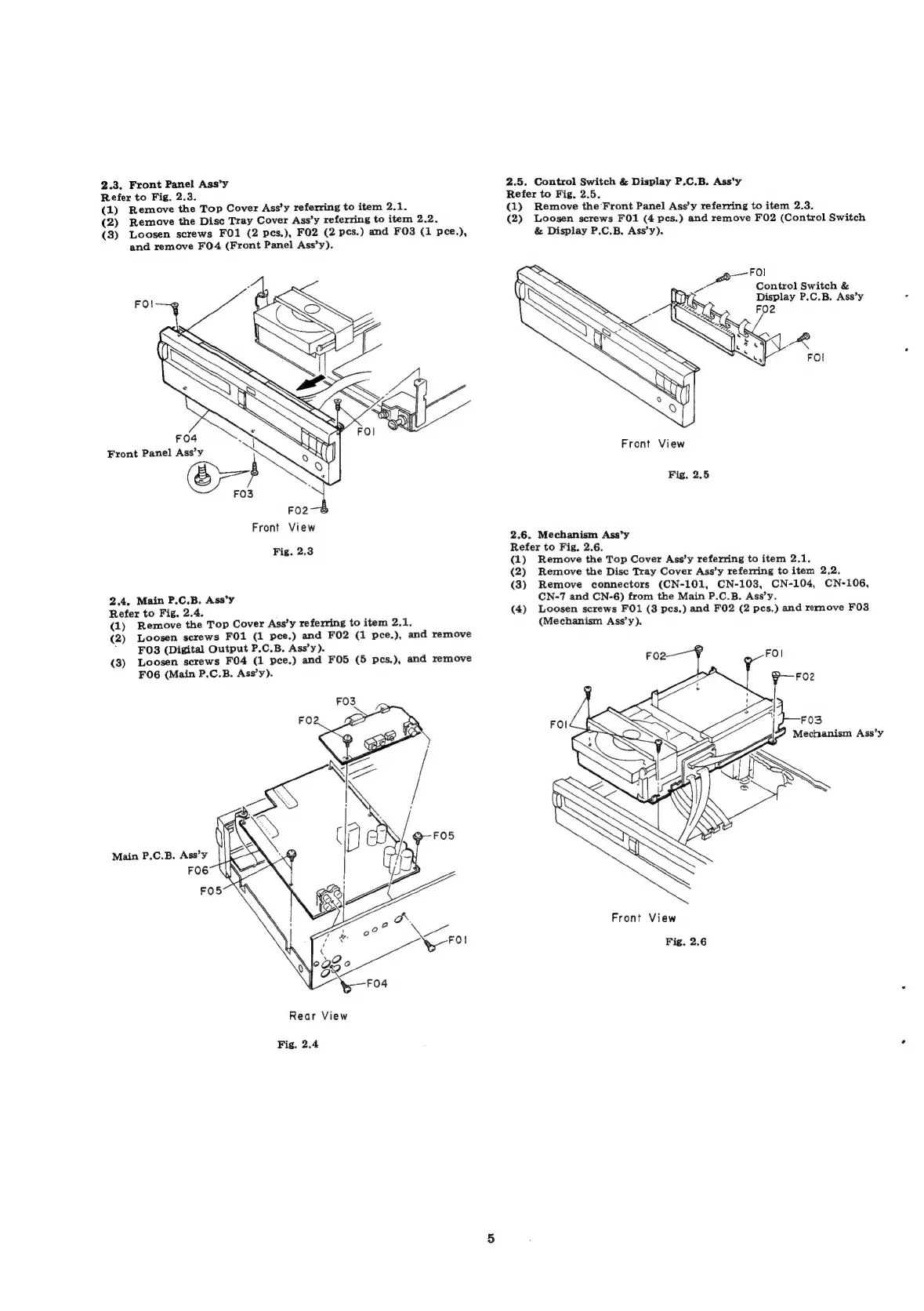
2.3,
Front
Panel
Ass’y
2.5.
Control
Switch
&
Display
P.C.B.
Ass’y
Refer
to
Fig,
2.3.
Refer
to
Fig.
2.5.
(1)
Remove
the
Top
Cover
Ass’y
referring
to
item
2.1.
(1)
Remove
the
Front Panel
Ass’y
referring
to
item
2.3.
(2)
Remove
the
Disc
Tray
Cover
Ass’y
referring
to
item
2.2.
(2)
Loosen
screws
FO1
(4
pes.)
and
remove
F02
(Control
Switch
(3)
Loosen
screws
FO1
(2
pes.),
FO2
(2
pes.)
and
FO3
(1
pee.),
&
Display
P.C.B.
Ass’y).
and
remove
F0O4
(Front
Panel
Ass’y).
Eke
:
Control
Switch
&
Display
P.C.B.
Ass’y
Front
View
Fig.
2.5
FO2
Front
View
2.6.
Mechanism
Ass’y
Fig.
2.3
Refer
to
Fig.
2.6.
(1)
Remove
the
Top
Cover
Ass’y
referring
to
item
2.1.
(2)
Remove
the
Disc
Tray
Cover
Ass’y
referring
to
item
2.2,
(3)
Remove
connectors
(CN-101,
CN-103,
CN-104,
CN-106,
2.4.
Main
P.C.B.
Ass’y
CN-7
and
CN-6)
from
the
Main
P.C.B.
Ass’y.
Refer
to
Fig.
2.4.
(4)
Loosen
screws
FO1
(3
pes.)
and
F02
(2
pes.)
and
rernove
F03
(1)
Remove
the
Top
Cover
Ass’y
referring
to
item
2.1,
(Mechanism
Ass’y).
(2)
Loosen
screws
FO1
(1
pee.)
and
FO2
(1
pce.),
and
remove
*"
F038
(Digital
Output
P.C.B.
Ass’y).
(3)
Loosen
screws
F04
(1
pee.)
and
FO5
(5
pes.),
and
remove
FO6
(Main
P.C.B.
Ass’y).
Front
View
Fig.
2.6
Rear View
Fig.
2.4

Related product manuals